

 DE
DE EN
EN

















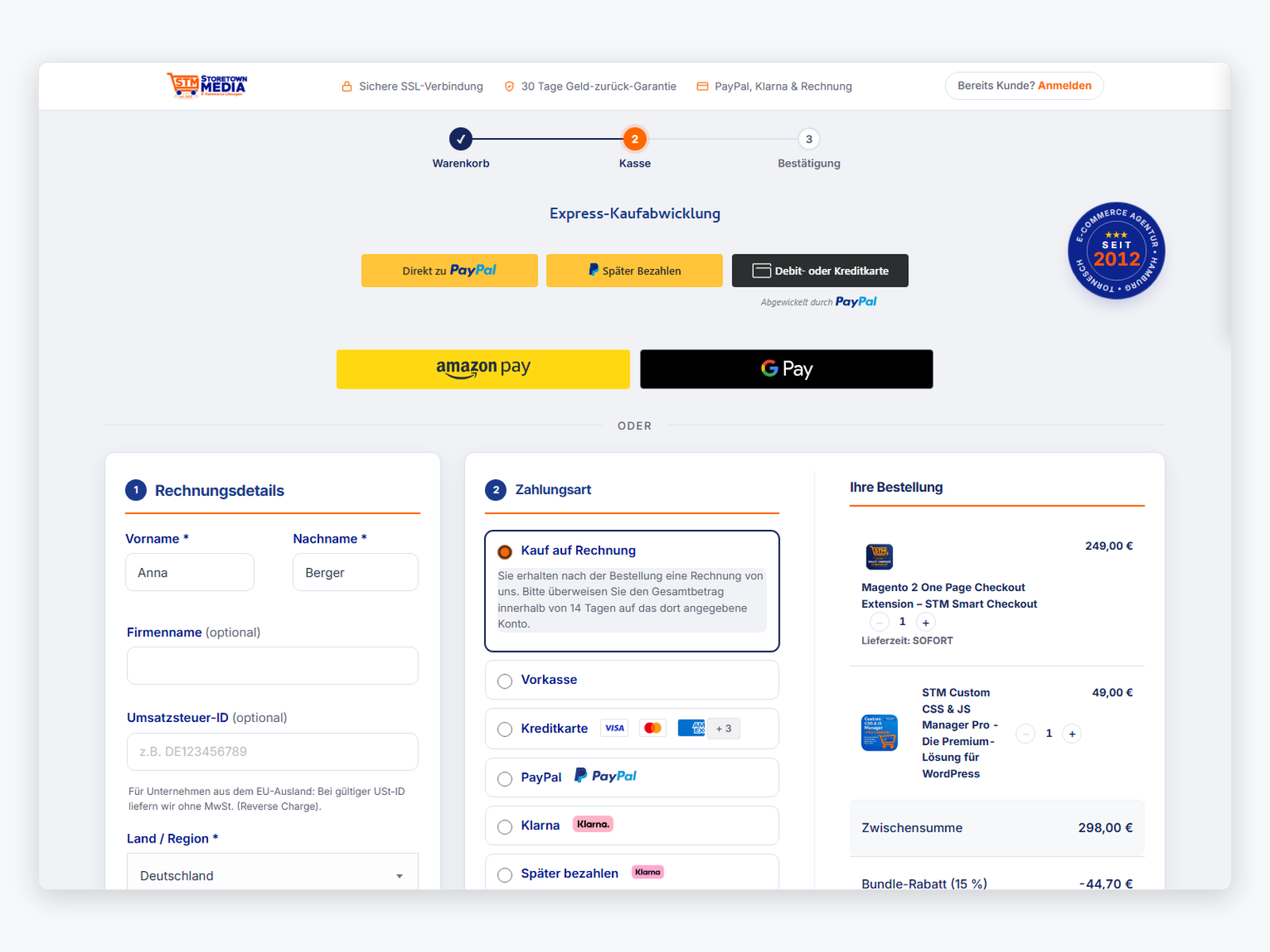
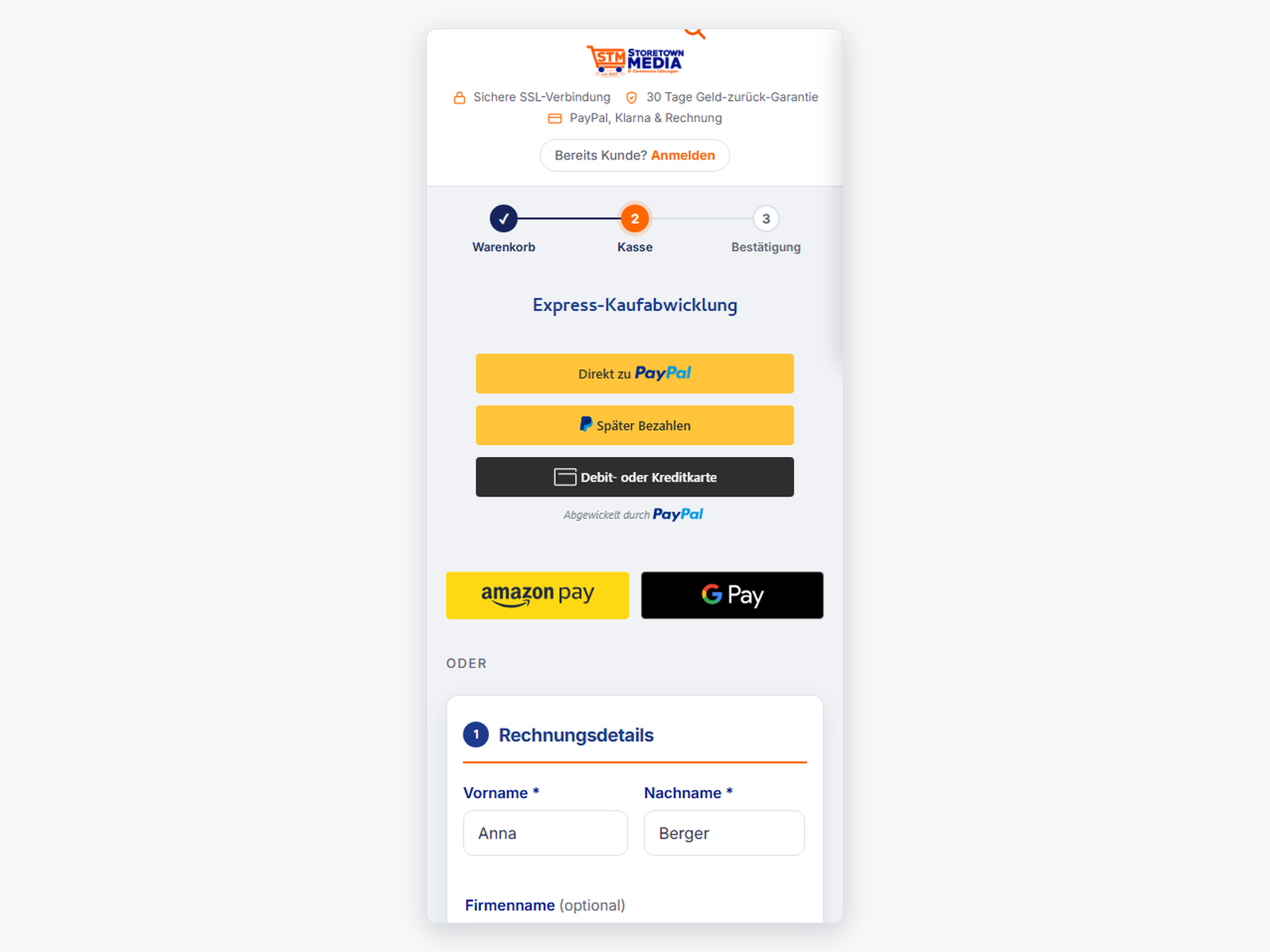
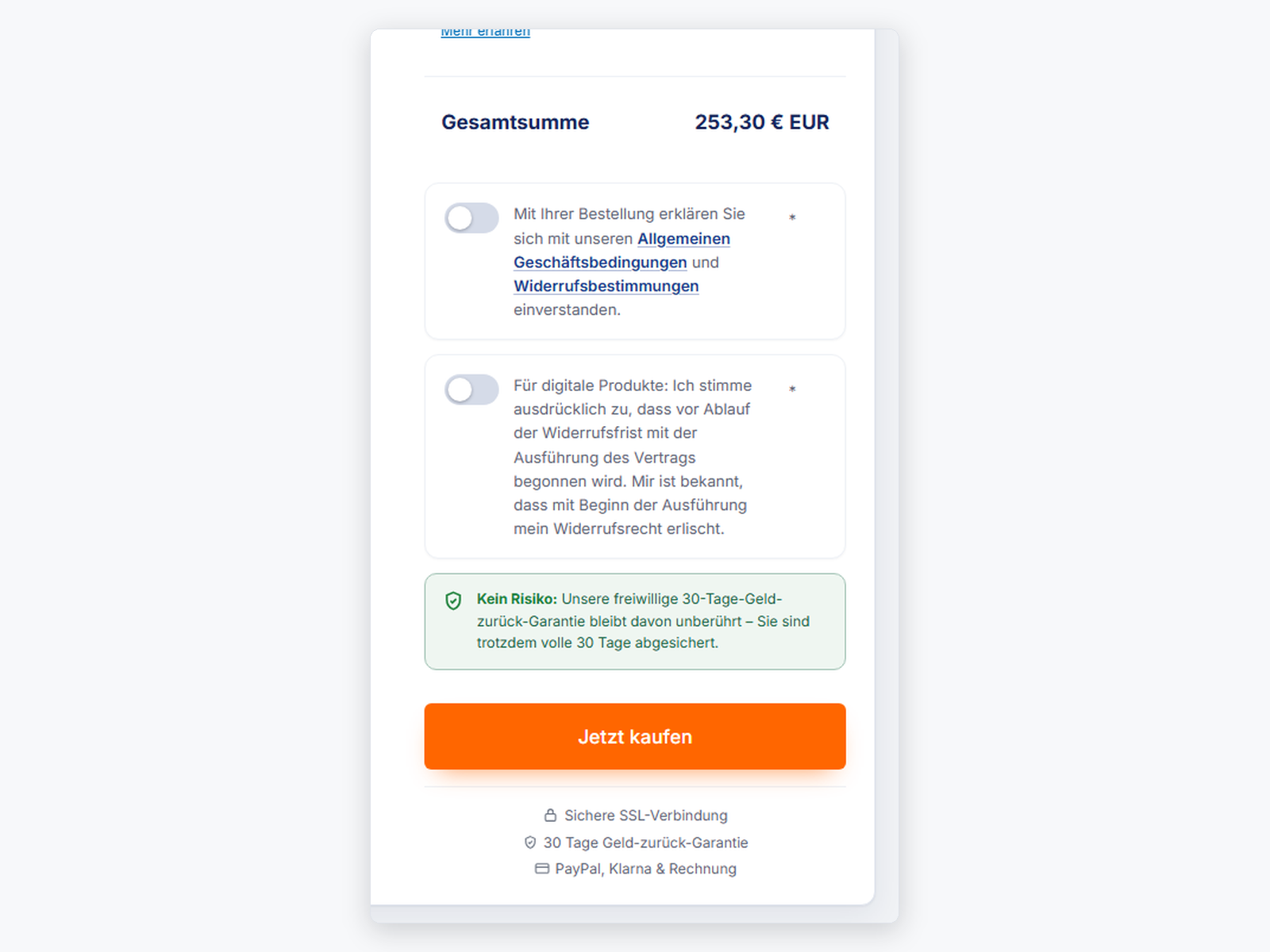
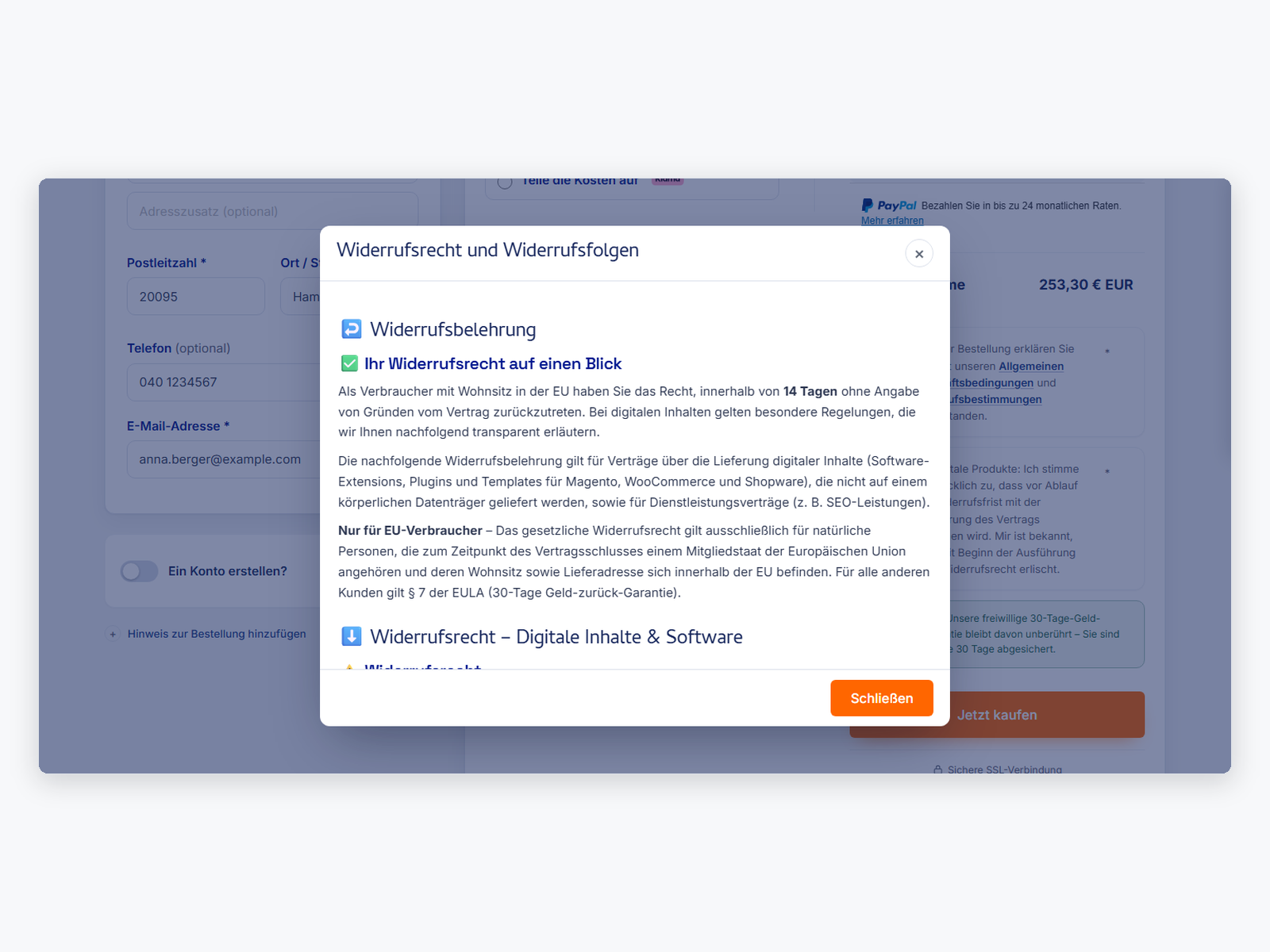
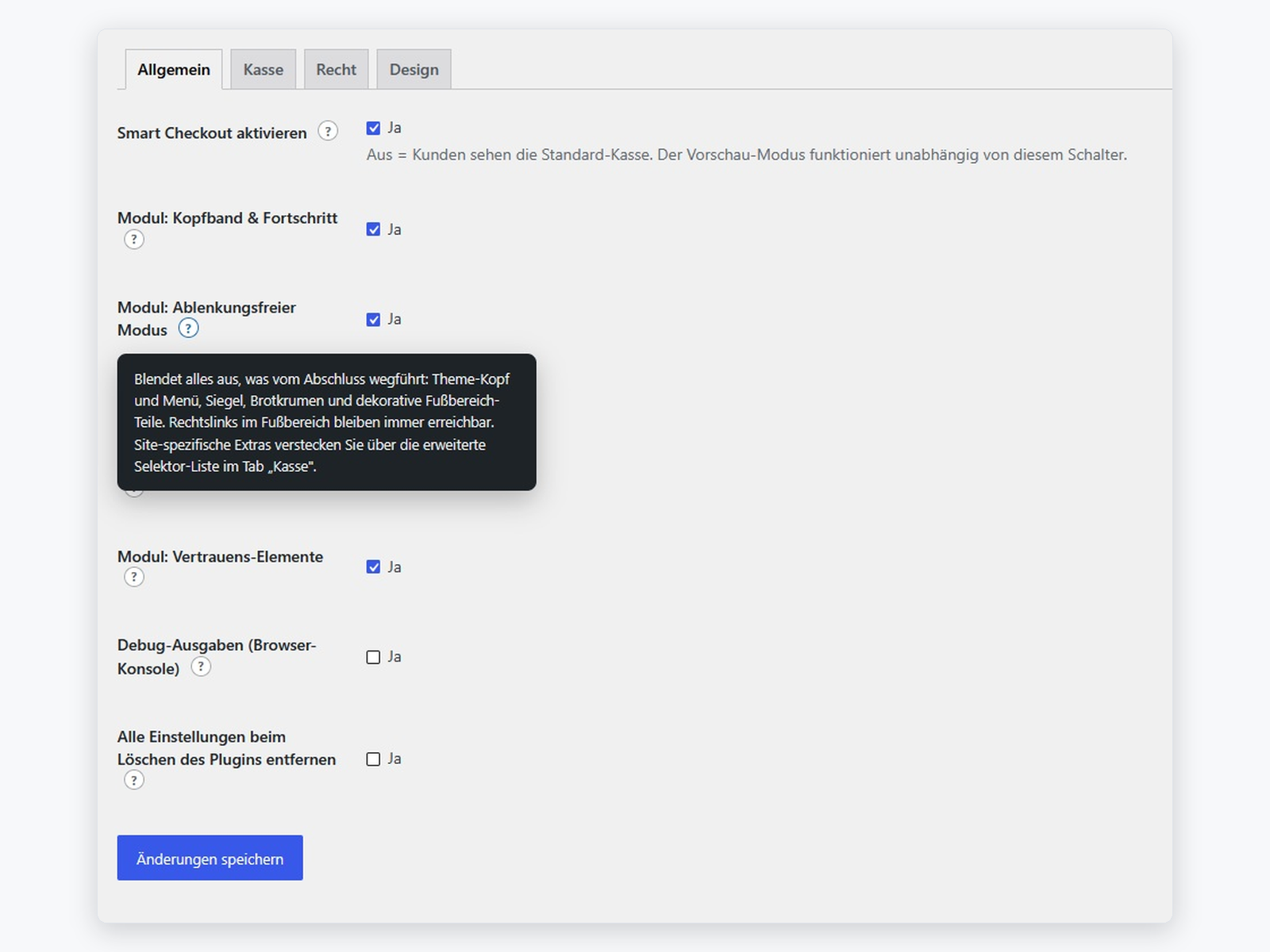
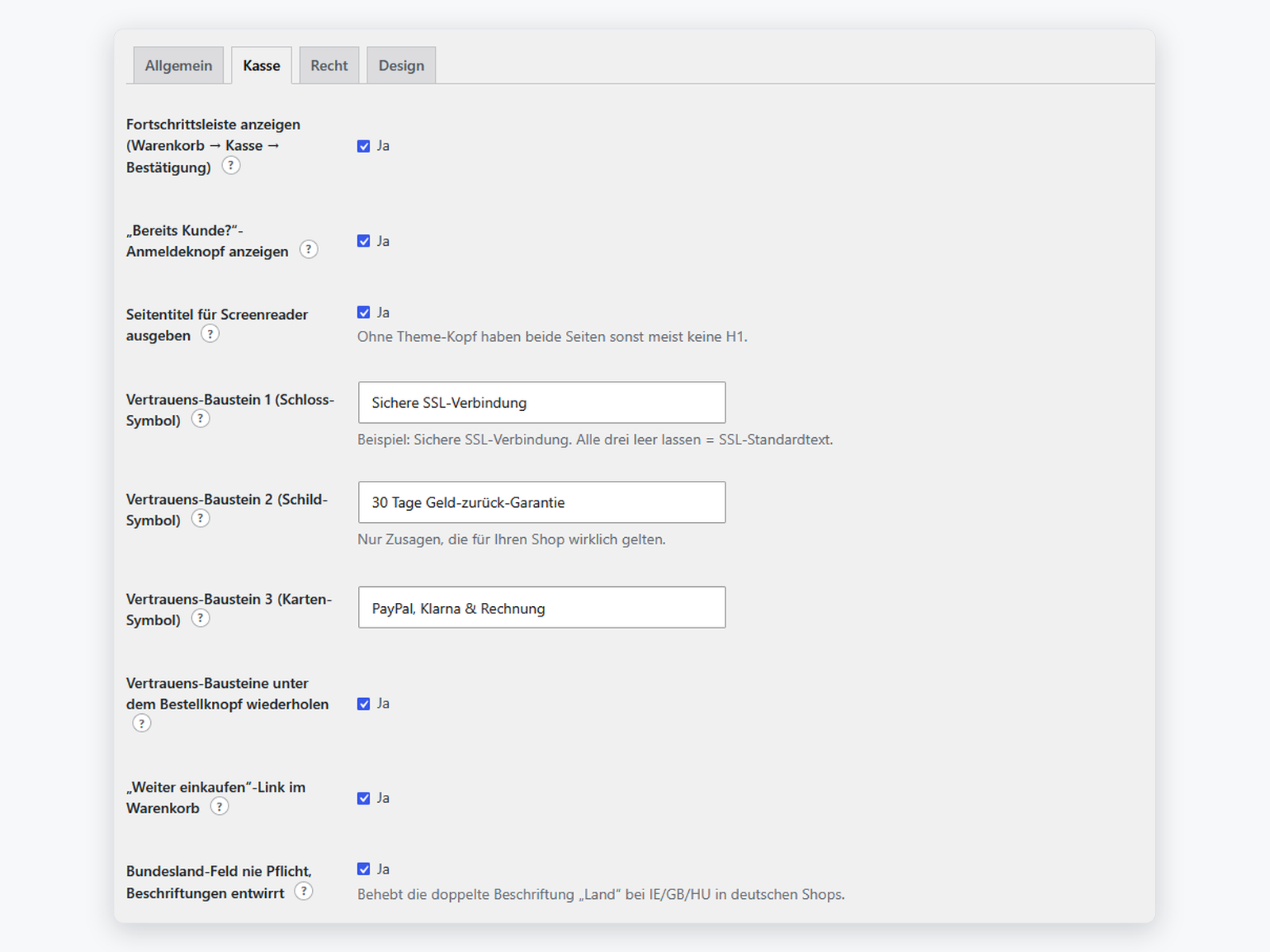
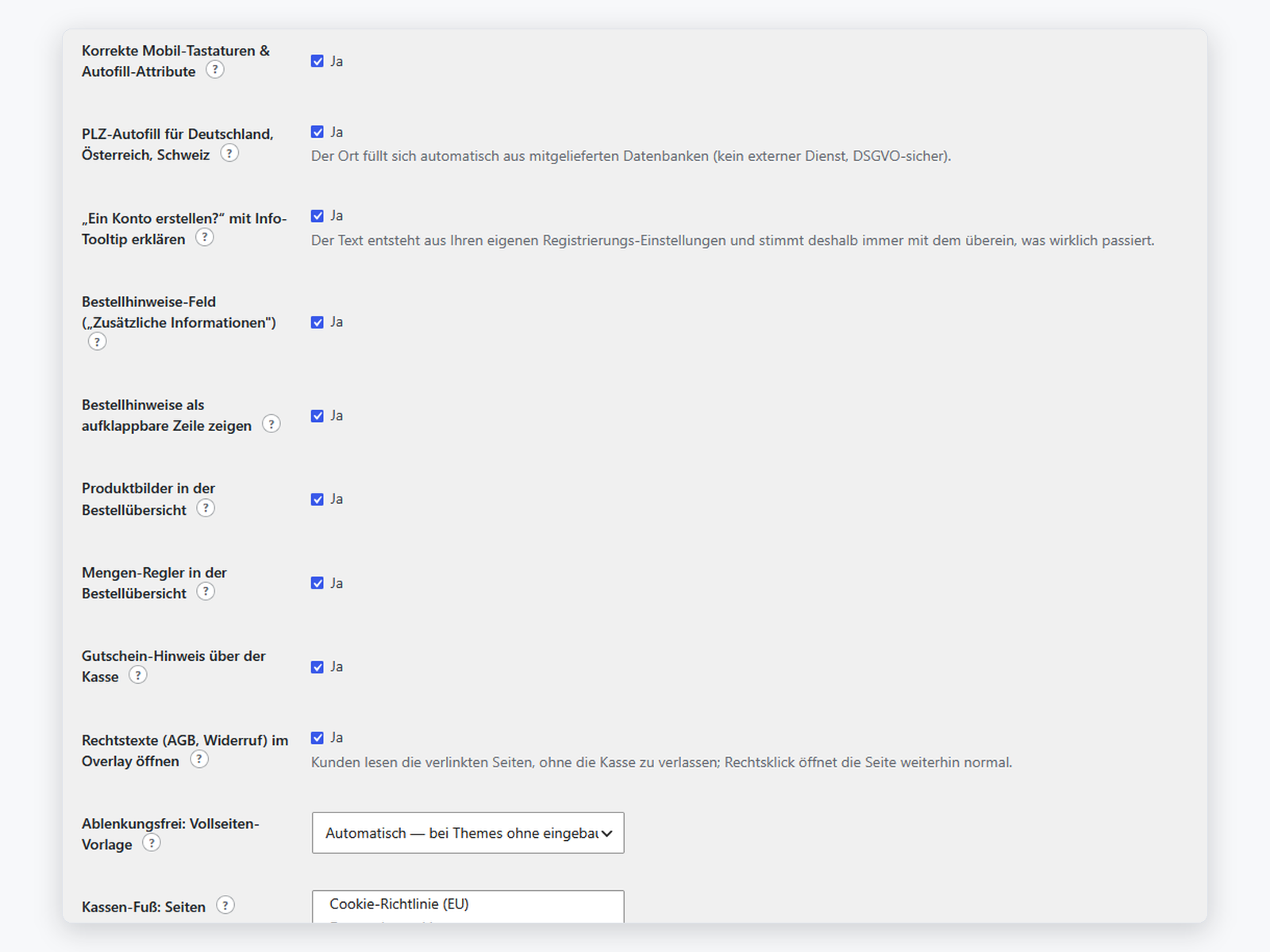
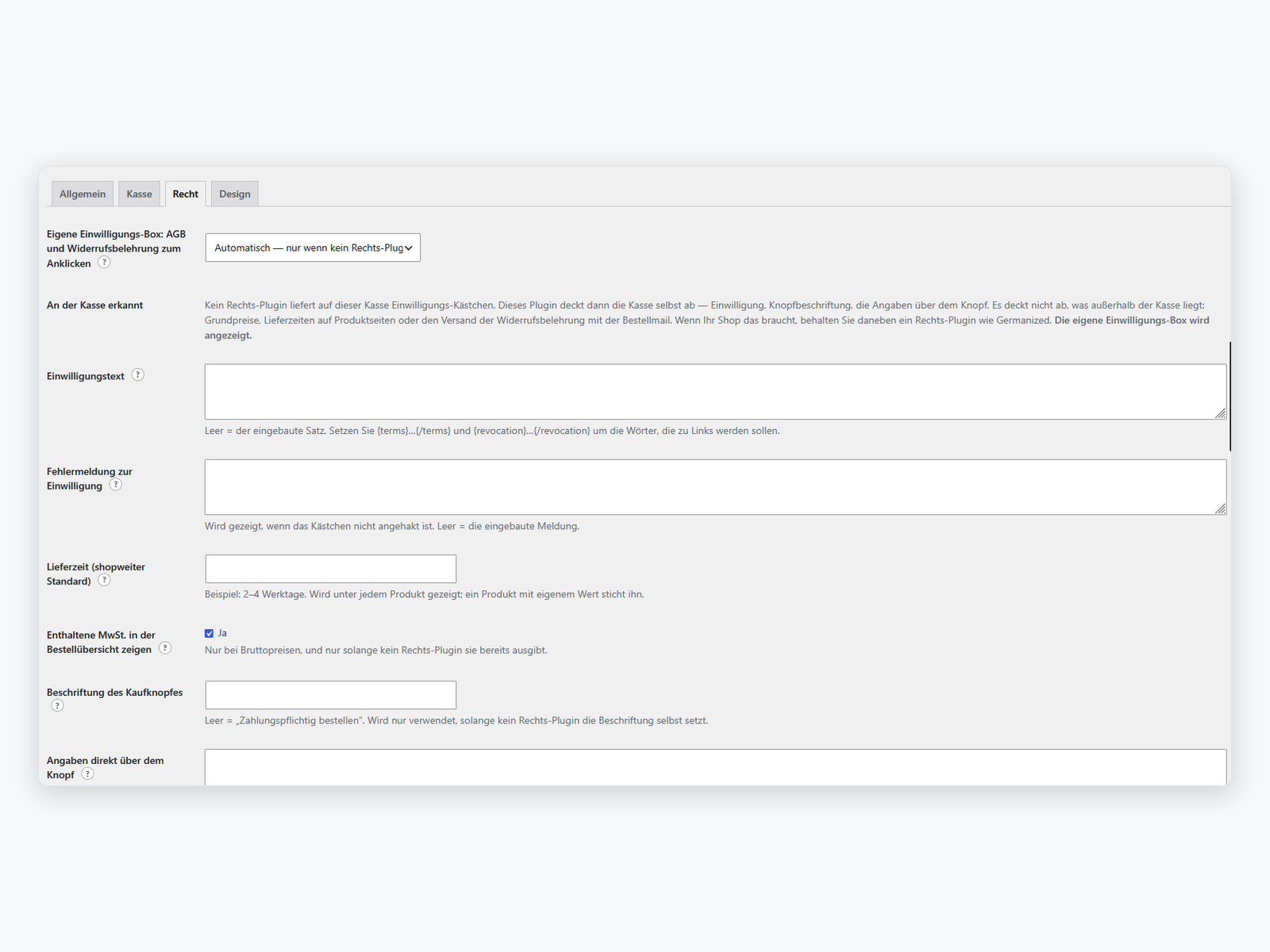
STM Smart Checkout for WooCommerce – kostenlose Kasse mit DACH-Rechtsangaben
KostenlosKostenlos und vollständig nutzbar. STM Smart Checkout macht aus der Standard-Kasse von WooCommerce eine aufgeräumte, rechtssichere Kaufstrecke — ohne Ihre Zahlungsarten, Ihr Rechts-Plugin oder Ihr Theme zu ersetzen. Fehlt ein Rechts-Plugin, bleibt die Kasse trotzdem nicht nackt: Einwilligung, Knopfbeschriftung nach § 312j BGB, MwSt.-Ausweisung und Lieferzeit liefert das Plugin dann selbst.
Kopfband mit Fortschritt, nummerierte Schritte, Bestellübersicht als Karte
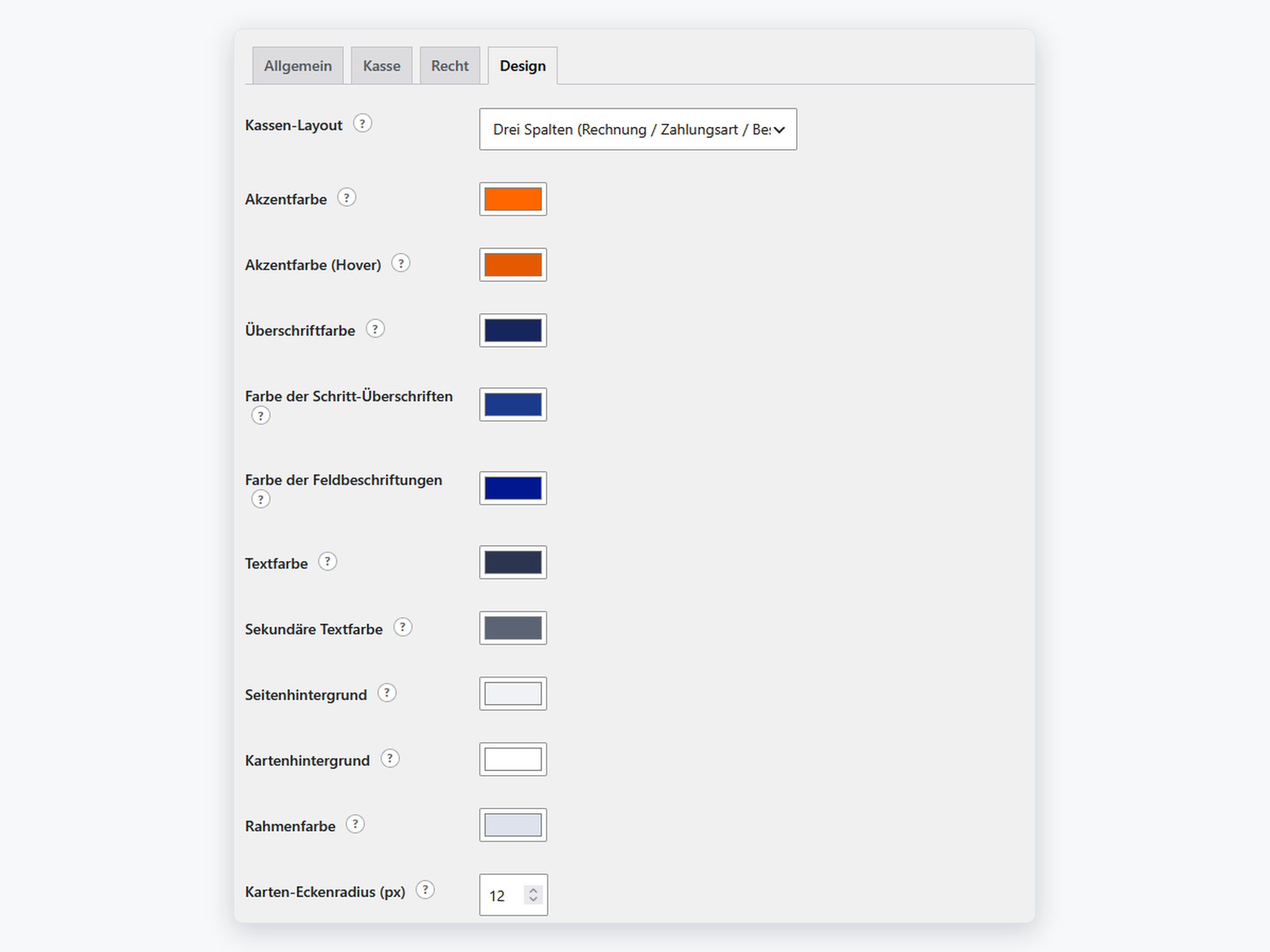
Ein, zwei oder drei Spalten; Farben und Schriftgröße im Backend, ohne CSS
Einwilligung, § 312j-Knopftext, MwSt.-Ausweis, Lieferzeit je Artikel
Germanized und German Market liefern weiter — wir treten dann zurück
DE, AT und CH aus mitgelieferten Daten — kein externer Dienst
Pflichthäkchen werden nach dem Absenden erneut geprüft
Richtige Tastaturen, treffsichere Felder, Zahlarten immer einzeilig
Vollständig übersetzt, Sie-Form, HPOS- und Block-kompatibel
Eine Kasse, die verkauft — und die Pflichtangaben mitbringt
Die Standard-Kasse von WooCommerce ist funktional, aber sie führt nicht. STM Smart Checkout ordnet sie: Kopfband mit Fortschritt und Trust-Zeile, nummerierte Schritte, die Bestellübersicht als ruhige Karte, ein Kaufknopf, der dort sitzt, wo die Entscheidung fällt.
- Layouts: ein, zwei oder drei Spalten — im Backend umschaltbar.
- Design über Tokens: Farben, Schriftgröße in Pixeln, Rahmen und Flächen. Ohne
!important-Kämpfe mit dem Theme. - Feldverwaltung mit Sofortprüfung und den richtigen Tastaturen auf dem Handy.
- PLZ-Autovervollständigung für DE, AT und CH aus mitgelieferten Daten — kein externer Dienst, keine Kundendaten unterwegs.
- Rechtstexte im Overlay lesbar, ohne die Kasse zu verlassen.
Rechtssicher auch ohne Rechts-Plugin
Nach einer Regel: Liefert ein Rechts-Plugin die Pflichtangabe, tritt das Plugin zurück. Liefert keines, bleibt die Kasse trotzdem nicht nackt. Entschieden wird das nicht daran, ob ein Plugin installiert ist, sondern daran, ob es tatsächlich etwas ausgibt.
- Einwilligung zu AGB und Widerruf, mit dem exakten Wortlaut auf der Bestellung gespeichert.
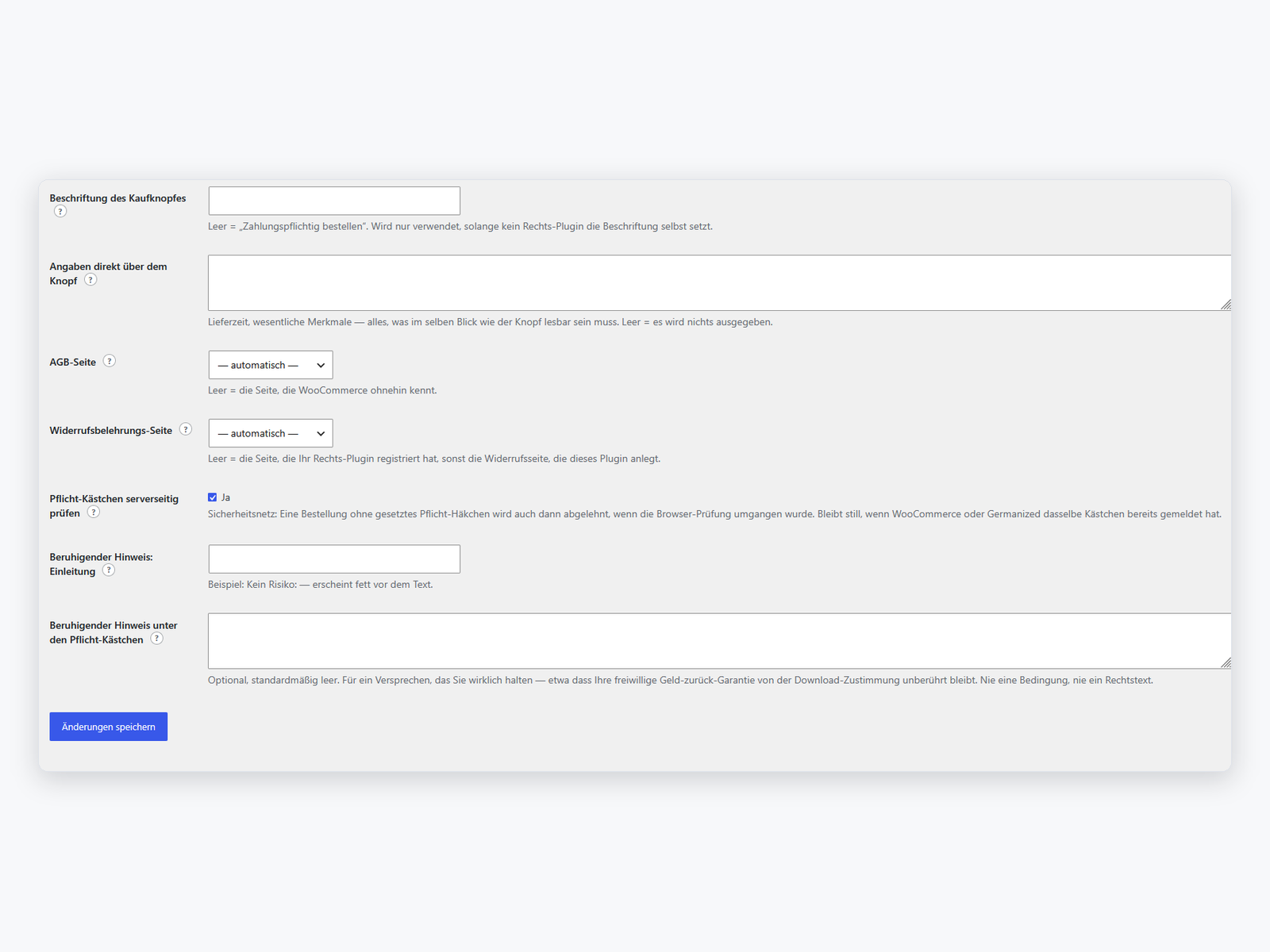
- Knopfbeschriftung nach § 312j BGB, wo kein Rechts-Plugin sie setzt.
- MwSt.-Ausweisung in der Bestellübersicht bei Bruttopreisen.
- Lieferzeit je Artikel — pro Produkt entschieden, nicht pauschal.
- Serverseitige Prüfung der Pflichthäkchen nach dem Absenden.
Was die Pro-Version ergänzt
Die kostenlose Version ist vollständig nutzbar und wird es bleiben. STM Smart Checkout Pro ergänzt sieben Bausteine: das Online-Widerrufsformular (seit dem 19.06.2026 EU-Pflicht) samt Verwaltung im Backend, die Express-Zone für Wallet-Knöpfe, zahlartabhängige Pflichtfelder, das Anpassen der Zahlarten (Name, Hinweis, Symbol, Reihenfolge), einen Sicherheitsmodus gegen Ausfälle an der Kasse, die mobile Sticky-Bestellleiste und das ultra-kompakte Layout.
Klassische Kasse und Block-Kasse
WooCommerce hat zwei Kassen: die klassische mit Shortcode und die neuere aus Blöcken. Beide werden bedient — aber nicht mit demselben Umfang, und die Einstellungsseite sagt genau, was wo gilt, statt es Sie später herausfinden zu lassen.
- Klassische Kasse: vollständig — Spalten-Layouts, Feldverwaltung, PLZ-Autovervollständigung, alle Rechtsbausteine.
- Block-Kasse: der rechtliche Kern und die Gestaltung. Pflicht-Einwilligung, die WooCommerce serverseitig prüft, Pflichthinweis und Rechtstext-Links über dem Knopf, Knopfbeschriftung nach § 312j BGB, Lieferzeit je Artikel, Trust-Reihe unter dem Knopf und Beruhigungshinweis unter den Häkchen. Spalten-Layouts und Feldverwaltung bleiben vorerst der klassischen Kasse vorbehalten.
- Ein Klick zurück: Der Wechsel auf die klassischen Seiten ist umkehrbar — und das Plugin ändert Ihre Seiten nie von selbst.
Vertrauen zeigen — und vorher ausprobieren
- Trust-Kopfband mit Ihrem Logo, drei kurzen Aussagen samt Symbolen und einer „Bereits Kunde?“-Anmelde-Pille, die das Anmeldeformular öffnet, das WooCommerce ohnehin ausgibt.
- Trust-Badges aus einem kuratierten Symbolsatz und ein Beruhigungshinweis direkt zwischen Einwilligungen und Kaufknopf — dort, wo der Zweifel entsteht.
- Gutschein-Hinweis und Bemerkungsfeld abschaltbar: zwei der häufigsten Gründe, warum Kunden die Kasse verlassen, um woanders etwas zu suchen.
- Rechts-Fußzeile unter der Kasse, befüllt aus Seiten Ihrer Wahl, aus einem Menü oder automatisch aus den Rechtsseiten, die Ihre Site ohnehin registriert.
- Vorschau-Modus: das Ganze auf der Live-Site ausprobieren, während Kunden weiter die Standard-Kasse sehen.
- Von WordPress geprüft. Jedes Plugin im Verzeichnis durchläuft vor der Freigabe eine Sicherheits- und Code-Prüfung durch das ehrenamtliche Plugin-Review-Team — ein fremdes Urteil, kein Eigenlob.
- Unser Quelltext liegt offen. Jede Zeile ist im Verzeichnis einsehbar — dieselbe Sorgfalt, mit der wir in Kundenprojekten arbeiten, nur diesmal öffentlich nachlesbar.
- Entwickelt in Tornesch bei Hamburg. Für deutsches Shop-Recht gebaut: Pflichtangaben, Germanized-tauglich, Sie-Ansprache — nicht nachträglich übersetzt.
Technisches
- WordPress 6.5+, WooCommerce 8.3+, PHP 7.4+.
- HPOS-kompatibel, Kompatibilität mit den Cart/Checkout-Blöcken erklärt.
- Keine externen Anfragen, keine fremden Schriften, kein Tracking.
- Deutsch (Sie-Form) und Englisch, plus
.potfür weitere Sprachen. - GPLv2 oder später.
Wer dahintersteht
Entwickelt wird STM Smart Checkout von Storetown Media, einer E-Commerce-Agentur aus Tornesch bei Hamburg. Wir bauen seit 2012 Online-Shops und kennen die Kasse aus der Wartung echter Shops in Deutschland, Österreich und der Schweiz — nicht aus der Dokumentation. Dieselbe Kasse gibt es als One Page Checkout für Magento 2.
Sie möchten die Kasse nicht selbst einrichten? Unsere WooCommerce-Agentur in Hamburg übernimmt Einrichtung, Anpassung und Anbindung an Ihre Warenwirtschaft — unverbindlich anfragen.
Dieses WordPress-Plugin installieren Sie als ZIP-Datei – wie jedes andere WordPress-Plugin auch.
Installation per ZIP-Datei
Nach Ihrer Bestellung steht Ihnen das Plugin als ZIP-Datei zum Download bereit.
1. ZIP-Datei herunterladen
Laden Sie die ZIP-Datei über Ihren Account unter Mein Konto → Downloads herunter.
2. Plugin im WordPress-Admin hochladen
Gehen Sie im WordPress-Admin zu Plugins → Installieren → Plugin hochladen und wählen Sie die heruntergeladene ZIP-Datei aus.
3. Plugin aktivieren
Klicken Sie nach dem Hochladen auf „Plugin aktivieren“. Das Plugin ist sofort einsatzbereit. Die Konfiguration finden Sie unter WooCommerce → Smart Checkout.
Hilfe benötigt?
Bei Fragen zur Installation wenden Sie sich gerne an unseren Support unter support@storetown-media.de.
Change Log
Version 0.1.52
- Fixed: with the plugin's own consent box in charge, every order was rejected with "Please read and accept the terms and conditions to proceed with your order" as soon as a WooCommerce terms page was set — no matter what the customer ticked. The consent box takes the place of WooCommerce's own terms checkbox, but the server-side check still demanded that checkbox, which was never on the page. Reported by a customer of a live shop on 12.10.2026.
- WooCommerce's terms checkbox is now demanded only when it was actually rendered, recognised by the "terms-field" companion WooCommerce posts with it. That is the rule WooCommerce core applies, and the one this plugin already used for Germanized's checkboxes.
Version 0.1.51
- Fixed: in the two-column layout the order summary hung below the address column instead of beside it, with the column empty above it and only the "Your order" heading in place. That heading rendered next to the summary rather than in it, and a second item in the right column has nowhere to go but the next grid row — which starts below the full height of the address column. The heading now sits inside the summary card, where the billing and additional-information headings sit as well.
- A tab of its own now describes what the paid add-on adds, and the plugin's row on the Plugins page carries one link to it. Both disappear the moment the add-on is installed — nobody should be sold what they already own.
- Deliberately nowhere else. The directory permits upselling but binds it to guideline 11, which is explicit about the shape: prompts and notices "must be limited in scope and used sparingly, be that contextually or only on the plugin's setting page". So there is no admin notice, dismissible or not, anywhere in this plugin.
- The tab describes the add-on rather than showing switches that do nothing. Shipping locked functionality and selling the key is what guideline 5 forbids, and a settings screen full of dead controls is a poor way to explain a product anyway.
- No banner is fetched, no image loaded, no counter pinged: the panel is static markup and local strings. The listing promises this plugin never phones home, and an upgrade page is no reason to start.
- Every claim on the tab names a module that exists. The readme once promised features that did not, and this list is checked against the shipped classes rather than against a roadmap.
Version 0.1.50
- No code changes. This release exists so the plugin directory serves a rewritten description — WordPress.org reads it from the stable tag, so a new text needs a new version.
- The description now leads with what actually sets this plugin apart instead of listing twelve features: that it asks the rendered checkout whether another plugin already prints a consent box, a button label or a VAT line before printing its own; that the German and EU legal essentials work with no legal plugin at all; that the postcode databases for Germany, Austria and Switzerland sit inside the plugin so no customer address leaves your server; and that nothing phones home.
- Preview mode moved from the eleventh bullet to the second sentence. Trying the plugin on your own live site while customers keep seeing the standard checkout is the most useful thing a shop can do with it, and it was buried.
- The Pro section was incomplete and is now correct: bundle discounts and checkout offers had been shipping since 0.6.0 and 0.7.0 without ever being described, and the VAT ID field with its live VIES check and reverse charge has been added.
- The tag "one page checkout" has been replaced with "checkout fields" — this plugin is not a one page checkout, and the field manager it does have is free.
Version 0.1.49
- On the block checkout the own consent box now stands down for a legal plugin that renders its own — until now a shop running Germanized read two consent texts on one page, ours as a required checkbox and Germanized's below it, with the setting on "automatic".
- Why it took a different answer than the classic checkout: the block field has to be registered at woocommerce_init, because the Store API needs it registered to validate and store it, and at that moment no legal plugin has hooked the checkout yet. Measured in a real request — the detection answers "nobody" there and "Germanized" a few hooks later, too late to matter.
- So on the blocks, and only there, the question is answered by presence rather than by hook, and as narrowly as possible: not "is Germanized installed" but "is its block integration loaded". Registering the field and declining to render it later would have been better, but WooCommerce offers no filter for that.
- The settings screen says what was found, because a decision made on presence can be wrong and must not be wrong silently. A shop whose legal plugin is installed but not showing a consent box switches the setting to "on".
Version 0.1.48
- The coupon prompt and the order-notes field can now be switched off on the block checkout too — the same two settings that already governed them on the classic pages, so a shop configures once and both surfaces agree.
- Measured before it was promised, and the measurement moved the answer: WooCommerce hands the block app a couponsEnabled flag and offers a filter behind it, but that flag is global for the request — the Store API checks the same function, so using it would not hide a prompt, it would refuse coupons the shop still issues by link. The narrow lever is the block wrapper itself.
- The order-notes filter the classic checkout uses does not exist in the block path at all; the block that draws the field carries no logic to hook into. What works is that the Checkout block renders server-side as a tree of empty wrappers and the app mounts into them — no wrapper, nothing to mount. Verified through first paint, through a re-render, and on the way back.
- Said plainly rather than sold: the block checkout already folds the notes and the coupon behind a single line by itself, so the separate "expandable line" setting for the notes changes nothing there. The settings screen says so.
Version 0.1.47
- The trust row and the reassurance note reach the block checkout. The row of small trust items sits under the buy button, where the last doubt happens, and the reassurance note under the consent box it comments on — the same markup, the same settings and the same stylesheet the classic checkout uses, read from one place so the two can never drift apart.
- Measured first, because the reasonable guess was wrong: the block checkout offers no hook under its button and no slot either — the four Slot/Fill points WooCommerce exposes all sit in the order summary. What does work is appending markup after a block, and the checkout's React tree leaves it alone: through the first paint, and through re-renders while a customer types.
- The block stylesheet no longer depends on the legal module. A shop that lets a legal plugin handle consent kept its buy button, fields and cards unstyled on the blocks, because the whole layer hung on one switch. The design travels with the plugin now; the button label, the consent box and the legal line still stand down with the module they belong to.
Version 0.1.46
- The block checkout wears the plugin's design. Every step of the Checkout block is a card now — the same background, border, radius and shadow as the classic sections — with the classic numbered title: a disc in the title blue counting contact, address, shipping and payment, and the accent rule beneath. The additional-information block and the order notes keep the card and skip the number; they are addenda, not steps. The order summary heading speaks in the same voice. All of it is stylesheet only, hung on the block's own class names as measured on WooCommerce 11, and switched off with the plugin.
- Not attempted, and said so: the three-column choreography of the classic checkout. The block offers no wrapper for two independent columns of steps, and a grid would couple the address and payment columns row by row — a tall payment step forcing an equally tall blank beside it. The layout setting keeps applying to the classic checkout only, as the settings screen states.
Version 0.1.45
- The legal core works on the Cart and Checkout blocks. A required consent box for terms and cancellation policy is registered through WooCommerce's additional checkout fields, so the Store API validates it on the server — a checkout request without the tick, or with it set to false, is refused before an order exists — and the order carries the moment of consent and the exact sentence agreed to, as it does on the classic checkout. The links to both texts stand one line above the buy button, in the place WooCommerce reserved for legal text, and open in the plugin's overlay. The buy button carries the label from your settings; the blocks never read the classic filter, and what looked compliant on German shops so far was WooCommerce's translation of "Place order" and nothing more.
- The design tokens reach into the block form: the buy button, the fields, the section titles and the order summary wear the same accent, radius and type scale as the shell around them. The shell itself — full-page template, trust band, step indicator, legal footer — has worked on the blocks all along; it hangs on page hooks, not on the classic checkout's rendering hooks, which is more than the previous FAQ answer allowed for.
- The mandatory notice and the delivery time follow. The notice from your settings — the essential order details the courts want readable right before the decision — shares the line above the buy button with the legal links, in body size where the links stay quiet. The delivery time under each item rides on WooCommerce's own item data, the mechanism the Store API and both blocks already render under a product name: it appears in the cart block and in the checkout's order summary, resolved from the same sources as on the classic checkout (the product's own value, a legal plugin's delivery term, the shop-wide default), stands down for virtual items and where a legal plugin labels the item, and is printed once even on a shop whose cart is classic while its checkout is a block.
- Not on the blocks yet, and said so on the settings screen: the column layouts, the field manager and postcode autofill, the trust row, the reassurance note, the coupon and order-note controls. Every piece above stays out on WooCommerce older than the additional-fields API; the classic checkout is unaffected there.
Version 0.1.44
- The logo field no longer promises something the checkout does not do. Its help text said an empty field falls back to your site logo; the header band actually prints your site title as text, which is what the code has always done. A shop owner who left the field empty expecting a logo got a line of text and no explanation. Both help texts now describe the behaviour, and say out loud that the site logo and this field are different places in WordPress.
- The German translation follows the WordPress glossary. The German polyglots team pointed at the glossary and the style guide when granting editor rights, and four terms did not match it: Knopf is Button, Kästchen is Checkbox, Fußbereich is Footer, and Site is Website. 38 places in each of the two German catalogues, with the article corrected wherever the gender changed with the word — a Kästchen is neuter, a Checkbox is not, and a blind replacement would have left "das Checkbox" behind in a dozen sentences. Translations are delivered by WordPress.org and are not part of this package.
Version 0.1.43
- The links to our own pages sit at the end of the description instead of its second line. A shop owner opening a directory page wants to know what the plugin does; a link to the vendor's shop before the first feature reads as an advertisement, whatever it points at. Both language sections now describe the plugin in full first and name the pages afterwards, where someone who has read that far might actually want them. The first link is now halfway down the description rather than in its opening. No code changed.
Version 0.1.42
- The links in the description are links. WordPress.org renders a readme with a Markdown subset — bold, lists and headings came through, but a bare URL stays plain text, so every address in the description sat there unclickable. They are written as proper links now, with the product's name as the anchor instead of the address, which is also what a search engine reads. The two attribution links in Credits had the same problem and are fixed with them. No code changed.
Version 0.1.41
- The description says what the plugin actually does. It listed eight bullets for a checkout that has closer to twenty settings worth naming, and it described the paid add-on as "three things" when it has carried seven since the end of August — an understatement is as inaccurate as a promise, and this readme has been on the wrong side of that before. Both product pages are linked now, in the language of the section that links them, and the German half spells out the legal features under the words a German shop actually searches for: Button-Lösung, § 312j BGB, Widerrufsformular, AGB-Checkbox, MwSt.-Ausweisung, Lieferzeit. Two questions were added to the FAQ, one of them stating plainly that the online withdrawal form required since 19 June 2026 is in Pro and not in this plugin. No code changed.
Version 0.1.40
- The plugin's own homepage link no longer leads to the paid version. The Plugin URI in the header pointed at a path that redirects to the Pro product page, and WordPress.org publishes that header field as this plugin's homepage — so the free plugin's link led to a sales page for a different product. It now points at this plugin's own page. Both header URLs are the English ones, because the directory listing is written in English; the German product pages are carried by the German translation of those fields, which is what translatable header URLs are for.
Version 0.1.39
- The settings screen loads its stylesheet and its script as files. Both were printed into the page as a style and a script block, which renders the same but skips everything WordPress does around an asset: a version the caches can see, one place from which a site can dequeue or replace them, and markup that stays out of the middle of the form. The distraction-free module's extra hide rules take the same route and hang off the checkout stylesheet now instead of being written into the page head — and the child combinator survives their sanitizer, so "header > .bar" hides that bar rather than everything below the header.
- Values written into a style element are stripped of the characters that could leave it. The word between the express buttons and the form is translatable, and a translation is a string from outside the code: one carrying a closing style tag would have ended the element and turned the rest of the declaration into markup. The colour and size tokens pass the same filter, applied late, where the value is written into the CSS rather than where it was read.
- Translations come from WordPress rather than from the package. The plugin no longer calls load_plugin_textdomain and no longer ships compiled .mo files: for a plugin in the directory, WordPress delivers translations into wp-content/languages/plugins/ and loads them on the first translated string without being asked, so a bundled copy would only give one language two sources — of which the packaged one is always the older. The Domain Path header goes with them, because it pointed at a folder the package no longer carries. The German translation stays maintained in the source repository and goes to translate.wordpress.org, where anyone who finds a better word can correct it.
Version 0.1.38
- The shipping-address switch speaks in the checkout's voice. Its label carries the text, so a theme's label rules land there rather than on the heading around it — Basel sets 22px and uppercase on
.woocommerce-form__label, and that one line shouted at 66px while the rest of the checkout spoke normally. Font size, weight, letter spacing and casing now inherit from the row, stated on the label and on the span inside it, because which of the two a theme targets differs.
Version 0.1.37
- Customers can enter a different shipping address again. The rule that steps the theme's own section headings aside — so the plugin's numbered titles can take their place — also caught the shipping block, and WooCommerce does not put a heading there: it puts the "Ship to a different address?" checkbox inside that h3. Hiding it removed the only control that opens the shipping address and left an empty card in its place, on every shop that offers shipping. The shipping block is now excluded from that rule and its heading is styled as what it actually is: a switch, in the body font, with a 44px tap target. Reported from a live shop; the two test shops had never rendered the section, one forcing shipping to the billing address and the other selling a virtual article.
Version 0.1.36
- The plugin now says it when your cart and checkout are built from blocks. A stock WooCommerce install renders both pages from the Cart and Checkout blocks; this plugin extends the classic cart and checkout, and none of its hooks fire inside the blocks. Until now that combination was silent in every direction: the settings screen offered its full set of options, the checkout kept looking exactly as before, and WooCommerce said nothing either — because the plugin declares block compatibility, which is true (it breaks nothing) and which switches off Woo's own warning. The settings screen now names the affected pages above the tabs, states plainly that nothing below will change what customers see, and offers to switch those pages to the classic cart and checkout in one click. The block markup is kept in the page's meta, so the way back is one click as well and stays visible for as long as the switch is in place. The same note appears once on the plugins list, where it can be dismissed.
Version 0.1.35
- Preview mode can be left again. Once a shop manager had opened the preview, every later visit showed the Smart Checkout while the settings screen kept saying "off" — which reads like a broken switch.
?stmc_preview=0(also "off", "no") clears the cookie and takes effect in the same request, and the settings screen now says out loud whenever the cookie is set: preview is on for you, this is why the checkout looks switched on, customers still see the standard checkout — with the link that ends it. Customers were never affected.
Version 0.1.34
- Delivery time per line item — the last piece a shop without a legal plugin was missing in its checkout. Shown under every product in cart and checkout, resolved from the most specific source that knows one: a value typed onto this product (new field in the product's Shipping tab) wins, then Germanized's own delivery-time term (variation falling back to parent), then the shop-wide default. The
stmc_delivery_timefilter has the last word for shops that compute it from stock, a supplier feed or the shipping zone. Where a legal plugin already states the delivery time for a product, this one stays away — decided per product, not per shop.
Version 0.1.33
- The two blues become settings. The step-heading blue and the field-label blue were hardcoded in the token file, which made them the only colors a shop could not change; both are colour settings on the Design tab now, with their current values as defaults, so nothing shifts visually. They stay deliberately separate from "Heading color" — labels are read while filling in, headings while orienting, and one colour for both flattens the form into a grey block. The reassurance note moves back between the consent boxes and the buy button, where it comments on the consent right above it.
Version 0.1.32
- The order summary states its VAT. With gross prices WooCommerce prints no tax row at all, reasoning that the price already contains it — so on a shop whose legal plugin has stopped rendering, the summary charges VAT and says nothing about it. The checkout now states it itself, one row per tax rate beside the other money lines, wherever no legal plugin is doing it. The percentage comes from the tax rate, never from its name: shops name their rates freely, and a legal statement must not depend on what someone typed into a settings field.
Version 0.1.31
- Lite and Pro become two plugins. The withdrawal complex, the mobile sticky order bar and the ultra-compact layout move to a separate STM Smart Checkout Pro plugin, so the free plugin neither carries nor loads paid code. Lite grows the extension points that make an add-on possible instead of a fork:
stmc_settings_fields,stmc_admin_tab_fields,stmc_admin_tab_{slug},stmc_layouts,stmc_layout_labelsand public row helpers, so both plugins speak one visual language. NewSTMC_Settings::layout()resolves the effective layout from the raw option, so a stored layout whose provider is momentarily absent degrades to its nearest relative instead of silently falling back to the default.
Version 0.1.30
- The checkout stands on its own legally. For shops with neither Germanized nor German Market, the plugin now owns the buy-button label wherever no legal plugin sets one (§ 312j BGB) — previously a compliant label arrived only by way of WooCommerce's German translation, which is accidental compliance, not compliance. Priority 5, so anything hooking later keeps the last word, and a setting for shops with their own wording. Plus a slot for the information that must be readable in the same glance as the button, printed inside the place-order row so it travels with the button wherever the layout moves it. The settings screen now says plainly what the plugin does not cover when no legal plugin is present.
Version 0.1.29
- Font size in pixels. The type scale had one knob expressed as a percentage of rem, which handed the real size to the theme's root font size — the same setting rendered differently on two shops. It is a pixel value now, with every step a fixed ratio of it, chosen to reproduce the previous scale exactly at the 15px default; the old percentage is migrated rather than reset. Payment rows stay one row: a gateway setting
display:blockinline on its own rows made the block-level label start a new line, stranding the radio above it — an inline-flex label sits beside the radio there and is blockified back to flex where the row is flex, so nothing changes elsewhere. No!importantinvolved.
Version 0.1.28
- The consent box detects the legal plugin itself. The switch becomes a three-way choice with Automatic as the default: the box asks the checkout whether a legal plugin is actually printing consent boxes, and only steps in when none is. Asked by hook, never by "is the plugin installed" — that distinction is the whole feature: a legal plugin can sit there active and configured and still render nothing, and a presence check would leave such a checkout with no consent at all. The decision is recorded and shown on the settings screen, because automatic behaviour nobody can inspect is how a checkout ends up legally naked without anyone noticing.
Version 0.1.27
- The checkout can carry its own legal consent — one required checkbox for terms and cancellation policy, seated between the grand total and the buy button, rendered with WooCommerce's own terms-wrapper class names so the existing card chrome, switch and invalid state apply. Links fill themselves from the pages the shop already registered; a placeholder whose page is unknown keeps its plain words instead of producing a dead link. Server-side validation reuses the existing required-checkbox path, and the acceptance is written onto the order together with the exact wording shown — a stored "yes" pointing at today's text proves nothing about last year's order. Order notes become a one-line disclosure at the end of the address column, so the field that hardly anyone fills stops costing a card and a step number.
Version 0.1.26
- DHL preferred services join the payment column, right under the methods — the integration only re-prioritizes their hook, so everything Shiptastic built (its script, refresh behavior, conditions) keeps working untouched. And a new default makes the totals block third-party-proof: any unknown row a plugin prints into the totals now lands after the grand total automatically — extras can never interrupt the money story again.
Version 0.1.25
- First member of the integrations family: Shiptastic (+ DHL). The pickup-location offer ("Not at home?") no longer interrupts the address fields mid-flow — it closes the address block as a quiet card. DHL's preferred services (delivery-day tiles, drop-off location, neighbor) speak the checkout's design language now and settle after the grand total, where delivery fine-tuning belongs. The adapter is guarded (no-op without Shiptastic) and never forks the plugin's behavior — the pattern every future integration follows.
Version 0.1.24
- Order-summary thumbnails survive theme lazy-loaders. Basel's lazy filter swapped the image source for its placeholder and lost the original along the way — the thumbnail rendered briefly, then stayed empty. The markup is now hand-built from the attachment URL, untouched by the attachment-image filter pipeline any lazy plugin hooks into; browser-native lazy loading still defers offscreen images, variations fall back to the parent image, missing images to the WooCommerce placeholder.
Version 0.1.23
- The full-page checkout footer configures itself and bends to your will: pick the exact pages in the backend (multi-select), or a whole menu — and without any choice the line now fills itself with the legal pages your site already registered (Germanized's imprint, privacy and withdrawal pages, WooCommerce's terms page, WordPress' privacy page), published pages only, in reading order.
Version 0.1.22
- Order summary round from the second-shop review. Product images now render reliably in the summary regardless of the legal plugin (when Germanized already provides one, no second image is added). Quantity steppers beside each product let customers fix amounts right at the checkout — changes run through WooCommerce's own refresh with all totals, stock limits and sold-individually respected; a setting turns them off. The coupon prompt is owner-switchable too: shops that never issue codes can retire the field that sends customers code-hunting.
Version 0.1.21
- Distraction-free works on every theme now: on themes without a built-in adapter, cart and checkout render through the plugin's own minimal full page (template_include) — the theme's header, menus and footer are never built at all, while styles, analytics, consent tools and chat widgets keep working. A configurable legal-links line under the checkout keeps imprint, privacy and terms reachable (pick your legal menu in the backend; the WordPress privacy page is the minimum fallback). Adapter themes (The7, Storefront) stay on their native path; owners can force the template on or off.
Version 0.1.20
- Theme-proof layout round, measured on a second shop (Basel theme, Bootstrap checkout template). Theme templates that wrap the billing and order anchors in their own grid markup (a .col-sm-6 gave the billing column 50% of its 50%) become layout-transparent — the checkout grid now always places the anchors themselves, whatever the template wraps them in. The default template's "Product / Subtotal" table head is retired (our column title already labels the area; as a re-flowed line its two cells overlapped). Gateway description boxes with intrinsically sized badges (Klarna) can no longer push past the card edge. Themes without a server-side adapter get a narrow distraction-free CSS fallback: the page-title hero banner and the breadcrumb step aside while the screen-reader heading keeps the page named.
Version 0.1.19
- Context translations restored: the rebuilt language files had silently lost every msgctxt entry (the page slug and the state-field labels fell back to English) — found on the first install on a second shop, where the withdrawal page appeared with a German title but an English slug. The build tool now writes GNU context keys correctly, and the page self-heal treats title and slug independently, so existing installs fix their slug on the next upgrade (WordPress keeps the old-slug redirect).
Version 0.1.18
- Plugin Check green again: the help-icon markup escapes its id at the exact output spot (a pre-escaped variable is invisible to the reviewer's static analysis), and reading WooCommerce's order-notes switch carries its documented justification.
Version 0.1.17
- Withdrawal round from the live review. The form pre-fills with the customer's data — logged-in customers get their billing details plus their most recent order suggested (number, date, address), everything editable. The address is entered as single fields exactly like the checkout (street, postcode, city) instead of one big blob. The form speaks the checkout's design language now: white card, label blue, 46px controls, choice cards for the scope, a full-width call-to-action. Fixed: German shops got a page literally titled "Withdrawal" — the textdomain loaded after the page was created; the priority is corrected and existing untouched pages heal themselves (title and slug, WordPress keeps the old-slug redirect). The last untranslated strings are gone. New: the order-notes field ("Additional information") can be switched off in the backend.
Version 0.1.16
- Every setting now explains itself: a "?" icon beside each label opens a plain-language help bubble — what the option does, the background, and when to use it. Hover, focus or tap; Escape closes. The help texts live in one map, so the short inline hints under the fields stay untouched. Fully translated.
Version 0.1.15
- The one-column layout is actually one column now. Without its own rules the theme decided — The7 turns the checkout form into its own two-column flexbox, so "one column" silently rendered like "two columns". The layout is a centered 760px flex column: express buttons keep their order, then billing, then the order block, everything stacked.
Version 0.1.14
- Compact review round: on shipping-free carts the "Additional information" section (order notes) moves under the payment methods instead of dangling as a lone card below the address — the numbering follows the story (payment becomes step 2, the notes read as a quiet sub-block). First/last name (and postcode/city) now sit on exactly the same line: WooCommerce's float-era
margin-topon.form-row-lasttilted the grid pair by 6px.
Version 0.1.13
- Parity round with the live shop's proven checkout, plus a new layout. Step numbering now follows the form flow (1 billing details, 2 additional information, 3 payment — the order summary is the unnumbered constant); step heads grow to the measured 1.15rem in the title blue with the number in a matching disc. Field and payment-method labels speak in the label blue at content size. Consent boxes and "Create an account?" become modern switches on individual white cards. In the order column the totals table now leads, consents and the buy button follow, and the money lines re-order so the grand total closes the column with zebra rhythm on the quiet lines. Payment and order share ONE wide card split by a soft center line (three-column stage now starts at 1160px). The express area gets its measured title size and a translated "OR" divider. New: an ultra-compact layout — the three-column stage one type step down with tight cards and fields, modeled on the Magento edition; on touch screens density yields to reachability (16px field text, full-height targets).
Version 0.1.12
- Plugin Check housekeeping — the remaining review warnings are resolved: request values in the withdrawal form and the postcode lookup are unslashed and sanitized before use, withdrawal table queries use the %i identifier placeholder (WordPress 6.2+), and the deliberate direct calls to the plugin's own table carry documented justifications. No functional change.
Version 0.1.11
- One typographic system across all three checkout columns. Section titles now run in the body font instead of the theme display face (a checkout is one surface, not three widgets), payment method names drop from the theme reading size to content size so the middle column stops shouting, brand icons follow the type down, and the scale is down to five deliberate steps driven by tokens: fine print, secondary, content, controls, emphasis. Adds a --stmc-fs-xs token and raises content size to 15px.
Version 0.1.10
- Consistent typography in the order summary. WooCommerce wraps every amount in its own price elements and themes style those wrappers directly, bypassing the cell — on The7 that meant a 13px tax label beside an 18px amount, three different blues in one column, and a grand total rendered in a completely different font family. The price wrappers now inherit from their cell, so each amount matches its label in family, size and color, with weight alone marking the value and the grand total as the only emphasized line.
Version 0.1.9
- Payment method rows are flex rows: a gateway with a wide brand icon strip (credit card) no longer pushes its label onto a second line, stranding the radio button above it — an inline-flex label is atomic and cannot break, so it dropped as a whole. Radio buttons now match the consent checkboxes at 18px. Order summary: rows get horizontal padding so labels and amounts no longer touch the card edge, the theme's grey table background is dropped in favor of the card surface, and row separators are drawn on the row instead of the cells (as flex items the cells were split by the column gap, breaking each line into two segments).
Version 0.1.8
- Design round on the three-column layout: fixed column numbering 1 address / 2 payment / 3 order (the CSS counter told the story backwards because WooCommerce renders the order markup before the payment markup); the address and additional-information titles were accidentally hidden by our own heading rule. Consent boxes: consecutive cards merge into one quiet group, text flows as a normal block with hanging indent (WooCommerce core's inline label + line-height 2 tore it apart). Order summary: rows rebuilt as label-left/amount-right lines against The7's stacked block cells, product names wrap instead of truncating, tidy 44px thumbnails; Germanized's relocated duplicate "Your order" heading hidden.
Version 0.1.7
- Legal round: server-side safety net for required consent boxes (an order without a required tick is rejected even when the browser check was bypassed — and stays silent when WooCommerce or Germanized already reported the same box, extendable via the
stmc_required_checkboxesfilter). Optional reassurance note under the consent boxes. "Create an account?" info tooltip whose wording is derived from your own registration settings.
Version 0.1.6
- Postcode autofill for DE/AT/CH from bundled databases (no external service) — the city fills in automatically, multiple matches feed a native suggestion list. Mobile sticky order bar: total + buy button pinned while the real button is out of view; the proxy click runs every native validation.
Version 0.1.5
- Three-column checkout layout (billing / payment / order) — the most compact arrangement, selectable under Design. Express area polish: WooPayments' English separator hidden, gateway description rhythm, theme content padding removed on checkout surfaces.
Version 0.1.4
- Consumer rights: online withdrawal form (EU withdrawal function) — auto-created form page for guests and customers, automatic menu placement from the backend, "Withdraw this order" in My Account, soft order matching that never blocks a submission, merchant notification + customer receipt emails, and a management screen with status workflow under WooCommerce → Withdrawals.
Version 0.1.3
- Legal module: terms and withdrawal texts open in an accessible overlay without leaving the checkout (native link behavior as fallback). Styled legal checkboxes, order table refinements, cart page round: tidy table columns, checkout button before wallet buttons, quiet update button.
Version 0.1.2
- Design round on live The7 + Germanized shop: express payment areas stack tidily above the columns, theme percentage-width traps neutralized in the grid, field pair raster (name, postcode/city), payment method rows with contained brand icons, empty section shells lose their card chrome.
Version 0.1.1
- Core checkout modules: header band with progress and login toggle, distraction-free mode with theme adapters, numbered section titles, two-column layout, field improvements (state handling, mobile input attributes), trust elements. German (formal and informal) translations.
Version 0.1.0
- Initial foundation: settings framework, design token system, checkout context detection, module registry, HPOS and cart/checkout blocks compatibility declarations.
Häufig gestellte Fragen
Welche WordPress-Versionen werden unterstützt?
Dieses Plugin ist kompatibel mit WordPress 6.5 und höher. Die genauen Versionsanforderungen finden Sie in der jeweiligen Produktbeschreibung.
Funktioniert das Plugin mit meinem Theme?
Ja, unsere Plugins sind mit allen standardkonformen WordPress-Themes kompatibel – einschließlich Gutenberg und Classic Editor.
Erhalte ich automatische Updates?
Das Plugin steht im WordPress-Plugin-Verzeichnis: wordpress.org/plugins/stm-smart-checkout. Installierte Kopien aktualisiert WordPress von dort automatisch, wie jedes andere kostenlose Plugin — Sie müssen dafür nichts tun. Der Download hier bleibt für alle, die eine Fassung lieber von Hand einspielen.
Wo finde ich Support?
Schreiben Sie uns an support@storetown-media.de. Wir antworten in der Regel innerhalb von 24 Stunden.
Individuelle Anpassungen
Sie benötigen zusätzliche Funktionen oder eine Anpassung dieser Extension an Ihre individuellen Anforderungen? Wir bieten maßgeschneiderte Entwicklung als Agenturleistung an.
Unser Angebot umfasst:
- Funktionserweiterungen & individuelle Features
- Integration in bestehende Workflows & Drittsysteme
- Anpassung an Ihr Corporate Design & Theme
- Performance-Optimierung & Code-Reviews
- Dedizierter Support & Wartungsverträge
Interesse? Beschreiben Sie uns kurz Ihre Anforderungen und wir erstellen Ihnen ein unverbindliches Angebot.
Häufige Fragen zu STM Smart Checkout for WooCommerce
Was ist STM Smart Checkout for WooCommerce und wofür wird es eingesetzt?
STM Smart Checkout for WooCommerce ist ein professionelles digitales Produkt aus der Kategorie „Wordpress / WooCommerce Plugins“, entwickelt und vertrieben von Storetown Media aus Hamburg. Kostenlos und vollständig nutzbar. STM Smart Checkout macht aus der Standard-Kasse von WooCommerce eine aufgeräumte, rechtssichere Kaufstrecke — ohne Ihre Zahlungsarten, Ihr Rechts-Plugin oder Ihr Theme zu ersetzen. Das Produkt richtet sich an Entwickler, Agenturen und Shop-Betreiber, die eine zuverlässige und professionell gewartete Lösung suchen.
Ist STM Smart Checkout for WooCommerce kostenlos? Gibt es versteckte Kosten?
Ja, STM Smart Checkout for WooCommerce ist vollständig kostenlos. Es fallen keine Lizenzgebühren, Abo-Kosten oder versteckten Gebühren an. Sie können das Produkt frei herunterladen, in eigenen Projekten einsetzen und von regelmäßigen Updates profitieren. Der Download steht sofort nach der kostenlosen Bestellung im Storetown Media Shop bereit.
Wie funktionieren Download und Installation von STM Smart Checkout for WooCommerce?
Der Download von STM Smart Checkout for WooCommerce erfolgt sofort nach Kaufabschluss. Sie erhalten automatisch eine Bestätigungsmail mit dem direkten Download-Link. Zusätzlich steht die Datei dauerhaft in Ihrem persönlichen Kundenkonto unter „Meine Downloads“ zur Verfügung. Die Installationsanleitung finden Sie im Reiter „Installation“ auf dieser Seite. Bei Fragen zur Einrichtung unterstützt Sie unser technischer Support – auf Deutsch, direkt aus Hamburg.
Welcher technische Support und welche Updates sind bei STM Smart Checkout for WooCommerce enthalten?
Jeder Kauf von STM Smart Checkout for WooCommerce beinhaltet 12 Monate professionellen technischen Support auf Deutsch sowie alle Produktaktualisierungen. Unser Entwicklerteam mit über 14 Jahren E-Commerce-Erfahrung steht Ihnen per E-Mail zur Verfügung. Nach Ablauf des ersten Jahres können Sie den Support-Zeitraum mit 30 % Rabatt verlängern. Regelmäßige Sicherheits- und Kompatibilitätsupdates stellen sicher, dass STM Smart Checkout for WooCommerce zuverlässig und auf dem neuesten Stand bleibt.
Gibt es eine kostenlose Demo oder Testversion von STM Smart Checkout for WooCommerce?
Ja, Storetown Media bietet für STM Smart Checkout for WooCommerce eine kostenlose Live-Demo an, die Sie ohne Registrierung sofort ausprobieren können. Die Frontend-Demo zeigt die vollständige Funktionalität aus der Perspektive Ihrer Kunden und Besucher – inklusive aller UI-Elemente, Animationen und responsivem Verhalten auf verschiedenen Geräten. Sie finden die Demo-Links direkt auf dieser Seite unterhalb der Produktgalerie.
Welche Zahlungsmethoden akzeptiert Storetown Media? Ist die Bezahlung sicher?
Im Storetown Media Shop bezahlen Sie unter anderem mit PayPal, Kreditkarte, Apple Pay, Google Pay, Amazon Pay, Klarna, per Vorkasse oder auf Rechnung. Welche Zahlarten für Ihr Land verfügbar sind, sehen Sie an der Kasse. Alle Transaktionen sind durch SSL-Verschlüsselung geschützt. Sensible Zahlungsdaten werden nicht auf unseren Servern gespeichert, sondern ausschließlich von PCI-DSS-zertifizierten Zahlungsdienstleistern verarbeitet.
Wer steckt hinter STM Smart Checkout for WooCommerce? Wer ist Storetown Media?
STM Smart Checkout for WooCommerce wird entwickelt und vertrieben von Storetown Media, einem spezialisierten E-Commerce-Dienstleister mit Sitz in Hamburg (Tornesch). Das Unternehmen verfügt über mehr als 14 Jahre Erfahrung in der Entwicklung professioneller Shop-Lösungen auf Basis von Magento, Adobe Commerce und WooCommerce. Alle Produkte werden von erfahrenen, zertifizierten Entwicklern intern konzipiert, programmiert und gewartet – keine Drittanbieter-Software. Weitere Informationen finden Sie unter storetown-media.de.
Welche weiteren Wordpress / WooCommerce Plugins bietet Storetown Media an?
STM Smart Checkout for WooCommerce ist Teil der Kategorie „Wordpress / WooCommerce Plugins“ im Storetown Media Shop, die insgesamt 5 professionelle Produkte umfasst. Alle Produkte in dieser Kategorie werden vom selben Entwicklerteam gepflegt und sind aufeinander abgestimmt. Entdecken Sie unser gesamtes Portfolio an E-Commerce-Lösungen, die Ihren Online-Shop leistungsfähiger, sicherer und profitabler machen.
Darf ich STM Smart Checkout for WooCommerce in mehreren Projekten oder Shops einsetzen?
Die Standardlizenz von STM Smart Checkout for WooCommerce berechtigt zur Nutzung in einem einzelnen Projekt bzw. einer Produktivumgebung. Für den Einsatz in mehreren Shops oder Kundenprojekten bieten wir Agenturlizenzen und Mengenrabatte an. Kontaktieren Sie unser Vertriebsteam für ein individuelles Angebot. Entwicklungs- und Staging-Umgebungen sind in jeder Lizenz kostenfrei enthalten.
Ähnliche Produkte

Magento 2 B2B Registration Extension – STM B2B Register
inkl. 19 % MwSt.

Magento 2 One Page Checkout Extension – STM Smart Checkout
inkl. 19 % MwSt.

STM Custom CSS JS Manager Free
inkl. 19 % MwSt.

STM EU Tax Rate Sync für Magento 2 Community
inkl. 19 % MwSt.
 {% endif %}
{% if title and title != "" %}
{{ title }}
{% endif %}
{% if excerpt and excerpt != "" %}
{% endif %}
{% if title and title != "" %}
{{ title }}
{% endif %}
{% if excerpt and excerpt != "" %}
Rezensionen
Es gibt noch keine Rezensionen.