

 DE
DE EN
EN















STM Barrierelotse for WooCommerce – BFSG-Prüfung der echten Kaufstrecke
Kostenlosinkl. 19 % MwSt.
Kostenlos und vollständig nutzbar. Der STM Barrierelotse prüft die echte Kaufstrecke Ihres WooCommerce-Shops — mit gefülltem Warenkorb und der Kasse, die Ihr Kunde sieht —, erzeugt die Informationen nach § 14 BFSG aus echten Messwerten und dokumentiert jeden Schritt. Keine Quote, keine Sperre, kein ausgegrauter Knopf.
Was es nicht ist: kein Werkzeug, das Ihnen Konformität verspricht. Automatische Regeln erreichen zuverlässig nur einen Teil der Anforderungen; ob das Ergebnis für Ihren Shop ausreicht, ist eine Beurteilung, die das Gesetz Ihnen und gegebenenfalls Ihrem Anwalt überlässt. Wer Ihnen etwas anderes sagt, verkauft ein Overlay.
Lieber begleitet? Den ersten Durchgang übernehmen wir für 49 € einmalig — Installation, erste vollständige Prüfung, § 14 befüllt, Durchsprache des Berichts. Mehr zum BFSG im WooCommerce-Shop.
Drei Dinge — und eine klare Grenze dazwischen
Seit dem 28. Juni 2025 gilt das Barrierefreiheitsstärkungsgesetz für Online-Shops, die an Verbraucher verkaufen. Der STM Barrierelotse tut drei Dinge dafür, und er sagt bei jedem, wie weit es trägt.
- Er prüft — die echte Kaufstrecke Ihres Shops, nicht eine Liste von Seiten.
- Er erzeugt — die Informationen, die § 14 BFSG von Ihnen verlangt, aus echten Messwerten statt aus Platzhaltertext.
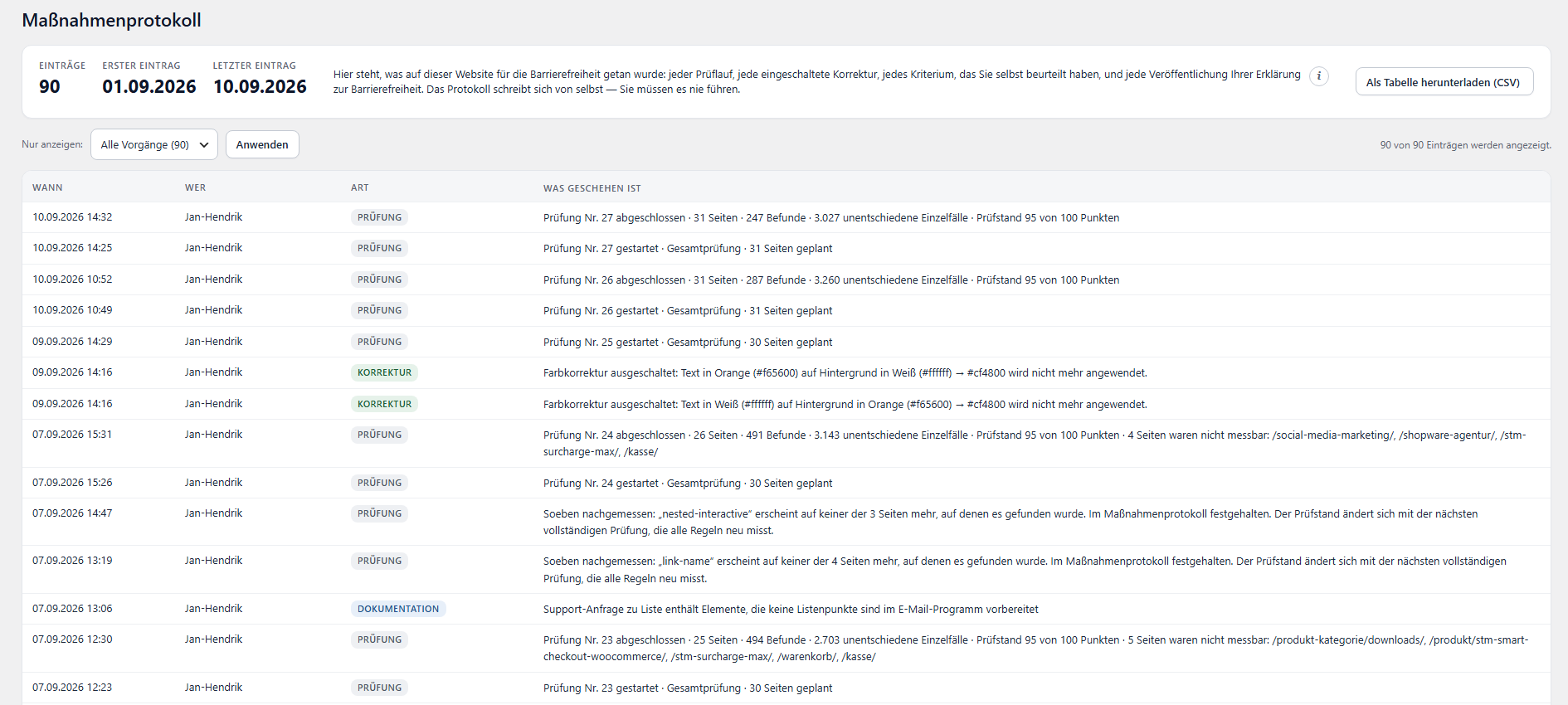
- Er dokumentiert — ein Maßnahmenprotokoll, das sich von selbst schreibt, damit die Arbeit zeigbar ist und nicht nur behauptet.
Was er nicht tut, steht weiter unten — an derselben Stelle wie das, was er kann.
Die echte Kaufstrecke — mit gefülltem Warenkorb
Die meisten Prüfwerkzeuge messen eine Liste von Adressen. Dabei fällt genau der Teil heraus, an dem Ihr Umsatz hängt: Ein leerer Warenkorb ist eine andere Seite als ein voller, und eine Kasse ohne Fehlermeldungen ist eine andere Kasse als die, die Ihr Kunde sieht, wenn er ein Pflichtfeld übersprungen hat.
- Ein Produkt wandert in den Warenkorb, und Warenkorb und Kasse werden mit Inhalt gemessen — samt der Fehlermeldungen bei leerem Pflichtfeld. Klassische Kasse und Block-Kasse.
- Der Seitenplan kommt aus dem, was ein Shop wirklich ist: Startseite, Shop-Seite, die größten Kategorien, je ein Produkt pro Art (einfach, variabel, reduziert), die Rechtsseiten, eine Suche mit einem echten Produktwort, die 404-Seite — und der Cookie-Hinweis, wie ein Besucher ihn antrifft.
- Auf Wunsch die vier wichtigsten Seiten ein zweites Mal in Handybreite.
- Ihr eigener Warenkorb wird vorher beiseitegelegt und danach zurückgelegt, und während einer Prüfung kann keine Bestellung ausgelöst werden — der Kassen-Schritt drückt den Bestellknopf mit Absicht.
Bevor die Prüfung startet, sagt sie in Worten, was sie sich gleich ansehen wird. Sie erfahren also vorher, worüber später eine Zahl steht.
Die Erklärung nach § 14 BFSG — aus Messwerten, nicht aus Textbausteinen
§ 14 BFSG verlangt von Ihnen Informationen zur Barrierefreiheit, und Anlage 3 der BFSGV sagt, welche vier Bestandteile darin stehen müssen. Der Barrierelotse erzeugt sie — als eigene Seite oder als Baustein für Ihre AGB, samt der für Sie zuständigen Marktüberwachungsstelle.
- Bestandteil c — wie Sie die Anforderungen erfüllen — wird aus echten Daten gefüllt: dem Maßstab, Datum und Umfang der letzten Prüfung, und jedem geführten manuellen Kriterium, das Sie als erfüllt beurteilt haben, mit Namen und Datum.
- Leere Pflichtfelder halten den Generator an. In Ihrem Namen wird kein Platzhaltertext veröffentlicht — ein Rechtsdokument mit „Lorem ipsum“ ist schlimmer als keines.
- Ob das Ergebnis für Ihren konkreten Shop ausreicht, ist eine Beurteilung, die das Gesetz Ihnen und gegebenenfalls Ihrem Anwalt überlässt. Diese Frage beantwortet kein Plugin, auch dieses nicht.
Wo die Automatik endet, sagt er es
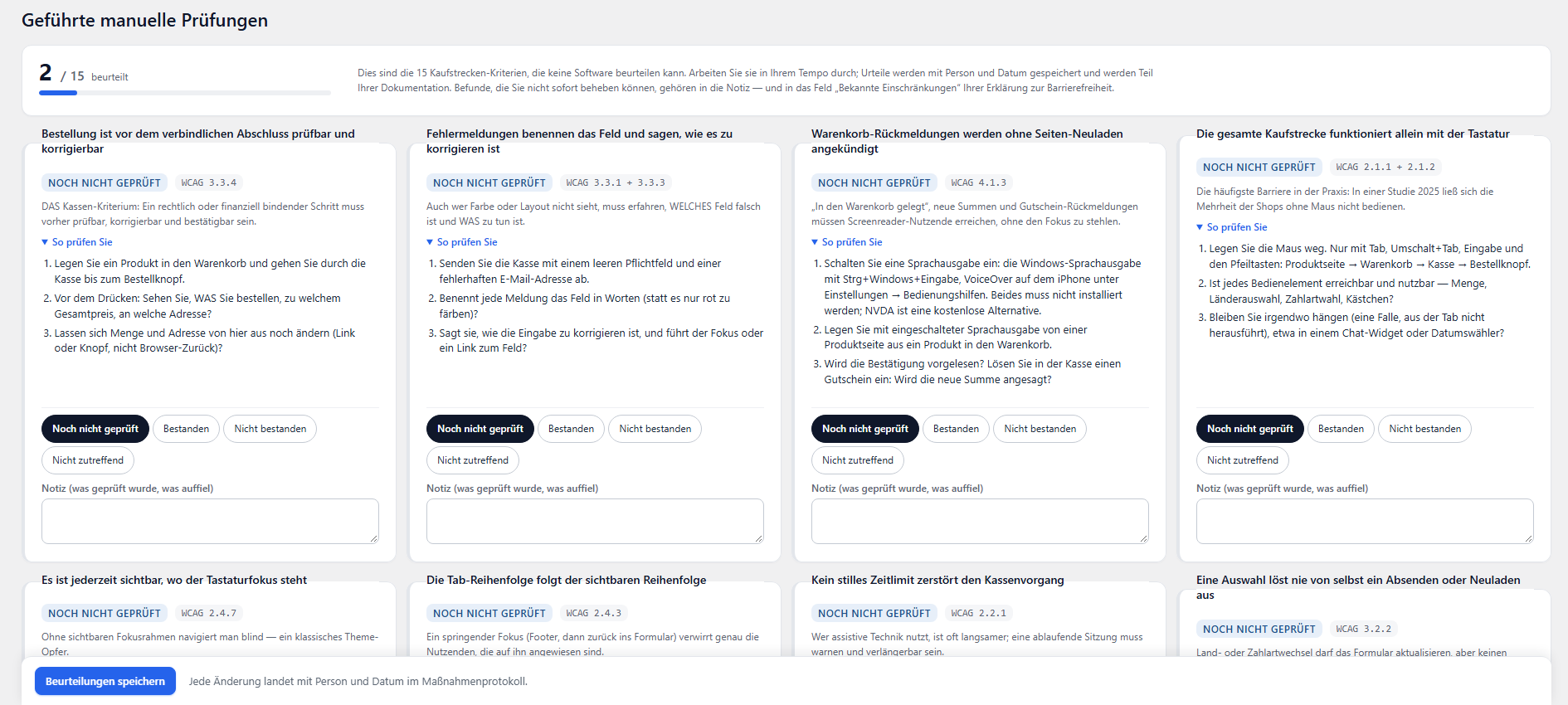
Automatische Regeln erreichen zuverlässig nur einen Teil der WCAG 2.1 AA (EN 301 549). Etwa zwei Drittel der Kriterien kann nur ein Mensch beurteilen — ob eine Bestellung vor dem verbindlichen Klick noch geprüft und korrigiert werden kann, ob eine Fehlermeldung wirklich weiterhilft, ob der Weg zum Konto mit der Tastatur funktioniert.
Diese Kriterien stehen im Barrierelotsen als ungeprüft da, statt stillschweigend als erfüllt gezählt zu werden. Die wichtigsten davon kommen als geführte Checklisten, eine Frage nach der anderen, mit dem Ort im Shop daneben.
Das ist der Unterschied zwischen einem Werkzeug, das eine schöne Zahl zeigt, und einem, das Ihnen sagt, was diese Zahl nicht abdeckt.
Ein Bericht, der führt statt aufzulisten
Siebenhundert Befunde sind keine Aufgabe, sondern eine Lähmung. Der Bericht bündelt sie zu dem, was sie wirklich sind — bei Kontrastfehlern etwa zu einer Handvoll Farbpaare, von denen oft drei die Hälfte aller Fundstellen ausmachen.
- Jede Gruppe erklärt das Problem, die typische Ursache und die Behebung — und jede Fundstelle führt direkt zur betroffenen Seite, wo „Auf der Seite zeigen“ das genaue Element markiert.
- Wo eine Farbe herkommt, wird gesucht — in den Theme-Optionen, im Seitenbaukasten, im Customizer — statt Ihnen einen Hex-Wert hinzulegen und Sie damit allein zu lassen.
- Ein Befund kann als behoben, weitergegeben oder bewusst hingenommen gekennzeichnet werden. Die nächste Prüfung hält diese Angabe gegen das, was sie misst, und schreibt den Widerspruch auf, wenn es einen gibt.
- Berichte bleiben erhalten, vergleichbar und druckbar, mit einer Kennzeile auf dem Papier, die Shop, Berichtsnummer, Umfang und Maßstab nennt.
Kein Overlay. Keine Wolke. Keine Daten unterwegs.

Es wird keine Werkzeugleiste in Ihren Shop gespritzt und kein Widget eingeblendet. Overlays versprechen Barrierefreiheit per Knopfdruck; was sie liefern, ist eine Schicht über dem Problem — und in den USA hat die FTC einen Anbieter solcher Versprechen mit einer Million Dollar belegt.
Die Korrekturen, die der Barrierelotse anbietet, sind eng umrissen, standardmäßig aus, und jede nennt genau, was sie ändert.
Und: alles läuft auf Ihrem Server und in Ihrem Browser. Kein Cloud-Dienst, keine externe Prüf-Schnittstelle, keine Telemetrie, keine Kundendaten, die Ihr Haus verlassen. Die Prüfung lädt jede Seite einmal — dieselbe Last, die ein Besucher verursacht.
Lieber einmal gemeinsam durchgehen?
Das Plugin ist kostenlos und vollständig nutzbar — es gibt keine Sperre, keine Monatsquote und keinen ausgegrauten Knopf. Wenn Sie den ersten Durchgang trotzdem nicht allein machen möchten, übernehmen wir ihn für 49 € einmalig: Installation, erste vollständige Prüfung, die Erklärung nach § 14 befüllt, und eine Durchsprache des Berichts — damit Sie wissen, was die Zahlen bedeuten und woran Sie zuerst arbeiten.
Mehr zum BFSG im WooCommerce-Shop — oder unverbindlich anfragen.
Technisches
- WordPress 6.5+, PHP 7.4+. WooCommerce ist optional — ohne es arbeitet alles außer dem Kaufstrecken-Teil der Prüfung.
- Die Prüfung läuft in Ihrem eigenen angemeldeten Browser-Tab. Ein voller Durchgang dauert etwa fünf bis sieben Minuten.
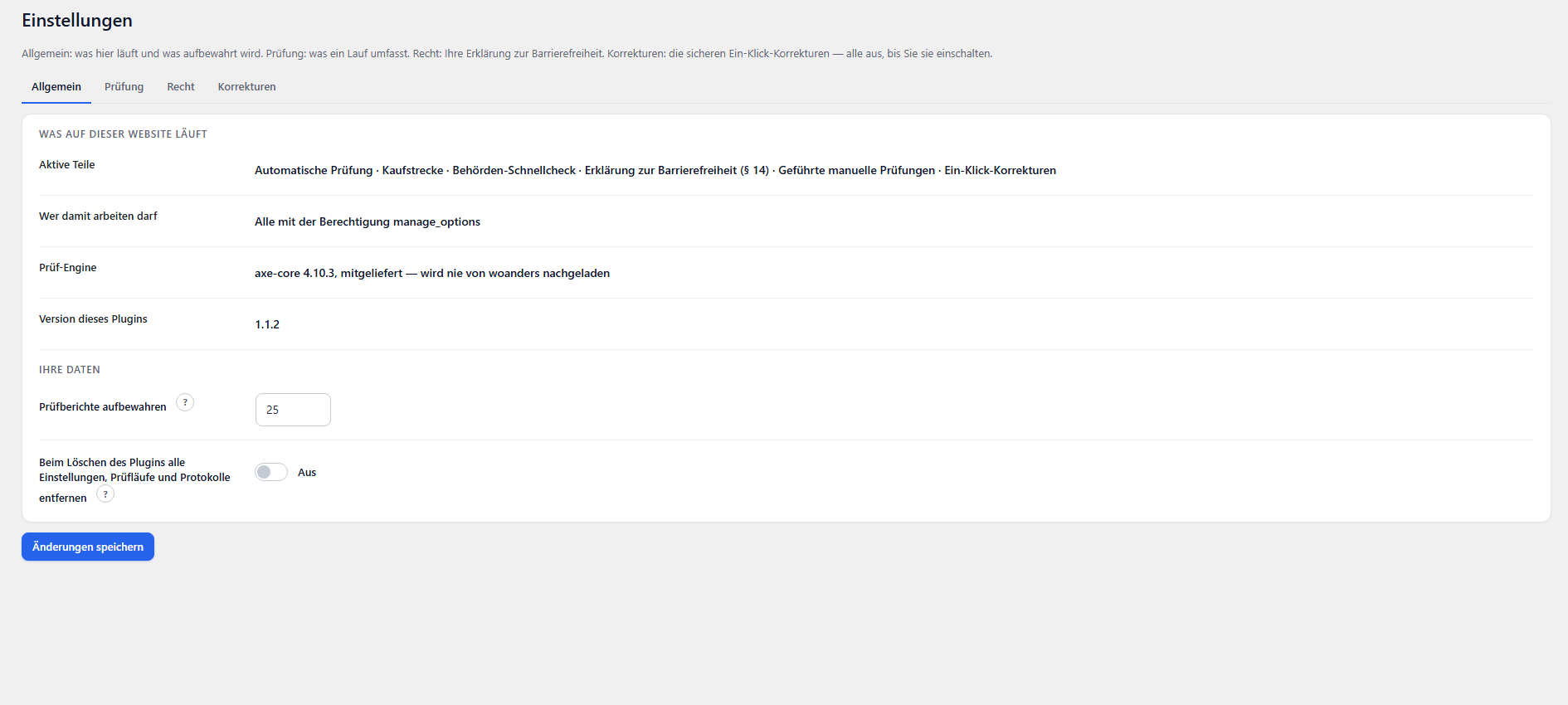
- Regelwerk: axe-core 4.10.3, mitgeliefert und unverändert, geprüft gegen WCAG 2.1 AA (EN 301 549). Nie von einem CDN geladen.
- Berichte, Befunde, Regelzustände und das Protokoll liegen in fünf Tabellen Ihrer eigenen Datenbank.
- Deutsch (Sie-Form) und Englisch, plus
.potfür weitere Sprachen. - GPLv2 oder später.
Wer dahintersteht
Entwickelt wird der STM Barrierelotse von Storetown Media, einer E-Commerce-Agentur aus Tornesch bei Hamburg. Wir bauen seit 2012 Online-Shops und kennen die Kaufstrecke aus der Wartung echter Shops in Deutschland, Österreich und der Schweiz — nicht aus der Dokumentation. Dieses Plugin ist auf unserem eigenen Shop entstanden und wird dort seit dem ersten Tag selbst benutzt.
Sie möchten mehr als die Prüfung? Unsere WooCommerce-Agentur in Hamburg übernimmt auch die Umsetzung der Befunde — unverbindlich anfragen.
Dieses WordPress-Plugin installieren Sie als ZIP-Datei – wie jedes andere WordPress-Plugin auch.
Installation per ZIP-Datei
Nach Ihrer Bestellung steht Ihnen das Plugin als ZIP-Datei zum Download bereit.
1. ZIP-Datei herunterladen
Laden Sie die ZIP-Datei über Ihren Account unter Mein Konto → Downloads herunter.
2. Plugin im WordPress-Admin hochladen
Gehen Sie im WordPress-Admin zu Plugins → Installieren → Plugin hochladen und wählen Sie die heruntergeladene ZIP-Datei aus.
3. Plugin aktivieren
Klicken Sie nach dem Hochladen auf „Plugin aktivieren“. Das Plugin ist sofort einsatzbereit. Die Konfiguration finden Sie unter Einstellungen → CSS & JS Manager.
Hilfe benötigt?
Bei Fragen zur Installation wenden Sie sich gerne an unseren Support unter support@storetown-media.de.
Change Log
Version 1.1.3
- The report no longer opens WordPress's file editor inside a dialog of its own. The button stays, and it still points at the same editor; it opens a tab now instead of a frame, and says so in its own text, because a link that leads elsewhere without announcing it is precisely what this plugin reports on other people's sites. The plugin directory objected to the frame, and the distinction is worth keeping straight so that nobody rebuilds it by accident: not the link. Linking to an admin screen is ordinary, and that editor belongs to WordPress, which guards it with its own capability and puts the previous version back if a save would stop the site from loading. What invited the objection was putting somebody else's screen inside ours and hiding its admin chrome, which made it look like a part of this plugin. The dialog, the frame, the CSS that did the hiding and the three strings that went with them are all gone.
- "Tested up to" leaves the plugin header. It belongs in readme.txt and nowhere else. Carried in both places the header can win, and then the compatibility shown on a plugin's page is not the one its author is maintaining.
Version 1.1.2
- New name: STM Barrierelotse. The plugin directory pointed out that "BFSG Checker" is already carried by another plugin there, and a name that can be mistaken for somebody else's is a problem whichever of the two came first. A Lotse is a pilot — the one who comes aboard and steers a ship through water it does not know — and that is closer to what this plugin does than "checker" ever was: it does not hand over a list, it says what to do next and in what order. BFSG stays where it belongs, in the description and the tags: the law is what this is about, and the law is not a name anybody owns.
- The text domain moves with it, which is the whole of what a rename means in code: 1,582 places, none of them a key under which anything is stored. Runs, findings, the rule states and the measures log sit in tables and options named for the code, not the name, so an existing installation keeps every one of them.
- The CSS that strips the admin chrome out of WordPress's file editor is enqueued instead of echoed as a style tag, and on admin_enqueue_scripts rather than admin_head — by the time admin_head runs, the page's stylesheets are printed and there is nothing left to attach to.
- The link to the axe-core source answered 404: that file is built rather than committed, so it does not exist at a blob URL in the repository. It points at the source tree of the tag now. Not cosmetic — the sentence above it is the MPL-2.0 section 3.2 offer of the Source Code Form, and an offer that leads nowhere is not an offer.
- No more bundled translation, and no more load_plugin_textdomain(). The two belonged together and now both go: WordPress looks for a catalogue in wp-content/languages/plugins and .../themes and nowhere else, so a folder inside the plugin is reached only through a path that call registers — measured in WordPress 7.1, not assumed. Keeping the file without the call would have left it present, correct and never read. The German is not lost: it moves to translate.wordpress.org, which delivers it to the directory WordPress actually reads, and keeps it current for every language rather than the one the author happened to write.
Version 1.1.1
- The gradient measurement now reaches the report. Every value a checked page proposes is matched against a list of what it is allowed to look like, and anything unrecognised is dropped — a page being checked is somebody else's markup, and none of it becomes free text in this database. The rule added in 1.1.0 sent six values that list had never been told about: the two ends of the gradient, the ratio the text reaches against each, the verdict at the worse end, and what kind of thing is behind the text. All six were discarded on the way in. The card that explains those places skips any occurrence without them, so it drew nothing at all, while the chip above it counted 2,167 places and pointed at a section that was never printed. The six are now known, each with the same strictness as its neighbours: an end of a gradient is six hex digits or it is dropped.
- The cap on how much one occurrence may carry went from ten pairs to twelve. A gradient occurrence carries exactly ten, with the two selectors last in line — so the first thing over the edge would have been the answer to "where is it". Two spare, so the next value added is not eaten by a number nobody thought to raise.
- A check of the whole chain now runs on every push: every value the checking engine can send is compared against the list that lets values in. It is the gate that was missing, not the list — a gate a feature has to be let through is only half a gate until somebody opens it.
- "Open the report" after a check now opens THAT check. The button carried the newest report as of the moment the screen was built, and that screen is built before the check starts — so after a run it led to the report before it. Nothing about that report was wrong except which check it belonged to, which is the hardest kind of wrong to notice. It now carries no number at all: the report picks the newest run when the link is followed, by which time the new one exists.
Version 1.1.0
- Text on a colour gradient is named instead of passed over in silence. The checking engine gives no verdict where it cannot resolve a single background colour, and those places went into no report at all: measured on the shop this plugin was written for, 152 such places on the front page alone, 135 of them sitting on a gradient, 15 of those below the ratio their text needs. They are now measured against both ends of the gradient, and the worse end is the one reported — text has to stay readable across the whole area, not over its friendlier half.
- The measurement is deliberately not a verdict. These occurrences carry no severity and count neither as violations nor as passed: the check result leaves them out in both directions, exactly as it already leaves out every rule the engine could not decide. The card says so above the list, because a number nobody can place is worse than no number.
- What triggers it is not what the engine calls the case. Of the places that really sit on a gradient, only 42 were reported as a background gradient; 84 arrived under another name because a pseudo-element made the engine give up one step earlier. The trigger is that no background colour came back at all — what is really behind the text is then resolved from the open page, veils composited in the order the screen paints them.
- The check no longer measures a page that is still moving. A reveal animation changes a class, and the browser then carries on by itself for the better part of a second; a CSS transition is not a change to the document, so the wait that watches for changes sees none and calls the page still. Measured on the shop this plugin was written for: the badges of a process list were read part-way through their fade and reported as #c65010, #cd652d and #d47b4b, three colours that appear in no stylesheet of that site. They are one colour at 93, 82 and 70 per cent opacity — one step for each of the staggered delays. Eight findings across a run of thirty-one pages, every one of them sending the operator to go and fix a colour that does not exist.
- Movement is now finished rather than waited out. Each animation is put at the end state it was heading for anyway, which is what a visitor sees once the page has come to rest; that costs no time on any page of a run, and it needs no guess at how long a wait would have to be. Endless ones — a spinner, a carousel — are left running, because there is no end state to put them at. The same step answers the opposite failure as well: in a tab the browser is not drawing, an animation never advances past its first frame, and for a reveal that first frame is fully transparent, so the element was invisible to the check rather than measured wrongly.
Version 1.0.3
- Two files were shipped with mixed line endings — a few dozen lines written by a patch script with the other kind of newline. Nothing behaved differently because of it, but a checker reading those files says its own results may be wrong, and a report that doubts itself is worth less than one that does not.
- Three names that are deliberately not ours now say so where they stand: the constant every caching plugin listens for, and the two WPML filters this plugin asks rather than offers. Prefixed, each of them would address nobody.
Version 1.0.2
- The plugin header no longer carries a Plugin URI. It pointed at the same address as the Author URI, and those answer different questions: one is a page about this plugin, the other a page about who wrote it. Only the second exists, so only the second is stated. Neither is required.
Version 1.0.1
- A page that IS the cart is now recognised as one however it was built. The check left out the cart, the checkout and the account screens by asking WooCommerce which pages it is configured with — which answers only for the pages it is configured with. Tried on a second shop, one this plugin had never seen: beside the configured cart there sat a second page holding the cart shortcode, so it went into the plan as an ordinary page and would have been measured with an empty basket. That is the very thing the exclusion exists to prevent, reached through another door. The question is now what a page renders — the configured id, any translation of it, or the shortcode or block that does the rendering.
- Ten checks in the test set hold that open, and the shop it was found on is in them by name.
Version 1.0.0
- First public release. The plugin has been running on a live shop through twenty-four checks and fifty-five rounds of work; what changes here is that the version number says so.
- Prepared for the plugin directory: an installation section, the count of database tables corrected (five, not four), the pointer to the full changelog fixed to name the file that ships with the plugin, and the bundled engine's unminified source linked directly.
- The redaction of stored markup now covers what somebody typed rather than only where the browser usually keeps it: the content of a textarea and the text of a selected option go the way the value attribute already did. An order note reached the excerpt when the failing element was the form around it.
- The spot check ignores messages from other windows, the way a full run always has. What arrives there becomes a line in the measures log, and this plugin sells nothing but trustworthy evidence.
- Colour values are checked for being colours before they reach a style attribute; a settings screen made reachable by lowering the capability can now also be saved; the caches go with the data when uninstall is told to remove everything.
Version 0.59.0
- The report card is a work surface now. It was a card with an explanation column beside the list, a tinted box per page repeating the same two sentences of provenance in every box, and a line per element that flowed differently each time — a chip, two colour squares, a sentence of numbers, a button. The white colour square read as a checkbox, and the operator this was built with read it as one. Now the head says what and how many with the tools on its right, one sentence says the problem, the guidance folds away where a "start here" block already leads and stays open where none does, and the occurrences of a page are one table — element, colour sample, ratio, values, the way to see it — in columns that line up across every row.
- A page is one line: title, path, step, count, and two short marks saying where the elements come from and what they sit in, each with the full sentence behind an info button. The button that asks where the markup is written stands in that line too, and its answer appears beneath it. Measured on the shop this was built against, same report, same width: the screen went from 6,817 to 5,688 pixels tall, a row from 41 to 34, a page head from two or three lines to one, and 138 repeated provenance sentences became nine marks.
- The colour sample shows the pair as it looks — the text colour on its own background — instead of two squares, and the required ratio is said once per rule instead of once per row. The list keeps its items for assistive technology: rows align through a subgrid, not by dissolving the list.
Version 0.58.0
- A page that is still working is no longer written off as silent. The run gave a loaded page twelve seconds flat to answer, and on the heavy pages of the shop this was built against the engine alone took up to four of those, after up to six of waiting for the page to settle — so the same four pages answered in one run and were filed as "loaded but never answered" in the next, and the run before had named five different ones. The frame now reports each phase it reaches, every report starts the clock again, and only a page that stays quiet for twelve seconds, or works for a minute without a result, is given up on.
- Where it is given up on, the reason says how far it got — settled, scrolled through, check started — and how long it was waited for. And a page that loads late is no longer reported as never having loaded at all: that clock stops at the load event, where it should have stopped all along.
Version 0.57.1
- The changelog is split in two. wp.org shows at most 5,000 words of it, and this one had reached 8,200: the directory page was cutting the history off mid-sentence, while the note at its end said the limit was 5,000 characters — a guess, where the parser's own source counts words. readme.txt now keeps the recent releases, changelog.txt in the plugin folder holds every one of them, and the build counts the words before a release instead of wp.org counting them after.
Version 0.57.0
- A suggested replacement colour now lands beside the threshold rather than on it. A colour computed to reach exactly 4.5 falls off the other side the moment anything moves, and on a real site something always moves, because "white" is never one colour: measured here, a replacement worked out against #ffffff reached 4.5 while the same text on the site's near-whites came out at 4.20 on #f5f5f5, 4.35 on #f9f9f9, 4.34 on #f7f9fc. Same colour, same page, one shade of background apart. The size of the margin was measured rather than chosen: the shortfall is proportional, not a fixed amount, so 0.35 still left #f5f5f5 short at 4.47 while 0.5 clears every near-white that site uses. Where even the bare threshold is all that can be reached, the answer is still given.
Version 0.56.1
- The side effect is shown where the fix is actually listed. A correction that works leaves no findings, so its colour pair disappears from the report — and the report was the only place saying anything about it. The settings list is where a switched-on correction still stands, so that is where what it did beyond its own pair belongs.
Version 0.56.0
- A one-click colour correction now says where it went further than it was asked to. A correction is a CSS rule, and a rule is written with selectors measured against one background — those selectors go on matching elsewhere. Measured on the shop this was built for: a price rule taken from prices on white also caught the price in a sticky total bar on dark blue, which had no finding at all before and twenty-three afterwards.
- This is not an argument against the correction. On the pages two runs both measured, that same one took its colour's findings from 138 to 73. It is an argument against a correction that stays quiet: the check records the colours of every finding, so the arithmetic is done and shown instead of left to the operator to discover.
Version 0.55.3
- Two page counts stood on the dashboard contradicting each other: the header said 26 and the score line said 24. Both were true and they count different things — what the run opened, and how many distinct pages the score averages over, since the buying journey passes the same cart twice and the home page is reached two ways. Where they differ the line now says which is which instead of leaving the reader to decide who is broken.
Version 0.55.2
- Where the check stored no markup, the missing attribute is now shown anyway. Not knowing which tag the element is was reason enough to say nothing at all — and that threw away the part that was known, because which attribute is missing does not depend on the element's name.
Version 0.55.1
- An element's attributes are now read from the selector as well as from the stored markup, and the second is not a fallback for old records: a flag icon written as a data URI fills the whole stored excerpt, so the alt="EN" at the end of the tag was cut off — while the selector, img[alt="EN"], had kept it all along. That one finding is why the redundant-alt explanation stayed silent.
Version 0.55.0
- Every rule that has ever been measured on this installation now ends with something to act on, and the biggest gap was the commonest outcome of all: where the search did not find the file, the block said so and stopped — a sentence about the search and not a word about the finding. What has to change is usually knowable even when the file is not, so it is now shown either way.
- Where the stored markup settles the cause, it is named in the words of that element: the role that makes a whole section count as one picture, the role that promises a menu which is not there, the aria-hidden over something the Tab key still reaches, the alt text that repeats the words beside it, the list holding something that is not a list item, the viewport line that forbids zooming, the page with no level-1 heading.
- Two more rules can have their corrected line written out — a scrollable box that needs tabindex="0" and an unnamed progress bar — by taking the element's tag from the markup the check stored instead of fixing it in advance. And where the value is a fact rather than a choice, the screen says so instead of asking for words.
- Correcting yesterday's advice, measured on a live theme: with role="img" gone, the aria-label should STAY. Without the image role it gives the area a name rather than hiding what is inside it.
Version 0.54.0
- The markup search no longer stops at a style rule. A class name is written in two kinds of place — in the markup that carries it and in every rule that addresses it — and a template writes its CSS at the top and its markup at the bottom, so the first hit in a file was routinely the wrong one: on the case that exposed this, a style rule at line 796 while the section itself is built at line 2843 of the same file. An element wearing the name now ends the search, a rule addressing it is kept only in case nothing else turns up, and where that is what is shown the screen says so.
- "A clickable element inside a clickable element" is now explained in the words of the element itself. Where the stored markup carries a role whose contents count as one thing — role="img" around a hero section, for instance — the screen names that role as the cause and says what to remove, instead of repeating the general advice not to make a whole tile a link.
Version 0.53.2
- The code block never ends without an answer any more. For a contrast, a heading level, or any rule whose correction is not one attribute in one line, it said nothing at all — it showed somebody their own source code and stopped there, which makes a reader of the person who owns the site. It now says why no line is written out, and where in that card the answer does stand: the measured colours and a sufficient value, the heading levels, or the steps under "How to fix it".
Version 0.53.1
- The editor dialog now clears up after itself without relying on the "close" event. Measured in the browser this was built against, that event never fires: the dialog closes and the frame — a whole admin page — stays in the document, one per opening. Every way out now goes through the same step, and any leftover is removed before a new one opens.
Version 0.53.0
- A refusal now names the fix as well. Where the corrected line cannot be written out — several such elements on one line, a tag built inside a quoted string, a tag that does not finish there — the missing attribute itself is shown, ready to copy, with the tag it belongs in. Naming a problem and stopping leaves the reader where they started.
- And where the attribute is already in the tag, the screen says which of the two cases it is, because the file settles it: standing there empty is the whole defect, while a value that is present points at a file changed after the check ran — measure the rule again.
- The WordPress file editor now opens in a dialog over the report instead of taking the reader away from it. It is WordPress's own editor in a frame, with the admin menu and toolbar hidden inside it; the link keeps its address, so a middle click still opens a tab and the screen works without JavaScript.
Version 0.52.1
- The suggested line now finds the element it is about. What the search matches is a class, and a class sits on the container: the first live case pointed at line 4434, `<div class="product-manager-avatar-horizontal">`, while the link with the finding was on 4435. The element is now looked for from the hit downwards, the suggestion names the line it belongs to, and "there is no such element on these lines" is said as itself instead of as "the tag does not close".
Version 0.52.0
- "Where is this markup written?" now also shows what is written there. The answer named a file and a line, and the reader still had to go and open the file to see whether it was a line they could change — on a 672 KB functions.php that is a search of its own. The plugin has already read that file while searching; the lines around the hit are now shown on the screen, the found one marked.
- And, where it can be proved, the same line with the missing attribute in it, ready to copy. Only for findings whose whole defect is one missing name — a link, a button, an image, a select, a frame — and only where the opening tag can be read without doubt. Where several such elements sit on one line, where the tag is built inside a quoted string, where it does not finish on that line, or where the attribute is already there, the plugin says which of those it is instead of writing out a line that might be wrong. The words in the attribute are a placeholder: what an element does is the one part nobody else can decide.
- For a child theme there is now one click into WordPress's own file editor, which checks the file after saving and restores the previous version if the site stops loading. Only for a child theme: in a parent theme or a plugin the next update takes the change away again.
Version 0.51.3
- The markup search no longer skips the file the answer is in. Files above half a megabyte were treated as bundles rather than templates, and that line was drawn by guess: the child theme this was measured against has a 672 KB functions.php, so the search stepped over it and walked on into the plugins until its time ran out. Two megabytes now, and the time budget stays what actually guards the wait.
Version 0.51.2
- The markup search also reads the engine's selector. An element often carries nothing itself — an avatar link is written as <a href="…"> and the classes that name it sit on its container — so the search came back "not found" for nineteen findings whose file was in the operator's own child theme all along. The selector holds those classes and the report has stored it from the first run.
Version 0.51.1
- "Where is this markup written?" answers where the question stands. It was a link that reloaded the report with a parameter, and on a screen with seven hundred findings that means a long rebuild and a return to the top — which from the reader's chair is indistinguishable from landing in a different report. The search always ran on the server; only the page load was optional. The focus moves to the answer, so it is also read out.
Version 0.51.0
- The checkout error step says whether it saw an error state. It pressed the order button with empty fields, waited six seconds for an error summary, and then measured whatever was on screen either way — the answer was computed and thrown away. On a multi-step checkout the order button belongs to a later step and does nothing while the first one is showing, so the run measured the plain checkout a second time and filed it as "checkout error messages": the same eight findings, the same eight selectors, twice.
- Now the run says which of the two it measured — on screen while it happens, and in the measures log afterwards. A step that cannot say whether it saw what it claims to measure is a step nobody can believe.
Version 0.50.0
- The comparison between two checks only counts pages both of them measured. "213 fewer than last time" was a sentence about progress that was not one: the newer run had measured 27 pages where the older measured 30, and 125 of those 213 findings sat on pages the second run never opened. The check now counts the difference on the common ground and says so when that is less than the whole run — the old comparison asked only whether the scope matched, which is the same trap one size larger.
- A page that could not be measured keeps its address. The record held the number and nothing else: "3 pages could not be measured" is a hole in the evidence nobody can act on the next morning — and twice in a row here they were the legal pages, which is where an authority looks first. The run stores which ones and why, the measures log names them, and the report says under its own figures what it does not cover.
Version 0.49.1
- One blue button in the corner, not two. Three of the four alerts under the header asked for the full check — which the header offers permanently, one line above them — so the same action stood twice in the same corner. A second button is not a second choice; it is the same choice twice, and the reader has to compare them to find that out. The alert keeps the half only it can do: saying what changed, and the way to put it aside.
Version 0.49.0
- A heading finding names the heading. The row said which level follows which, and what stands above — and not the words of the heading itself, which is the one thing anybody types into the editor's search box. It was in the stored markup all along, so no new check was needed: every finding already recorded gains it.
- And the card stops hoping. "Where they are rendered by one template, one correction settles all of them" is a hope; whether a jump is one heading repeated or a dozen different ones is countable, so it is counted and said either way — the difference is one correction or a dozen edits.
- Headings nobody can see are no longer counted as the one above. A closed mobile menu holds a few, and counting them produced rows reading "H3 directly after H2", which is no jump at all: a sentence with nothing wrong in it under a finding that says something is.
Version 0.48.1
- The run track appears. It was shipped in 0.43.0 and never seen: the container starts hidden and is unhidden by the call that builds it, and that call was missing — so the page being checked, the segment for every planned page and the finishing wave were all in the document and none of them on screen. One line, and a check in the toolchain that fails on a function nothing calls, because a syntax check cannot see that.
Version 0.48.0
- A one-click fix for the quantity buttons. Plus and minus in a quantity field carry an icon and no text in most WooCommerce themes, and a screen reader announces nothing but "button" — with the cart one press away. This is one of the few icon buttons whose purpose is not a guess: the shape says it. A control marked plus or minus, inside a quantity box, beside the number it steps. Nothing is renamed — a control that already has a name of any kind is left as it is — and nothing is read out of wording.
- And the report says where markup is written. "Rendered by your theme's shop templates" names a category and leaves the operator to search a theme with ten thousand files; the file can be found, so it is looked up: the class list of the stored markup, searched for in the child theme, the theme and the active plugins, with a time budget because somebody is waiting for the screen. The answer is a file and a line — and what can be done with it, which differs: a child theme file is the operator's own, a theme or plugin file is gone with the next update.
- Where it is not found, that is said too. Plenty of components build their class names while rendering, and a search that comes back empty has proved nothing about who is responsible.
Version 0.47.2
- "in inline" is not a place. A rule that overrides a colour fix and comes from a style block printed into the page now says exactly that — it comes from a plugin or a widget and is found there, not in a stylesheet file. Named stylesheets keep their name; where the check could not read the stylesheet at all, it still says so rather than inventing a location.
Version 0.47.1
- The recheck says it in its own answer. Pressing "measure this rule again" is how an operator asks whether a correction took, and the finding that a rule of their site overrides it used to appear only on the card, only after the screen was loaded again — the answer to a button press should not need a page load.
Version 0.47.0
- A colour fix now says when it is being overruled — and by what. Switching one on used to end the story: the notice said it was on, and where a rule of the site set the old colour with more force, nothing on any screen ever mentioned it. The check measures that in the rendered page now, names the rule and the stylesheet it stands in, and hands over the corrected line to change it to.
- Deliberately not: out-shouting it with an even more specific rule. A correction that fights its way past the operator's own rules leaves nobody able to say where a colour comes from. Naming the rule is the fix; overpowering it is not.
- A recheck of the rule is the fastest way to find out — it measures the affected pages again and replaces what was known, so the warning goes as soon as it stops being true.
Version 0.46.0
- A colour rule can now address the KIND of element it was measured on. The checking engine names one element and names it however it can — a shop's add-to-cart buttons come back one product number at a time — and stripping the attribute leaves a bare tag no rule may use, because a rule on "a" repaints every link on the site. The element now says what kind it is while the page is open, and the report falls back to that where the engine's selector gives nothing.
- On the shop this was written for that is the last gap in its biggest colour pair: 164 occurrences, 132 of them addressable before this, the remaining 32 all the same button. A partial fix would have darkened the header and left the buttons bright — two oranges side by side, passing and visibly wrong.
Version 0.45.1
- The run window works. It shipped with the run bar and without the working area the check measures in, so the runner found no frame, returned, and the window sat there showing a heading and nothing else — no page being checked, no progress, no sign that anything was happening. The frame is now part of both screens.
- And a screen that was opened to run a check no longer stays silent when it cannot: it says the working area is missing instead of doing nothing at all.
Version 0.45.0
- Fixed, and it is why the biggest colour pair never had a switch: the test for "is this background transparent" asked whether the value ends in ", 0)" — which is true of rgb(246, 86, 0), whose last number is the blue channel and not an alpha channel. Every colour without blue in it counted as transparent, so nothing was ever recorded as painting one. The alpha channel is the fourth number, and only rgba() has one.
- The check writes down which element paints the background behind a text, when the text element does not paint it itself. Including the coloured layer a page builder lays BEHIND the text rather than around it — a sibling, not an ancestor, found by covering the text's box. That was the one thing missing for the biggest colour pair on a shop — white on orange, 157 occurrences, none of them painting that orange — and without it the one-click colour fix could write no rule and had to send the operator to a theme option instead.
- It is knowable only with the page open, so it is measured there: up to six steps above the text, never <body>, and only elements a stylesheet can address by their own classes. A background fix is then written for the elements that actually carry the colour, and its reach is counted the same way as before.
- Which means: the switch for such a pair appears after the next check, not before. A run recorded earlier still has no painters, and the report goes on saying so rather than writing a rule about elements nobody measured.
Version 0.44.1
- One button, not two. 0.44.0 put "Check in its own window" beside "Run full check", which is one thing offered twice and a decision nobody has the information to make. Starting a check opens the window — every start button, whichever scope it carries — and where a browser blocks it, the check runs in the tab instead and says so.
- Under the button, the promise it makes: it opens a window of its own, leave it in sight, and carry on working here.
Version 0.44.0
- The check can run in a window of its own. It always held while its tab was in the background — a browser throttles a hidden tab and stops painting it, and measuring there produces findings about a state no visitor is ever in — which meant watching a seven-minute run instead of working. A separate window keeps its own visibility: put it beside your work and the check carries on. Minimised or completely covered, it still waits, and the window says so.
- That window is the screen stripped to one job: the run bar, and the reason it has to stay in sight. It starts by itself when it opens, exactly once — a reload does not start a second run over the first one's data — and the address that opens it carries a nonce, because a link that starts a check is an action like any other.
Version 0.43.0
- The run bar says which page is being measured: its address, and beside it what kind of page the plan picked it as — front page, category page, product page, the cookie notice, the width of a phone. "Checking page 5 of 30" was a position in a list nobody could see.
- And how much is left, as a rail of one segment per planned page: done behind, the current one wider and breathing, a page that could not be measured grey and still in its place. A finished run turns the rail green from left to right; a run that was stopped does not, because the pages after the stop were never measured.
- The rail is decoration for assistive technology and says nothing the count above has not said; the motion stops entirely under reduced motion, and the segments keep an edge under forced colours.
Version 0.42.1
- The new-window hint no longer empties share buttons. Icon kits build their buttons out of an empty link and skip every button that already carries content, so the hint's span left six of seven buttons blank under each post of one site. An empty link is named through aria-label now, which announces the link without filling it.
Version 0.42.0
- A heading finding now says what it follows. "Heading levels skip a step" used to name one heading and stop; the check records the level above it, the level that belongs there and the wording of the heading above, all while the page is open — and the report writes it as a sentence per occurrence.
- In front of them, the jumps: forty occurrences are rarely forty problems but two or three jumps repeated by a template. The card names the biggest one first, with how often and over how many pages, then lists the rest.
- The accessibility statement's link is measured instead of asked for. The check opens every page anyway and now looks for a link to the statement page in the rendered markup — which works for a footer built by a theme or a page builder, where reading menus, templates and widget options stops. A confirmation given by hand stays on file and can be withdrawn at any time.
Version 0.41.0
- A colour fix, one click. On the contrast card, every colour pair the check knows well enough gets a switch: press it, and the plugin sets the new colour itself — as a stylesheet rule on exactly the elements the check measured, delivered with its own stylesheet, never by touching the theme or its settings. The report shows the two colours side by side before the press, the notice afterwards says to look at a page and measure again, one click switches it back, and both are in the measures log.
- Not a repaint. A rule is written only where the check recorded which elements carry the colour — and, for a background, that they paint it themselves — so a pair the check knows too little about gets no switch, and says so. What goes live is written from the stored findings, not from anything the browser sent.
- Settings → Fixes lists every colour fix that is on, with the pair in words, the new value, how many occurrences it reaches, since when, and the way off.
Version 0.40.2
- The hour-long cache of where a colour is set is keyed by release: 0.40.1 corrected what it finds and then served the answer 0.40.0 had stored.
Version 0.40.1
- The theme is named the way its settings screen names it — the parent's name for a child theme — so the way into its options is found, and the setting's own name is taken from the option that holds it rather than from the theme's cached CSS, which came first and knew none. Copies kept by caching and minifying plugins are no longer listed as places to change a colour.
Version 0.40.0
- The contrast card now says WHERE. "Look for #f65600 in your theme" is not something a shop owner can do; opening a settings screen that is named to them is. The plugin asks the site itself — the Customizer's theme modifications, every option that carries the value, the styles of a block theme — and lists each place by name with the way in: on the shop this was built against, the theme's own options (with the setting's name), the page builder's default colour, a comments plugin. Read-only, cached for an hour.
- The largest colour pair is written for the person who runs the shop. One line in colour names ("White on orange: too little contrast"), the two colours side by side as they are and as they would be, then three steps: make the orange darker (the new value one click from the clipboard), here is where it is set, then measure again. Every figure that is a measurement rather than an instruction — the ratios, the CSS route — sits behind "measurements and technical details".
- And a way to hand it over: a ready-made request in plain words for the web worker or theme author — which colour, to what, where it is set, why, how many occurrences, which report — one click to copy.
- The table of all combinations is folded under its own line, marked as the developers' view.
Version 0.39.3
- Seven of the new report texts of 0.39.2 reached German installations in English: one plural form was missing from the translation table, the catalogue was not rebuilt, and the release went out over a red gate. The forms are in, the catalogue is rebuilt, and the release chain now stops at the first red gate instead of reading past it.
Version 0.39.2
- The body of a rule card follows its head. The sentences that qualify the spot check sit behind an info button beside the button they qualify; the colour-pair section opens with a panel head and a count, its explanation behind an info button; the largest pair is a line of facts — the two colours with their swatches, then occurrences, pages, measured and required as chips — instead of a sentence, and the ready-made CSS is folded under its own line. Same words, a third of the height.
Version 0.39.1
- The head of the manual checks stood 782 pixels tall for one line of figures: the panel it became stacks its children, and in a column the widths of the two halves were read as heights. It is a row again, said so explicitly.
Version 0.39.0
- The dashboard's design system now carries all five screens. Tokens, buttons, panels, badges, tables and the info button moved into one shared stylesheet, so the report, the manual checks, the measures log and the settings speak the same language as the dashboard: one blue, hairline panels, compact controls with every state, and explanations behind an info button instead of in the way.
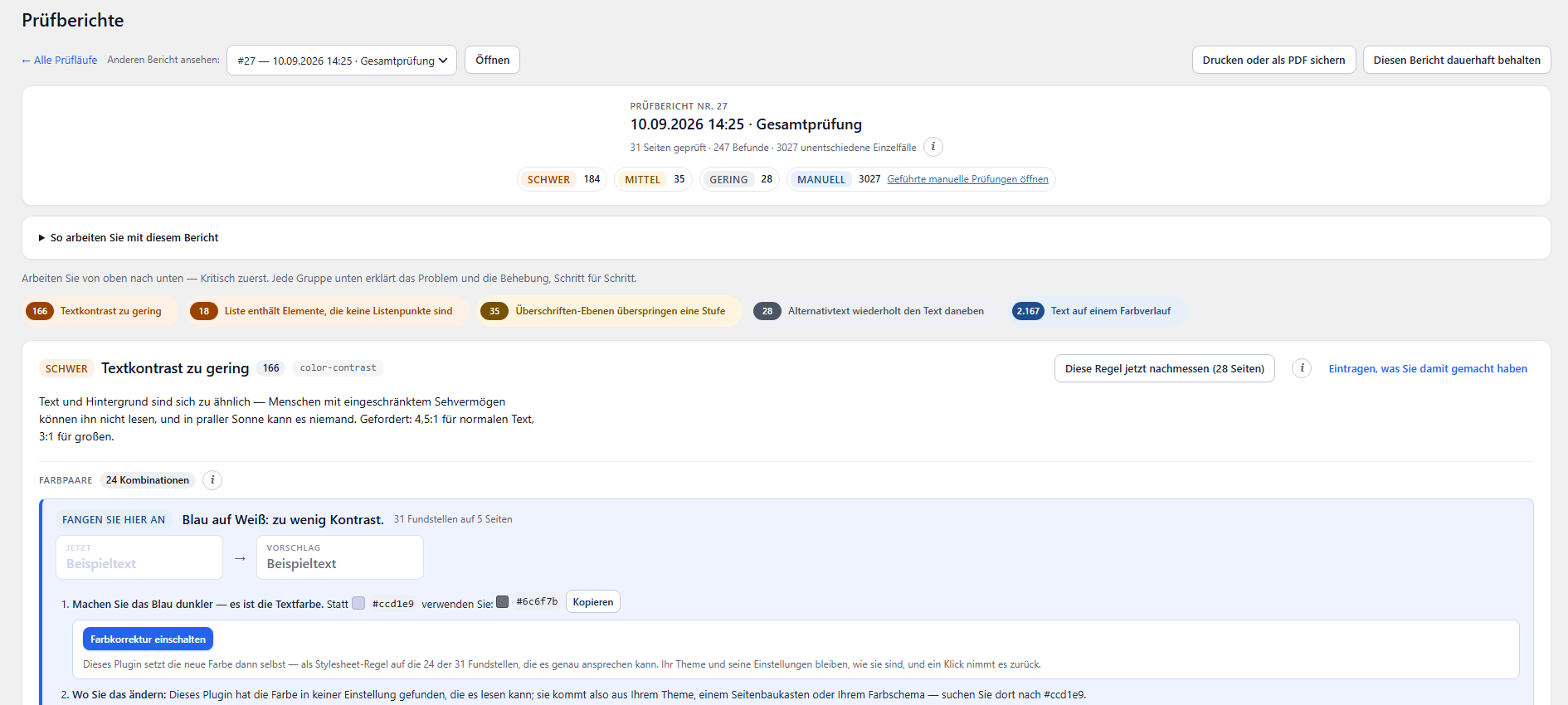
- The report is built for reading, not for scrolling. A toolbar above (all runs, the run picker, print, keep), an identity panel with the severity chips as links, and a rule card that opens with one line — severity, name, count, id — then one line of tools (measure again, record a decision), then the advice beside the places. Page groups and occurrence rows lost a third of their height.
- And it is fast. The report of the shop this was built against held 15,400 elements, four fifths of them in folded sections nobody had opened; the browser laid every one of them out on every load. Folded content is parsed but not built until its section opens, and cards below the fold are laid out when they come into view. Same HTML, a fraction of the work.
- The measures log opens with three figures and one sentence; the manual checks with the figure the dashboard shows; the settings tabs lost their folder look.
Version 0.38.1
- A card that says "Critical · 2" opens two findings, not the run of 809. The report can be limited to one severity now (?impact=critical), and the dashboard's critical and serious cards, the two matching milestones, and the severity chips in the report's own header all lead there. The way back to the whole run stays one click away, as with every filter.
Version 0.38.0
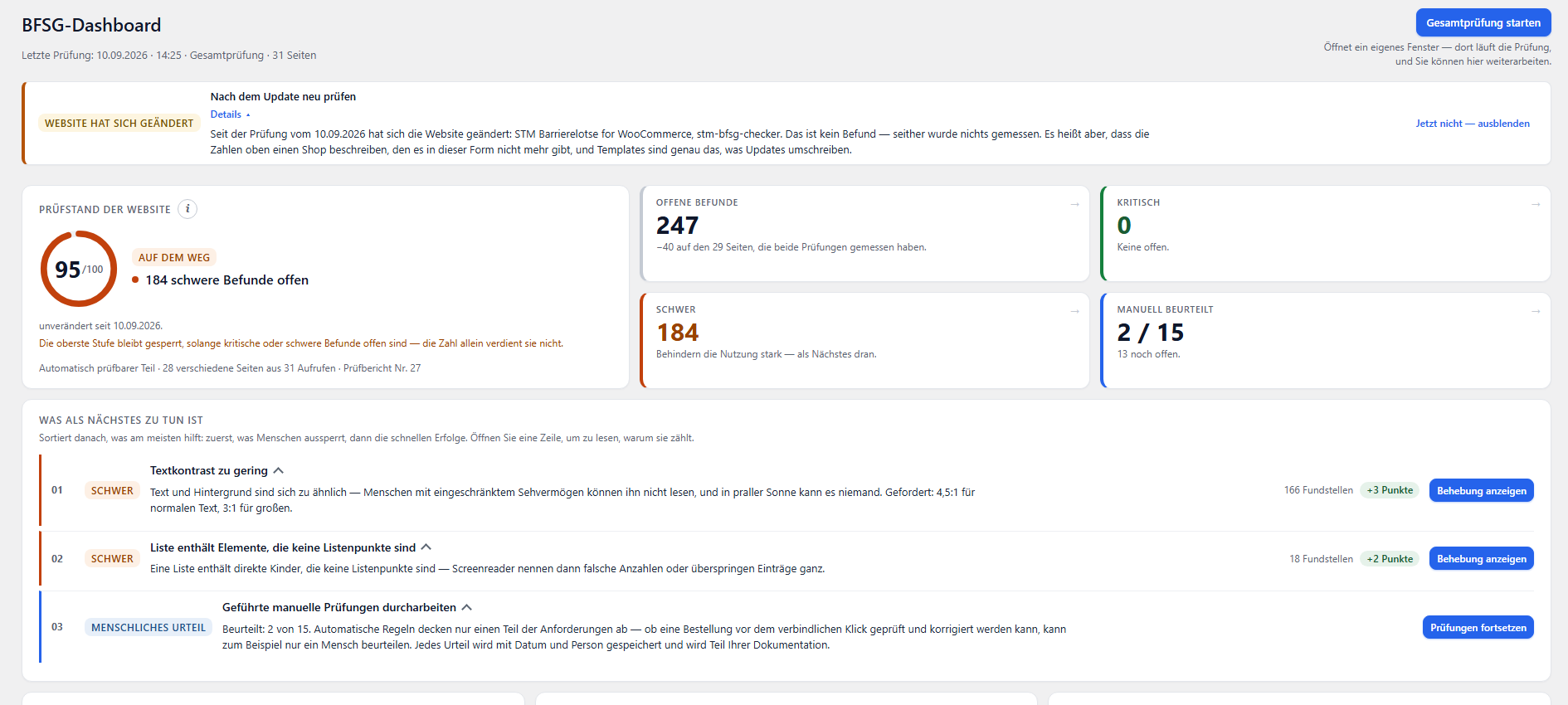
- The dashboard is a control centre now, not a report. One screen height answers the four questions in order: where the site stands (the score, its band, and how many critical findings are open, beside it), what is critical (critical and serious as two figures of their own, each a link into the report), what to do next (one line per task, the reason behind a fold on the title), and how far the work has come (the five stages as a stepper, the work share folded beneath).
- Everything that explains a figure — the formula, the cap for a page with a critical finding, which run a number was read from — moved behind an info button or into the foot of its panel. The dashboard decides; the report explains. Twelve paragraphs of method text left the main path.
- What was a sentence is a panel with a handle: the weakest page with its score, a bar and a button to open it; the levers as a three-column list with occurrences and points; the open findings with their split by severity as segments; the score history as a line with the points gained since the first check.
- The fifty criteria are a matrix of small cells with a counting legend and a tooltip on hover and keyboard focus; unchecked stays grey, dashed and never looks like passed. The authority quick-check is a two-column list of thirteen lines instead of thirteen cards.
- A running check speaks in a slim bar under the header — status, the stop button only while there is something to stop, the notes, then the result with the way to the report. Between runs the bar is not there.
- The screen is held to what it measures: no violations in the axe self-test, every text pair at 5.2:1 or better, every bar and dot at 3:1 against its track, every tooltip reachable by keyboard, focus visible on every control, and motion that stops under reduced-motion. The page never scrolls sideways, from 1440 down to a phone, where the order changes to what a phone reads first.
Version 0.37.1
- The built-in place for custom CSS is a link in both cases. Where a site has a plugin for it, the report named the plugin and then spelled out a menu path — and naming a path somebody has to go and find is half an answer.
Version 0.37.0
- "Look for #f65600 in your theme" is now a place with a name and a piece of code. The report looks up where custom CSS lives on THIS site — the plugins that hold it, or the Additional CSS section WordPress ships with — and hands over a rule made from the selectors the check actually measured, ready to paste, with a copy button.
- It says how far the code reaches, because that is not all the way. The checking engine writes the shortest selector that identifies ONE element, which is the opposite of what a stylesheet needs: a rule on a bare tag would repaint the whole site, and a rule on one product's button fixes one button of twenty. Both are dropped. Where only a tag is left, the path is walked outwards to the nearest container that can be addressed — the prices of this shop are a bare bdi inside .woocommerce-Price-amount, and 32 occurrences hang on that one class. Each block then states its own coverage: 86 of 117, 29 of 29.
- No background rule is written for an element that does not paint that background. Setting background-color on an element which never had one paints a coloured box inside an unchanged bar — technically passing and visibly broken. Whether an element paints its own background is something only the page knows, so the check now records it; runs from before get no background rule and a sentence saying why.
- And a rule that changes what a site looks like says so. Under every block: look at one of the pages afterwards — the contrast is right by then, and whether it still looks the way you want is yours to judge.
Version 0.36.2
- The value to copy is text now, not a form field. A readonly input is forty pixels tall in the WordPress admin, and that one field made every row of the colour table half as tall again — on the very screen this was meant to make compact. The field is still there, because the copy helper needs something selectable where the clipboard is refused, but it is clipped, out of the tab order and out of the accessibility tree: ten invisible tab stops on one screen would be ten places the keyboard stops for nothing, and the value is already in the text beside it.
Version 0.36.1
- The colour table takes the width it is given, and one pair is one line. It was capped at a width the admin screen is half as wide again as, so ten pairs filled thirty lines in a narrow column with an empty half-screen beside it. Every fact now has a column of its own — colours, contrast, occurrences, pages, what to do — and the line that repeated the two hex values is gone, because the cell beside it already carries both in brackets after the names. On a wide screen the section is little more than half its previous height; on a narrow one it folds back into three lines per pair rather than pushing the table sideways.
Version 0.36.0
- The colour table now says what to DO. A row reading "3.36:1, required 4.5:1" tells a developer everything and a shop owner nothing, and a number is not an instruction. The largest pair is written out as three steps: replace this colour with that one — the value worked out and one click from the clipboard — where a colour used on that many pages is actually set, and which button tells you afterwards whether it worked. Every other pair carries the same in one line: what to change, and the value to change it to.
- Colours are named as well as numbered. "White text on an orange background" is what the person reading this sees on their own site; six hex digits are a fact they do not read. The name is arithmetic on the value and stands beside it, never instead of it.
- And it counts what else the same change settles. The colour being replaced usually appears in more than one pair — on the shop this was built against as white ON the orange and as the orange ON white, 167 and 117 occurrences, and one new value passes for both. Every other pair containing the old colour is measured again with the new one, and only those that then reach their requirement are counted. Nothing is assumed.
- The contrast ratio the report prints and the ratio the checking engine measured are now the same arithmetic, and the test set holds them against each other on real measured values. Two implementations that disagree would put two numbers side by side with no way to tell which one was lying.
Version 0.35.0
- Seven hundred contrast findings are not seven hundred problems. The rule now opens with the colour pairs behind it: each pair with the ratio measured, the ratio required, how many occurrences it accounts for and how many pages it appears on, most frequent first. On the shop this was built against, three pairs carried half of all of them and all three were the same brand orange. Every number was already measured and stored — it had simply never been counted, so the report listed hundreds of rows and never said the one sentence that mattered.
- A row hands its pair straight to the contrast bench below it, which opens, fills, and takes the focus. Retyping two hex values between a table and a form is the kind of step that makes people stop.
- The bench's suggestion works for light text on a dark background, which it never did. It only ever moved the text, so where the text was already white it searched for something whiter, found nothing, and did nothing — silently, and precisely on the largest pair of that shop: white on orange, 167 occurrences. When the text has nowhere left to go, the background is what moves, and the result now says which of the two it changed, for the benefit of anyone who cannot see the field.
Version 0.34.2
- The words beside a nameless link are readable now. Reading a container's text glues its children together where the source has no whitespace between them, and the author widget of the shop this was measured on came back as "12 J.Marco RühmannMagento Entwickler" — three words that look like three typos. The boundaries are kept now: "12 J. Marco Rühmann Magento Entwickler", which is the name that link is missing. Script and style contents are left out, being text to a browser and nonsense to a reader.
Version 0.34.1
- The words shown next to a nameless link have to be worth reading. The first check to record them brought back "12 J." for all twenty author avatars of this shop — the experience badge sitting in the avatar's own container, while the author's name stood one level further up. The walk stopped as soon as it found three characters, and three characters are not the same as an answer. It now keeps going until it has at least eight, and the report withholds anything shorter than that, so the runs already recorded stop saying "next to it on the page: 12 J." A confident sentence that has said nothing is worse than a silence.
Version 0.34.0
- A finding about a link now says where the link leads. One page of this shop produced twenty rows reading "a" and nothing to tell them apart — while the destination had been sitting in the stored markup since the very first check: axe cuts a long element off right after its opening tag, and the opening tag of a link is exactly the part that carries the href. It is read out and shown beside the element: the path on this site, the other site's domain, a jump mark, a mail address — or, where the markup names none, the fact that there is no destination at all. This needs no new check; it works on the reports you already have.
- With the next check it also says what is INSIDE a link or button that has no name: an image whose alternative text is empty, an image with no alt attribute at all, a graphic without a title, an icon font, or nothing whatsoever. Each of those is a different repair, and the excerpt cannot say which one — so it is recorded while the page is still open, together with the words standing next to the element, which are often the very name it is missing. Nothing is guessed: every answer rests on something the markup states about itself, and where nothing matches, the report says nothing.
- Those neighbouring words are never taken from a container that holds a form field. That is where somebody's typed data lives, and this text is stored, shown and pasted into support messages — the same reason the values of form fields are removed from every markup excerpt.
Version 0.33.3
- "These elements sit in the cookie notice" was said about an author's avatar and a button in the checkout. WordPress writes "cookies-not-set" into the body class, and the search for the surrounding component walked all the way up to it — so everything that sat in no nearer container was confidently assigned to the cookie notice. The walk now stops before the body: what an element sits IN is never the document itself, and where nothing matches the report says nothing, which is the whole design of this feature.
Version 0.33.2
- "Show on the page" marks the element again. Every one of those links has been answering "this link has expired — nothing was marked" since the explanation for expired links was added, whether the link was expired or not: the flag went to the browser through wp_localize_script, which turns every value into a string, and "0" is true in JavaScript. The message replaced the feature it was written to explain. PHP now sends an empty string for a good link and the script compares explicitly, so neither side alone can bring it back.
Version 0.33.0
- A contrast finding now shows the numbers, and offers a bench to try a colour on. The engine measures both colours and the exact ratio for every one of these findings — and all of it was thrown away, after which the report told the operator to search the web for a free contrast checker and type the same two colours into it by hand. Both colours, the measured ratio and the required one now stand beside the element, and a fold-out bench starts pre-filled with them: change a colour, watch the ratio follow, and let it darken the text to the nearest shade that reaches 4.5:1 with the hue intact. WCAG's own arithmetic, in the browser that is already open — nothing about the shop's design leaves the site.
Version 0.32.0
- Measure one rule again, without a full check. After a repair the question is about one rule on a handful of pages, and answering it used to cost a complete run — every page against every rule — so in practice nobody measured and a report kept showing a finding that had been gone for a week. A button on each rule card loads just those pages in the same hidden window a full run uses and runs just that rule. Seconds instead of minutes. The answer appears in the button itself: green with a tick when the rule is gone, red with a warning sign when it still applies, and the label changes with it, because a result told by colour alone would be unreadable to anyone who cannot tell the two hues apart.
- It reaches the buying journey too. Cart and checkout findings had no button at first, because their elements exist only with something in the cart and a plain page call would have found them absent and reported a repair that never happened. The check now puts the same test article in the cart a full run uses, measures, and gives the operator's own cart back — through the same routes, and before the result is even shown. What stays out is the provoked error state of the checkout: it exists only after the order button has been pressed, and only a full run does that, under its own guard against an order coming into being.
- The spot check never edits the report. A report is the evidence of one check at one time; this is a second, narrower measurement and gets its own entry in the measures log, and the sentence on screen says that the check result changes only when a full run measures everything again.
- A finding says what it sits IN — a slider, a dialogue, the cookie notice, the mobile menu, a form, the product list, the header, the footer — recorded while the page is still open, because the element's own markup does not contain that answer. With the sentence that follows from it: a slider is set in its own options, not in the page content; the header carries this finding onto every page and one repair removes all of them.
- "Probably part of this page's own content" is looked up now instead of guessed. Where it was wrong it sent the operator into an editor that does not contain the markup. A distinctive token of the element is looked for in the saved page content, and the report says either that the element is in that content or that it comes from the theme or a plugin.
- One name for the document required by § 14: the accessibility statement everywhere, its page the statement page. The published text itself keeps its own wording, and so does the manufacturers' product information under § 19 no. 1 — a different thing that only sounds alike.
- The Check reports entry opens the newest report instead of a table; the list of all runs is one click away and keeps its own address.
- Every control says what it belongs to, for ears only — one report offered seventy-nine links reading "Show on the page", identical in a screen reader's list of links. The help bubbles open when asked rather than when passed, which also settles WCAG 1.4.13.
- The dashboard counted one part of the checking work and called it all of it, and "what moves this figure most" hid the repair worth twelve points. Both are arithmetic that now has its own test.
- Five screenshots of the plugin at work, with captions that describe them.
Häufig gestellte Fragen
Welche WordPress-Versionen werden unterstützt?
Dieses Plugin ist kompatibel mit WordPress 6.5 und höher. Die genauen Versionsanforderungen finden Sie in der jeweiligen Produktbeschreibung.
Funktioniert das Plugin mit meinem Theme?
Ja, unsere Plugins sind mit allen standardkonformen WordPress-Themes kompatibel – einschließlich Gutenberg und Classic Editor.
Erhalte ich automatische Updates?
Neue Versionen laden Sie über Ihren Account unter Mein Konto → Downloads herunter und spielen sie im WordPress-Admin ein.
Wo finde ich Support?
Schreiben Sie uns an support@storetown-media.de. Wir antworten in der Regel innerhalb von 24 Stunden.
Individuelle Anpassungen
Sie benötigen zusätzliche Funktionen oder eine Anpassung dieser Extension an Ihre individuellen Anforderungen? Wir bieten maßgeschneiderte Entwicklung als Agenturleistung an.
Unser Angebot umfasst:
- Funktionserweiterungen & individuelle Features
- Integration in bestehende Workflows & Drittsysteme
- Anpassung an Ihr Corporate Design & Theme
- Performance-Optimierung & Code-Reviews
- Dedizierter Support & Wartungsverträge
Interesse? Beschreiben Sie uns kurz Ihre Anforderungen und wir erstellen Ihnen ein unverbindliches Angebot.
Häufige Fragen zu STM Barrierelotse for WooCommerce
Was ist STM Barrierelotse for WooCommerce und wofür wird es eingesetzt?
STM Barrierelotse for WooCommerce ist ein professionelles digitales Produkt aus der Kategorie „Wordpress / WooCommerce Plugins“, entwickelt und vertrieben von Storetown Media aus Hamburg. Kostenlos und vollständig nutzbar. Der STM Barrierelotse prüft die echte Kaufstrecke Ihres WooCommerce-Shops — mit gefülltem Warenkorb und der Kasse, die Ihr Kunde sieht —, erzeugt die Informationen nach § 14 BFSG aus echten Messwerten und dokumentiert jeden Schritt. Das Produkt richtet sich an Entwickler, Agenturen und Shop-Betreiber, die eine zuverlässige und professionell gewartete Lösung suchen.
Ist STM Barrierelotse for WooCommerce kostenlos? Gibt es versteckte Kosten?
Ja, STM Barrierelotse for WooCommerce ist vollständig kostenlos. Es fallen keine Lizenzgebühren, Abo-Kosten oder versteckten Gebühren an. Sie können das Produkt frei herunterladen, in eigenen Projekten einsetzen und von regelmäßigen Updates profitieren. Der Download steht sofort nach der kostenlosen Bestellung im Storetown Media Shop bereit.
Wie funktionieren Download und Installation von STM Barrierelotse for WooCommerce?
Der Download von STM Barrierelotse for WooCommerce erfolgt sofort nach Kaufabschluss. Sie erhalten automatisch eine Bestätigungsmail mit dem direkten Download-Link. Zusätzlich steht die Datei dauerhaft in Ihrem persönlichen Kundenkonto unter „Meine Downloads“ zur Verfügung. Die Installationsanleitung finden Sie im Reiter „Installation“ auf dieser Seite. Bei Fragen zur Einrichtung unterstützt Sie unser technischer Support – auf Deutsch, direkt aus Hamburg.
Welcher technische Support und welche Updates sind bei STM Barrierelotse for WooCommerce enthalten?
Jeder Kauf von STM Barrierelotse for WooCommerce beinhaltet 12 Monate professionellen technischen Support auf Deutsch sowie alle Produktaktualisierungen. Unser Entwicklerteam mit über 14 Jahren E-Commerce-Erfahrung steht Ihnen per E-Mail zur Verfügung. Nach Ablauf des ersten Jahres können Sie den Support-Zeitraum mit 30 % Rabatt verlängern. Regelmäßige Sicherheits- und Kompatibilitätsupdates stellen sicher, dass STM Barrierelotse for WooCommerce zuverlässig und auf dem neuesten Stand bleibt.
Welche Zahlungsmethoden akzeptiert Storetown Media? Ist die Bezahlung sicher?
Im Storetown Media Shop bezahlen Sie unter anderem mit PayPal, Kreditkarte, Apple Pay, Google Pay, Amazon Pay, Klarna, per Vorkasse oder auf Rechnung. Welche Zahlarten für Ihr Land verfügbar sind, sehen Sie an der Kasse. Alle Transaktionen sind durch SSL-Verschlüsselung geschützt. Sensible Zahlungsdaten werden nicht auf unseren Servern gespeichert, sondern ausschließlich von PCI-DSS-zertifizierten Zahlungsdienstleistern verarbeitet.
Wer steckt hinter STM Barrierelotse for WooCommerce? Wer ist Storetown Media?
STM Barrierelotse for WooCommerce wird entwickelt und vertrieben von Storetown Media, einem spezialisierten E-Commerce-Dienstleister mit Sitz in Hamburg (Tornesch). Das Unternehmen verfügt über mehr als 14 Jahre Erfahrung in der Entwicklung professioneller Shop-Lösungen auf Basis von Magento, Adobe Commerce und WooCommerce. Alle Produkte werden von erfahrenen, zertifizierten Entwicklern intern konzipiert, programmiert und gewartet – keine Drittanbieter-Software. Weitere Informationen finden Sie unter storetown-media.de.
Welche weiteren Wordpress / WooCommerce Plugins bietet Storetown Media an?
STM Barrierelotse for WooCommerce ist Teil der Kategorie „Wordpress / WooCommerce Plugins“ im Storetown Media Shop, die insgesamt 5 professionelle Produkte umfasst. Alle Produkte in dieser Kategorie werden vom selben Entwicklerteam gepflegt und sind aufeinander abgestimmt. Entdecken Sie unser gesamtes Portfolio an E-Commerce-Lösungen, die Ihren Online-Shop leistungsfähiger, sicherer und profitabler machen.
Darf ich STM Barrierelotse for WooCommerce in mehreren Projekten oder Shops einsetzen?
Die Standardlizenz von STM Barrierelotse for WooCommerce berechtigt zur Nutzung in einem einzelnen Projekt bzw. einer Produktivumgebung. Für den Einsatz in mehreren Shops oder Kundenprojekten bieten wir Agenturlizenzen und Mengenrabatte an. Kontaktieren Sie unser Vertriebsteam für ein individuelles Angebot. Entwicklungs- und Staging-Umgebungen sind in jeder Lizenz kostenfrei enthalten.
Ähnliche Produkte

Magento 2 One Page Checkout Extension – STM Smart Checkout
inkl. 19 % MwSt.

Magento 2 B2B Registration Extension – STM B2B Register
inkl. 19 % MwSt.

Magento 2 Product Attachments Extension – STM Attachment Pro
inkl. 19 % MwSt.

STM Custom CSS & JS Manager Pro - Die Premium-Lösung für WordPress
inkl. 19 % MwSt.
 {% endif %}
{% if title and title != "" %}
{{ title }}
{% endif %}
{% if excerpt and excerpt != "" %}
{% endif %}
{% if title and title != "" %}
{{ title }}
{% endif %}
{% if excerpt and excerpt != "" %}
Rezensionen
Es gibt noch keine Rezensionen.