

 DE
DE EN
EN


















Firmenkonten, Angebote, Rechnungskauf und EU-Steuerberichte für WooCommerce
inkl. 19 % MwSt.
- Erweiterung des kostenlosen EuroB2B in derselben Version mehr Infos
- Kompatibel mit WordPress 6.7+ und WooCommerce 10.0+
- Produktaktualisierungen und Support für 12 Monate
- Verlängerung von Updates und Support mit 30 % Rabatt
- 30 Tage Geld-zurück-Garantie
- Die Lizenz sperrt keine Funktion mehr Infos
Die Erweiterung für größere B2B-Shops. EuroB2B Pro ergänzt das kostenlose EuroB2B um Firmenkonten mit Bestellfreigabe, Anfragen und Angebote, Bestellformular, Staffelpreise, Rechnungskauf mit Mahnwesen und die Meldungen und Nachweise, die sonst von Hand entstehen. Die Lizenz steuert Updates und Support, sie sperrt keine Funktion.
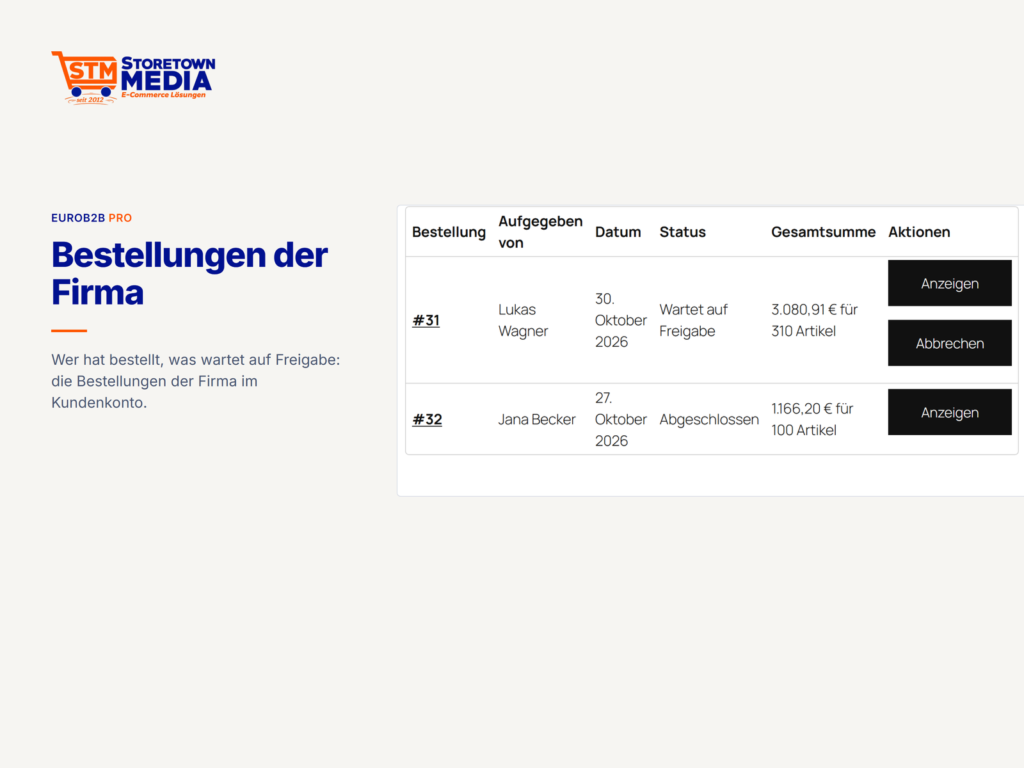
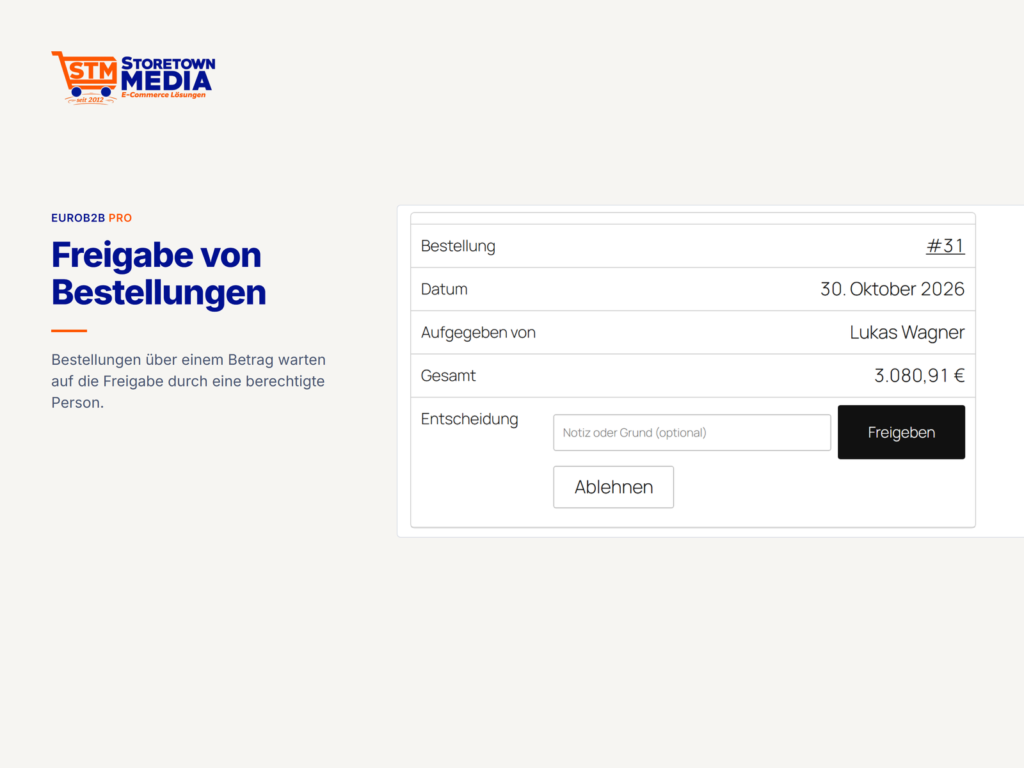
- Firmenkonten mit mehreren Einkäufern und interner Bestellfreigabe
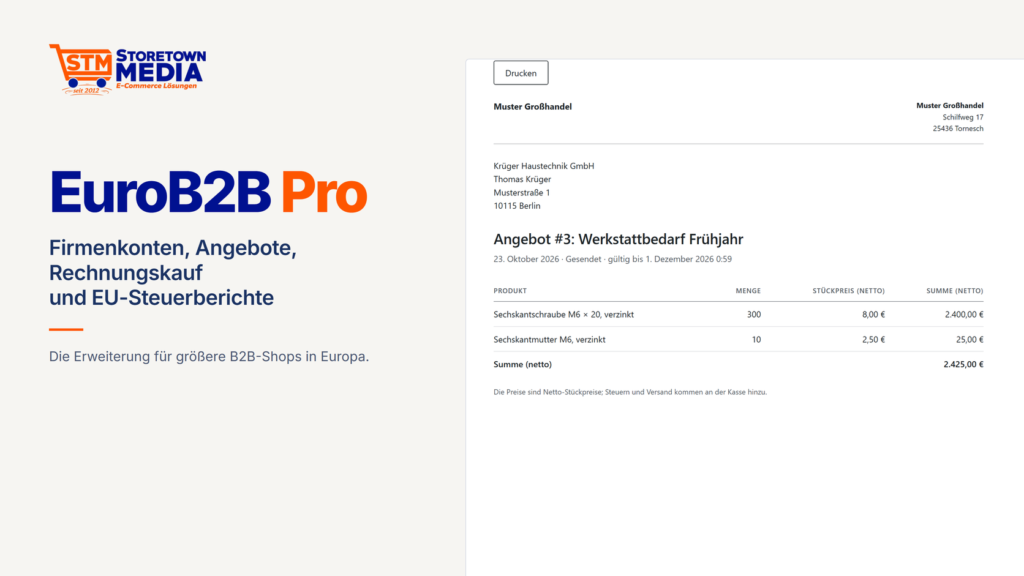
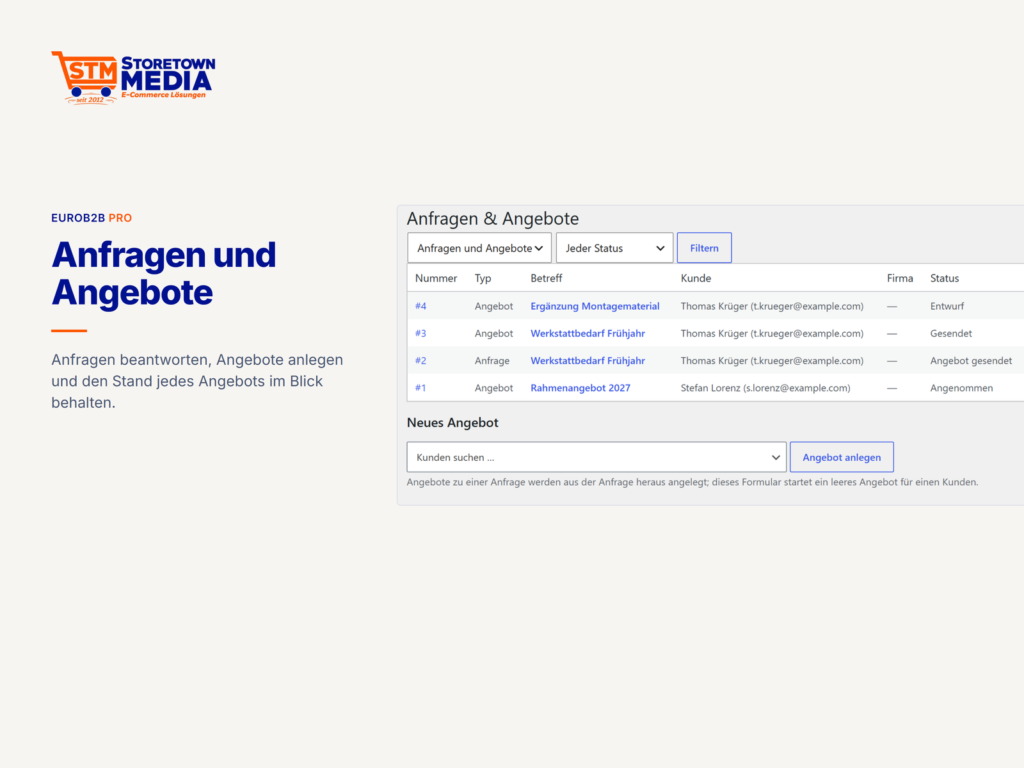
- Anfragen und Angebote mit PDF und Annahme im Kundenkonto
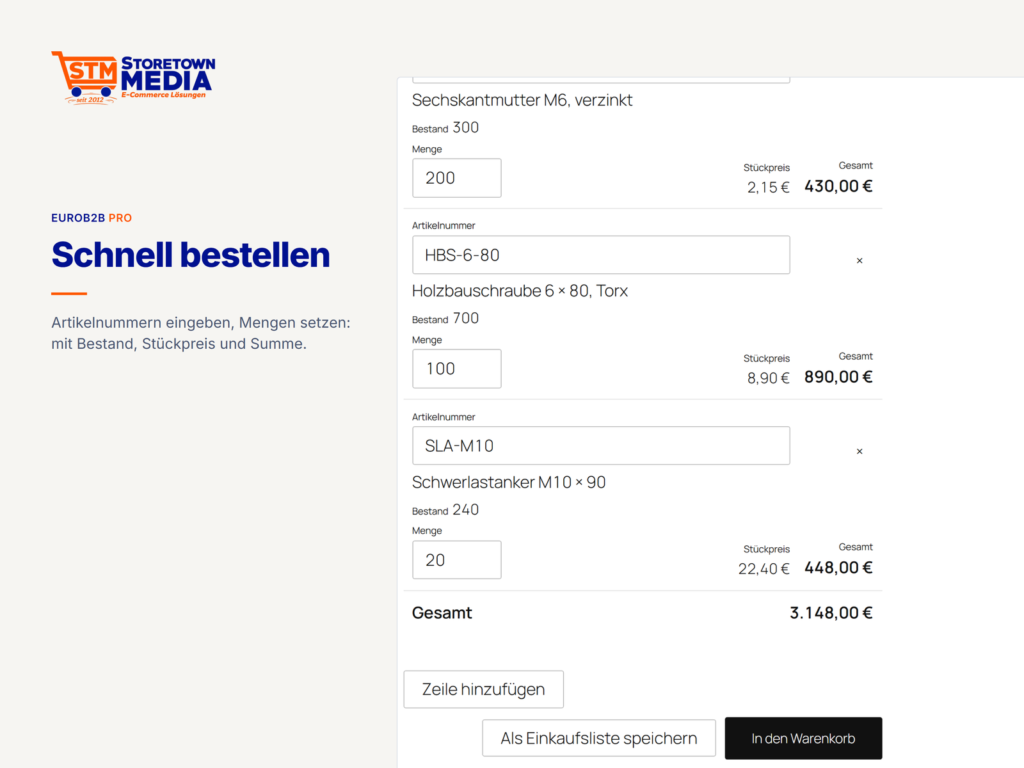
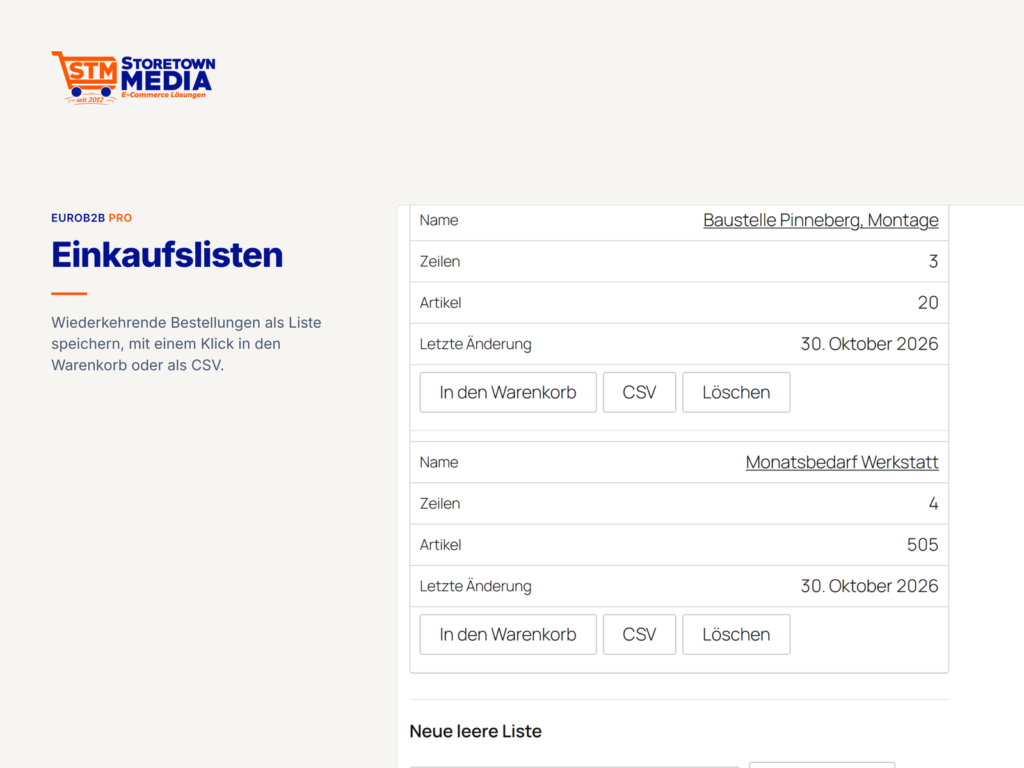
- Bestellformular, CSV-Schnellbestellung und Einkaufslisten
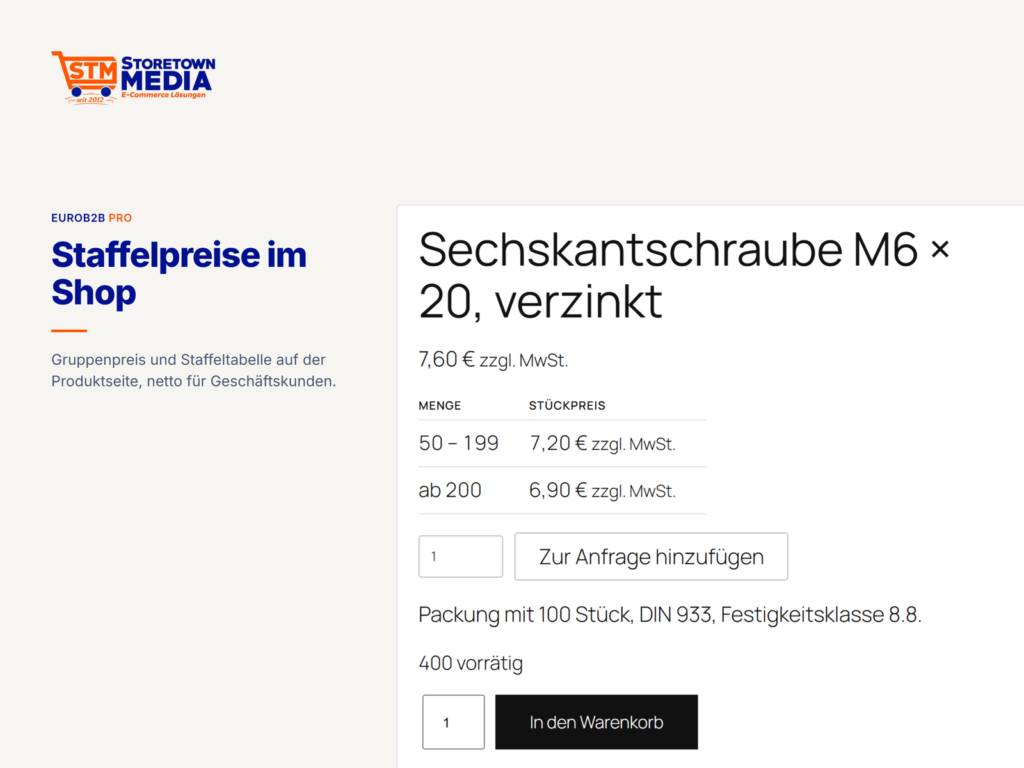
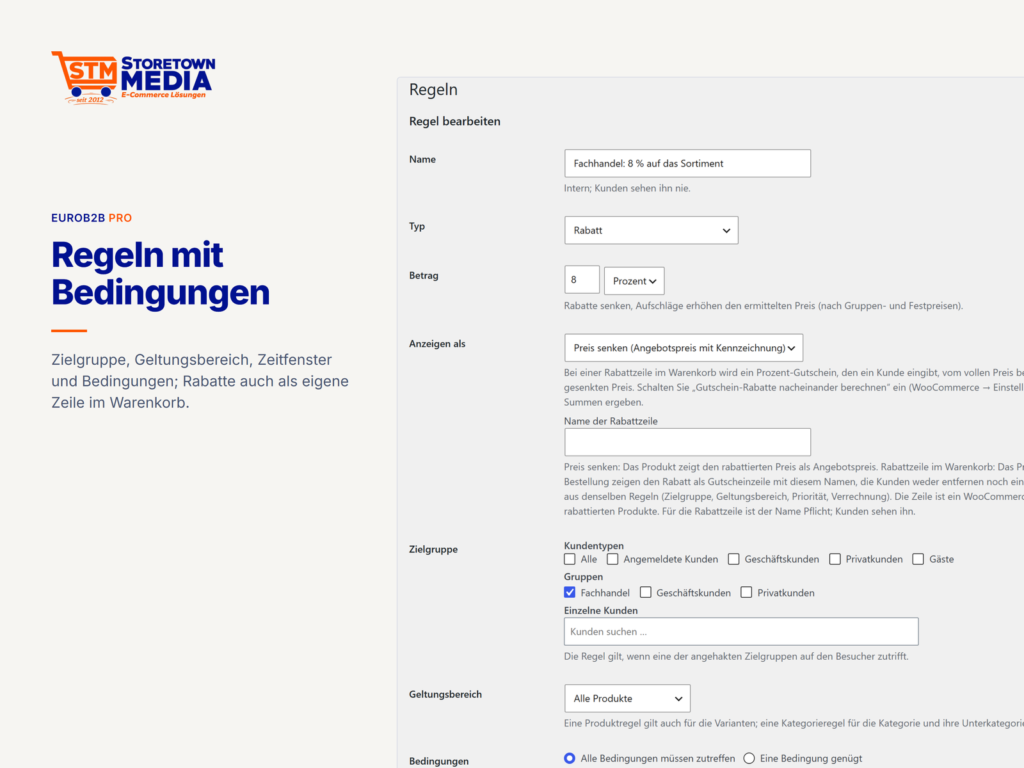
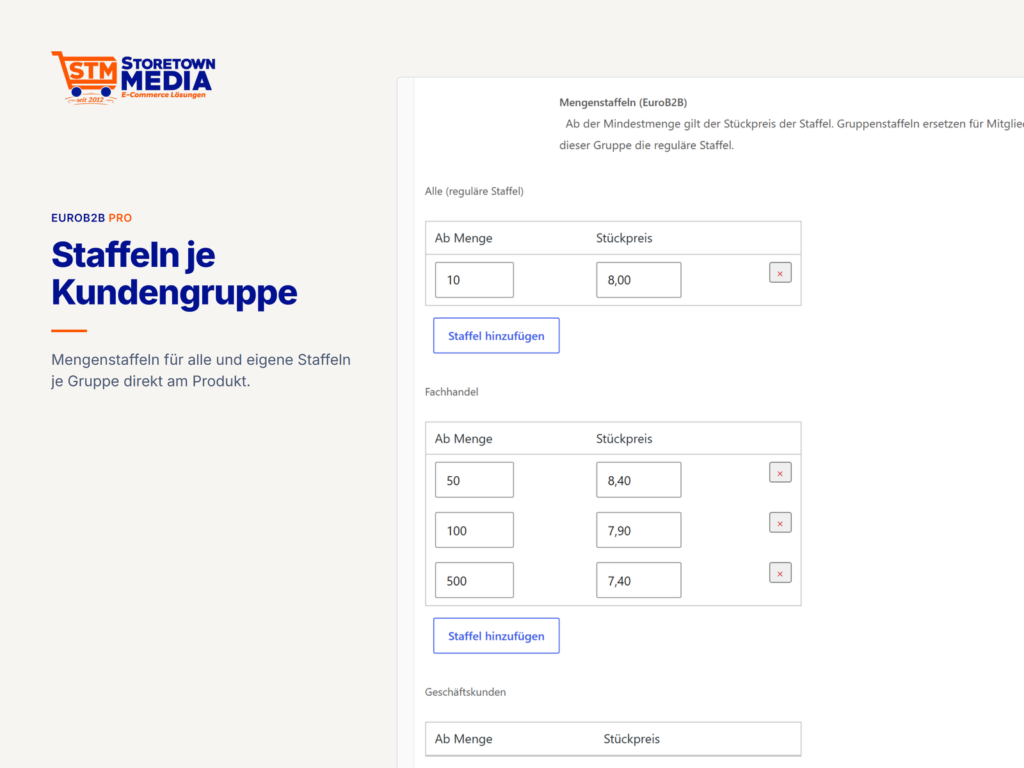
- Staffel- und Kundenpreise, Preislisten, weitere Regeltypen
- Rechnungskauf und Bestellschein, Zahlungsziele, Mahnwesen
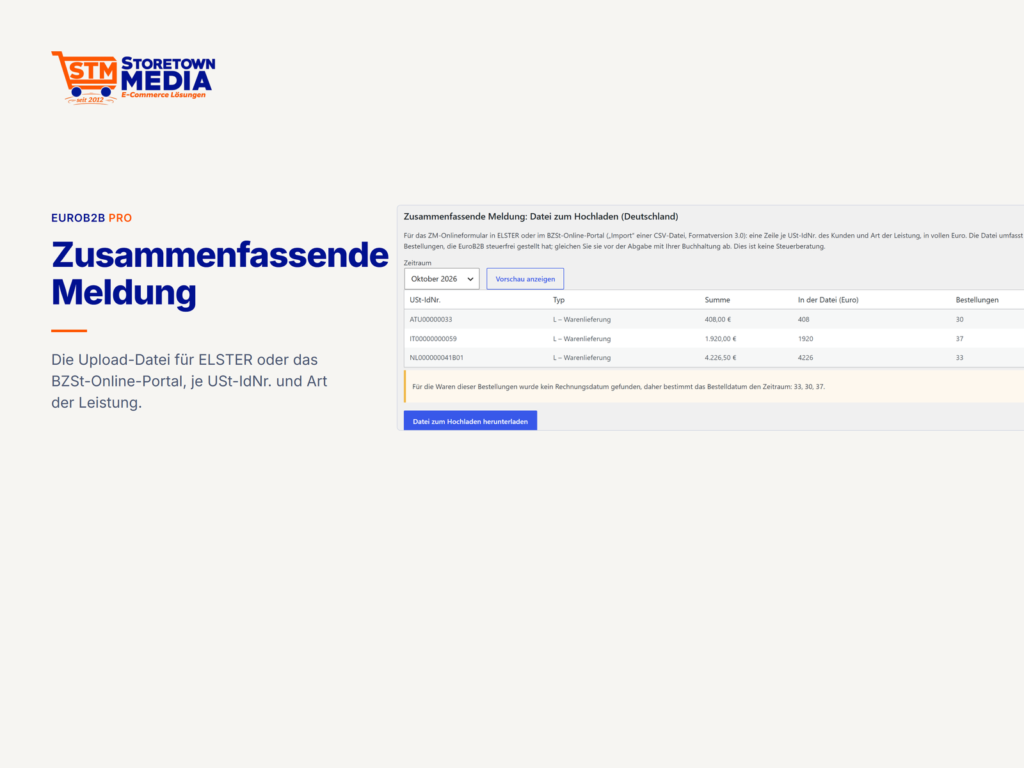
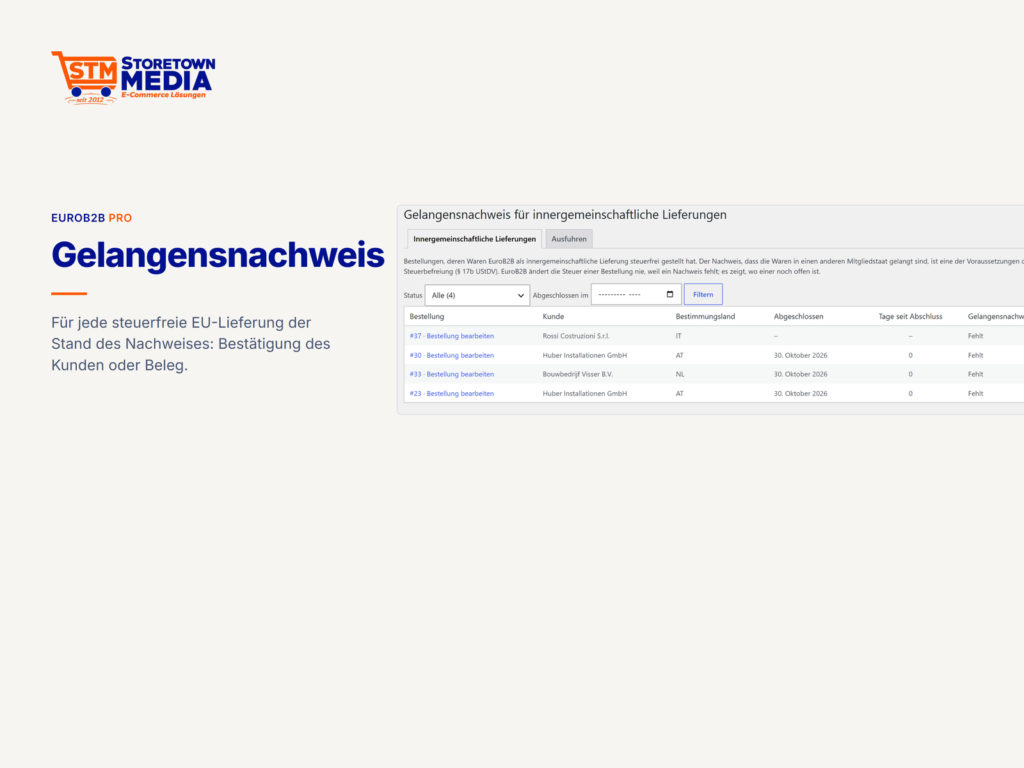
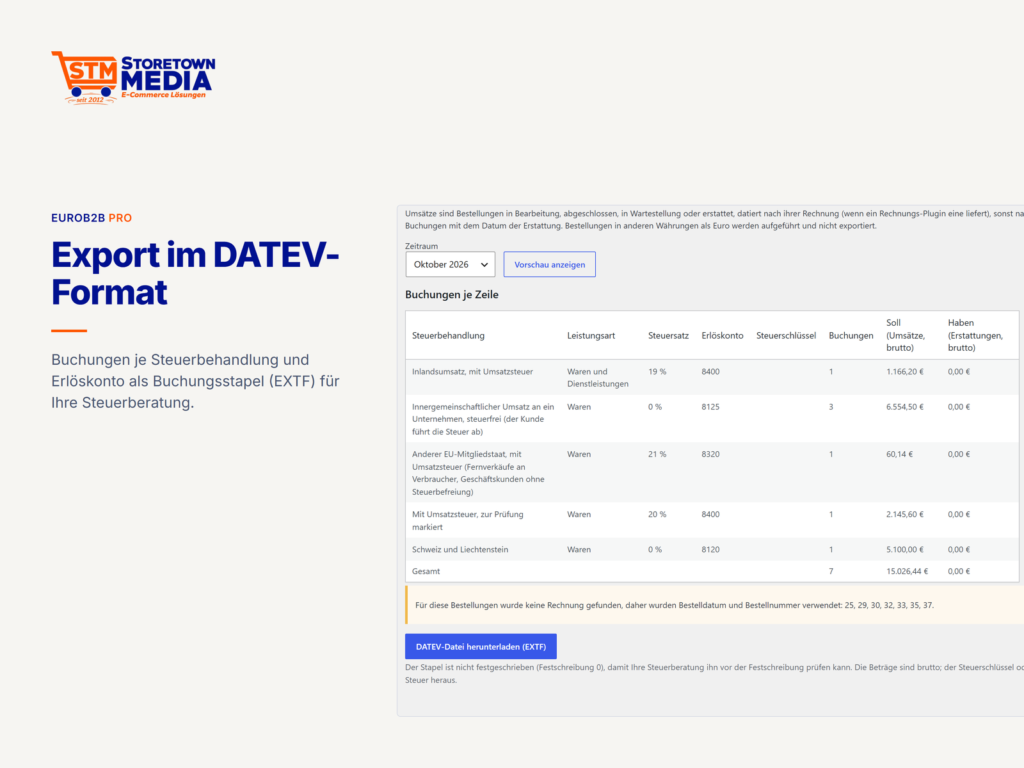
- Zusammenfassende Meldung, Gelangens- und Ausfuhrnachweis, OSS-Schwelle, Prüfakten, DATEV-Export
B2B für WooCommerce, gebaut für Europa
EuroB2B Pro ergänzt das kostenlose EuroB2B zu einer vollständigen B2B-Lösung für Shops, die an Firmen in der EU, in der Schweiz, in Liechtenstein und in Norwegen verkaufen. Die Steuerentscheidung folgt einer Tabelle, die Sie nachvollziehen können, jede Prüfung wird als Nachweis gespeichert, und der Datenschutz ist in jedes Modul eingebaut. Weiter unten finden Sie alle Funktionen, getrennt nach kostenloser Grundversion und Pro.
Warum EuroB2B für Shops in der EU
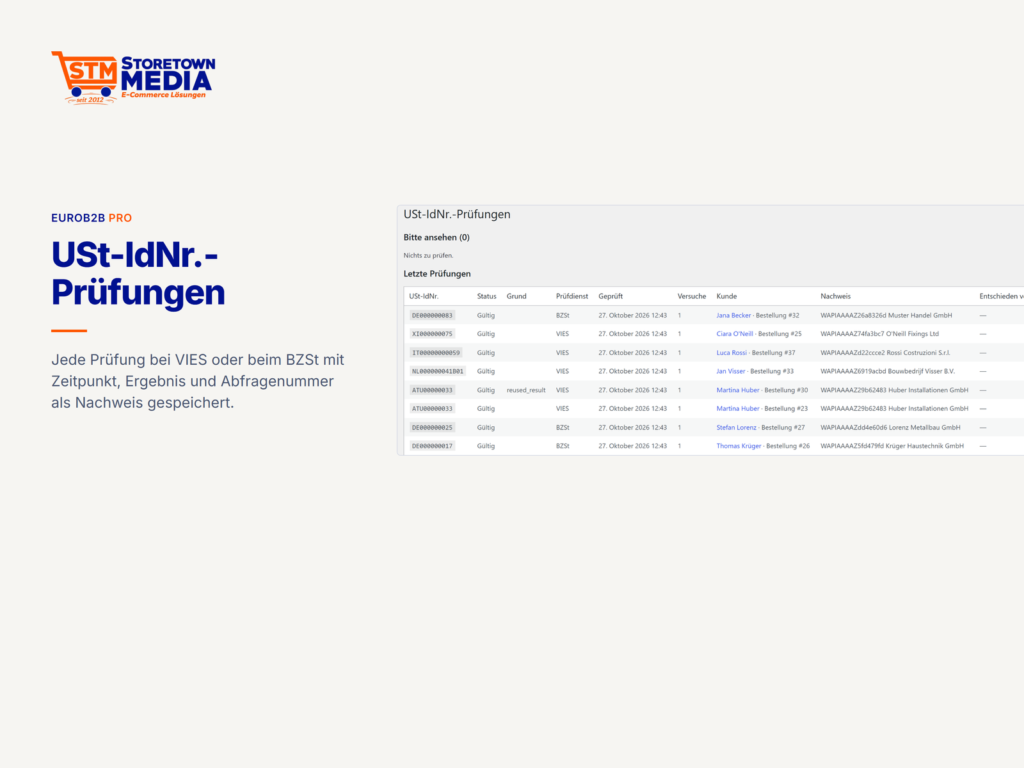
- USt-IdNr. mit Nachweis – Prüfung über VIES mit gespeichertem Ergebnis (Zeitpunkt, Abfragenummer, zurückgemeldete Firma). Fällt der Dienst aus, legt eine Einstellung fest, was passiert, und die Prüfung wird automatisch wiederholt.
- Weitere Register – qualifizierte Bestätigung beim Bundeszentralamt für Steuern für Shops in Deutschland, dazu das UID-Register der Schweiz und das Brønnøysund-Register Norwegens.
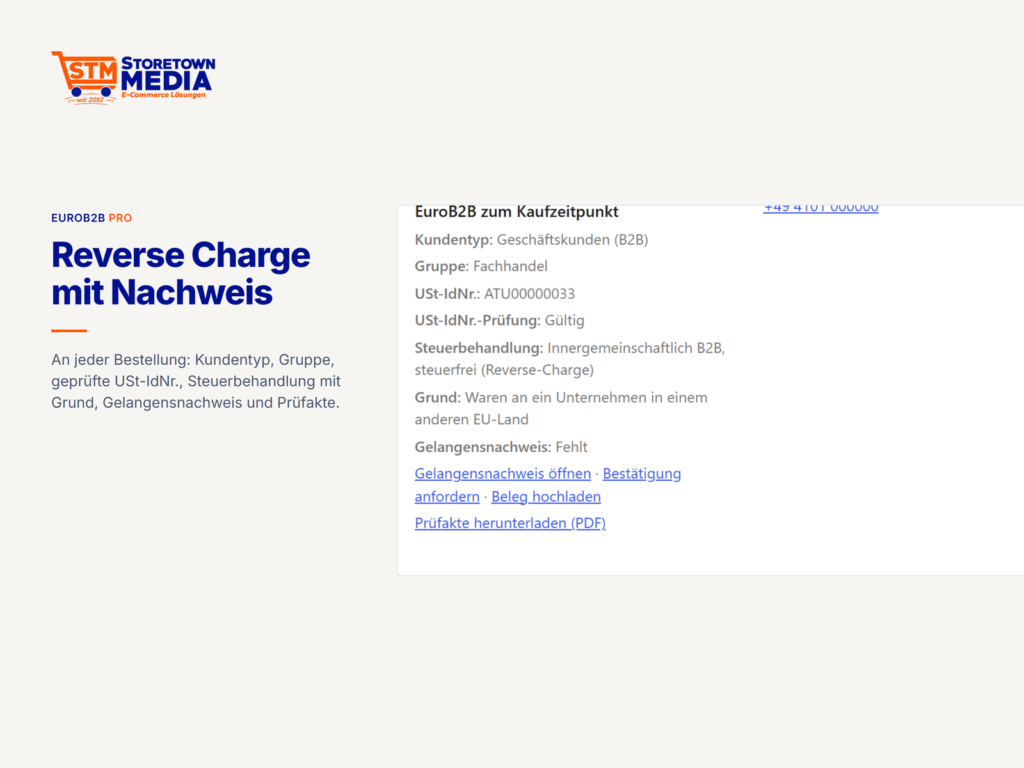
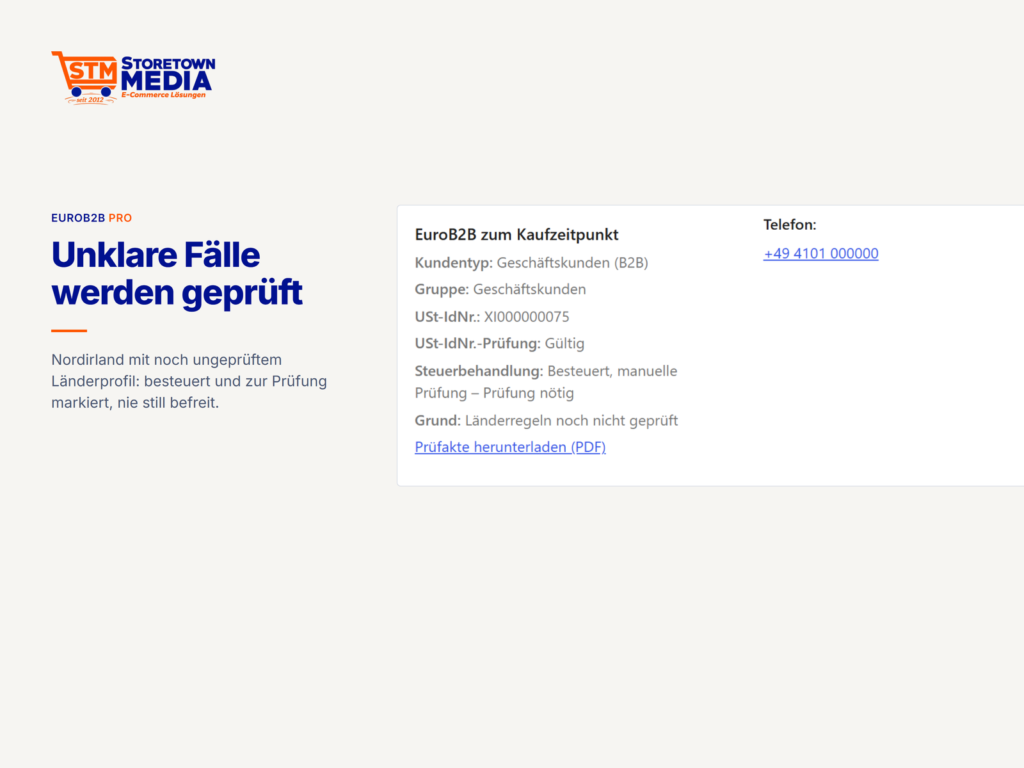
- Reverse Charge mit Schutzregeln – eine gültige USt-IdNr. allein reicht für die Steuerbefreiung nicht, eine aus dem eigenen Land befreit nie. Abholung wird erkannt, unklare Fälle werden besteuert und zur Prüfung markiert.
- EU, EWR und Europa getrennt – Länderprofile mit Quelle und Prüfstatus, Gebiete außerhalb des Mehrwertsteuergebiets, Nordirland nach dem Windsor-Rahmen (aus, bis Sie es einschalten).
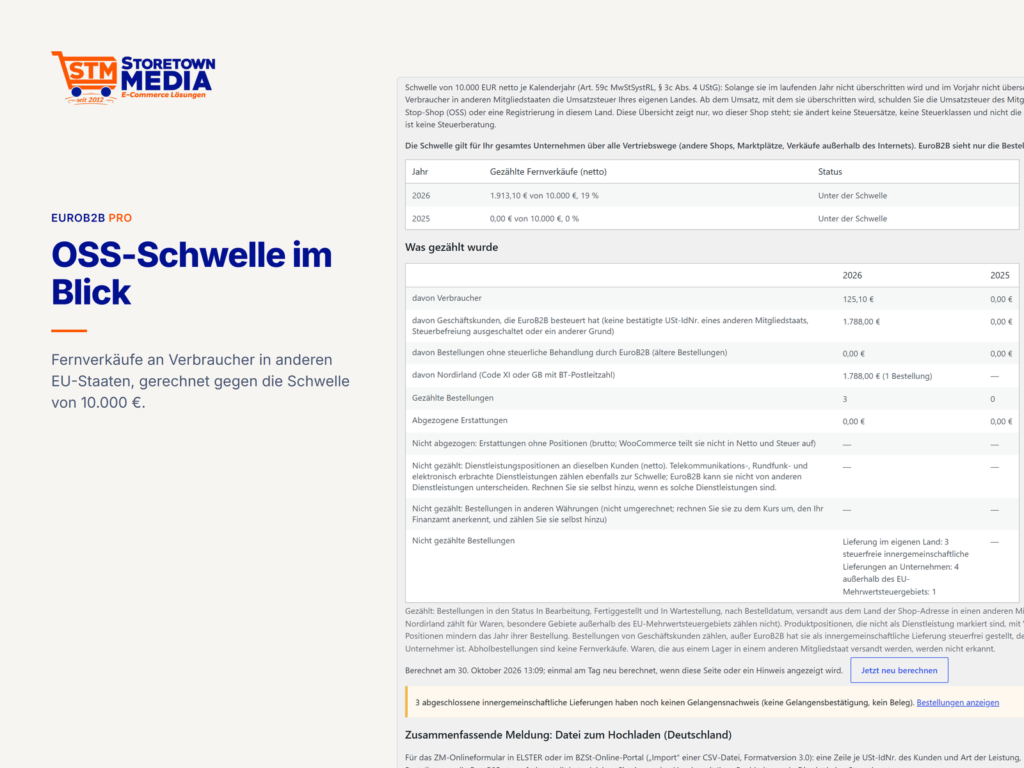
- Nachweise für das Finanzamt – Upload-Datei für die Zusammenfassende Meldung (Deutschland), Gelangensbestätigung nach § 17b UStDV, Ausfuhrnachweis für Drittländer, Prüfakte als PDF je Bestellung und Zeitraum, Überwachung der OSS-Schwelle von 10.000 €.
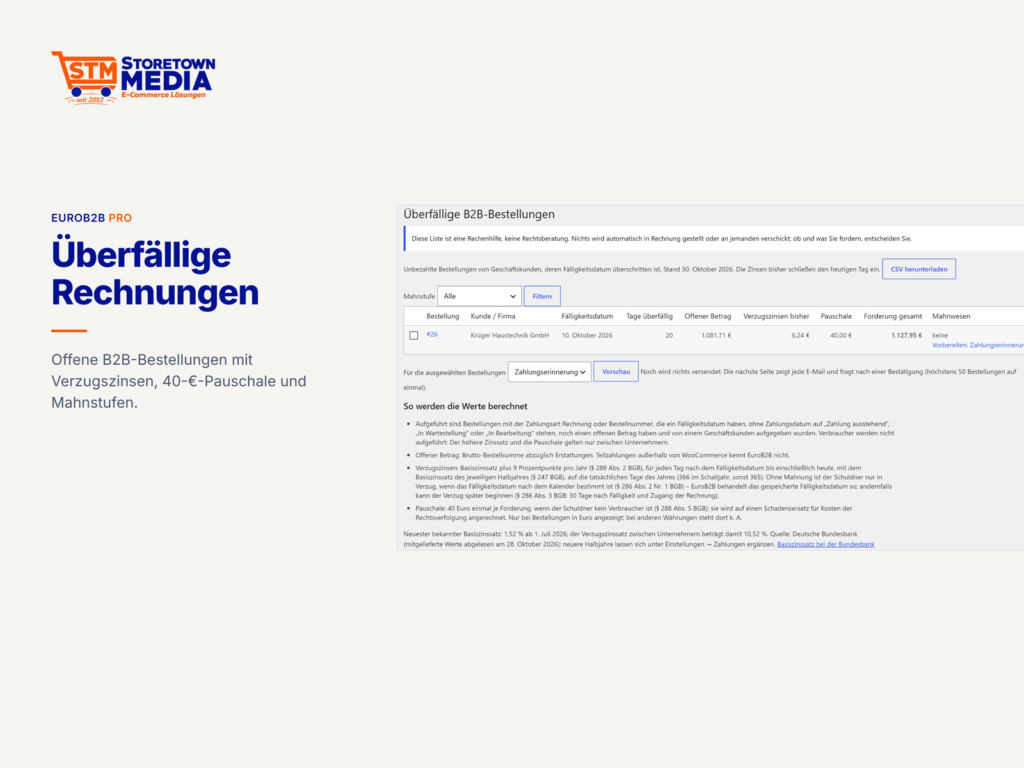
- Zahlungsverkehr zwischen Firmen – Zahlungsziele je Kundengruppe mit Warnhinweis über 60 Tage, überfällige Bestellungen mit Verzugszinsen und Pauschale, Mahnwesen in Stufen. Zuschläge auf Zahlarten gelten ab Werk nur für Geschäftskunden.
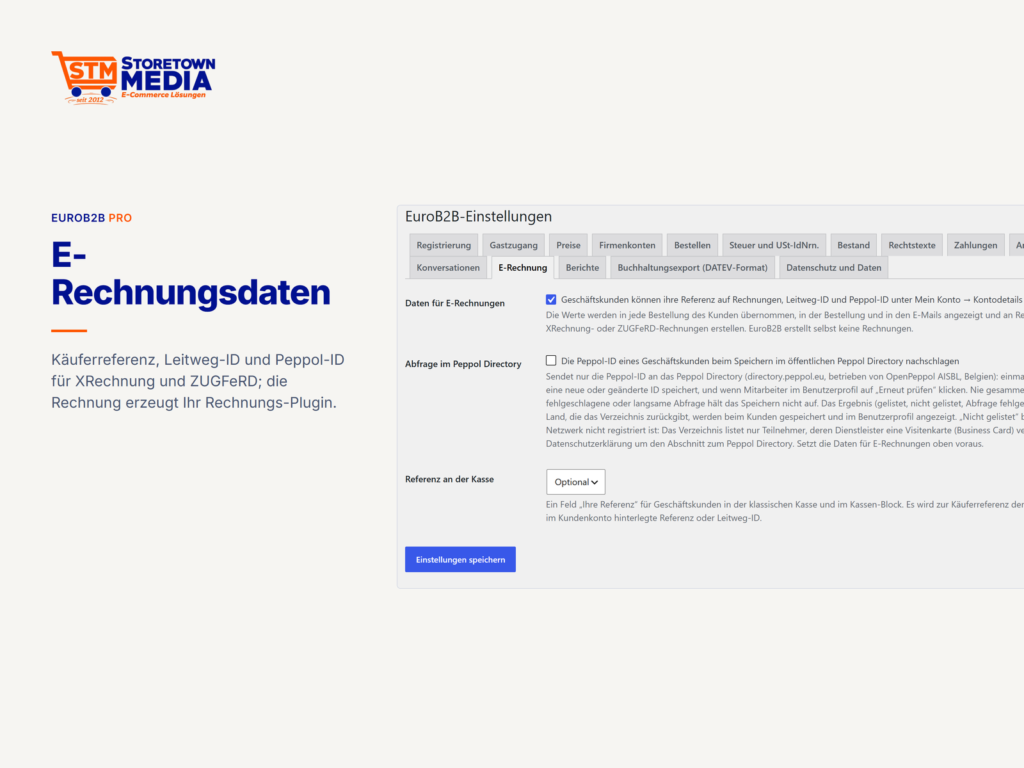
- E-Rechnung – Käuferreferenz, Leitweg-ID mit Prüfziffer und Peppol-ID mit Abfrage im Peppol Directory; Übergabe an Rechnungs-Plugins mit den Begriffen der EN 16931, fertig angebunden an Germanized Pro und PDF Invoices & Packing Slips.
- Rechtstexte je Kundenart – eigene AGB für Geschäftskunden; der Widerrufsbutton erscheint nur für Verbraucher.
- Datenschutz eingebaut – Auskunft, Löschung und Fristen in jedem Modul, Entwurf des Verzeichnisses nach Art. 30 DSGVO, Protokoll der Entscheidungen und ein Selbsttest der Datenschutz-Werkzeuge. Keine Telemetrie.
Im Vergleich zu B2BKing
B2BKing ist ein verbreitetes B2B-Plugin für WooCommerce. Bei den Themen, die für Shops in Europa zählen, unterscheidet sich EuroB2B so:
| Thema | B2BKing laut Dokumentation | EuroB2B |
|---|---|---|
| Ausfall des VIES | läuft weiter, Mail an den Shop; strenger Modus nur per Code | Regel als Einstellung, automatische Wiederholung, Nachweis |
| Nordirland, Schweiz, Norwegen | nicht in der Standardliste | erkannt und richtig zugeordnet |
| USt-IdNr. aus dem eigenen Land | per Länderfilter auszuschließen | befreit nie, fest eingebaut |
| Bestätigung beim BZSt | nicht beschrieben | einfach oder qualifiziert |
| Bestellfreigabe | als Zahlungsart | eigener Bestellstatus |
| Checkout-Block, HPOS | nicht erwähnt | unterstützt |
| Einzelne Varianten verbergen | über einen Umweg (Regel für verborgenen Preis) | direkt je Variante |
| B2B-Bestellungen ohne Lagerabzug | per Entwickler-Filter | als Einstellung |
| Bestellstatus beim Rechnungskauf | per Entwickler-Filter änderbar | als Einstellung |
| Versandkosten je Kundengruppe | Versandart je Zielgruppe doppelt anlegen | eigene Versandkosten je Gruppe in derselben Versandart |
| Versandarten außerhalb der Versandzonen | per Entwickler-Filter | als Einstellung |
Angaben zu B2BKing aus der öffentlichen Dokumentation (b2bkingplugin.com/docs), abgerufen am 18. Oktober 2026; „nicht beschrieben“ bzw. „nicht erwähnt“ heißt: dort nicht dokumentiert. B2BKing ist eine Marke ihres Inhabers, Storetown Media steht damit in keiner Verbindung. Wer von B2BKing umsteigt, übernimmt Gruppen, Kunden und Preise mit dem eingebauten Import.
Alle Funktionen im Überblick
Schon im kostenlosen EuroB2B enthalten
- Kundenarten und Kundengruppen – Geschäftskunden und Verbraucher, Gruppen für beide, Vorschläge für den Gruppenwechsel nach Umsatz.
- Registrierung – Registrierungsarten mit automatischer oder manueller Freigabe, eigene Felder (auch Datei-Upload mit privater Ablage), Formular im Kundenkonto oder per Shortcode und Block, E-Mails bei Eingang, Freigabe und Ablehnung, Schutz vor Missbrauch, Anbindung an Formular-Plugins.
- Preise – Gruppenpreise und Angebotspreise je Gruppe für einfache und variable Produkte, Prüfung jedes Preises an der Kasse.
- Rabattregeln – prozentuale Rabatte nach Zielgruppe, Produkten oder Kategorien, mit Priorität und Zeitraum.
- Zahl- und Versandarten – freigeben je Gruppe, für Verbraucher, für Gäste und je einzelnem Kunden.
- Preisanzeige – netto für Geschäftskunden, brutto für Verbraucher, mit passendem Preiszusatz; wahlweise Steuer erst im Warenkorb.
- USt-IdNr. – Feld bei Registrierung, im Kundenkonto, in der klassischen Kasse und im Kassen-Block; VIES-Prüfung mit Wiederholung, manueller Entscheidung und Prüfprotokoll mit Aufbewahrungsfrist.
- Steuerentscheidung – Inland, innergemeinschaftliche Lieferung und Leistung, Ausfuhr, Schweiz und Liechtenstein; Waren und Dienstleistungen je Produkt; Hinweis, wenn für ein Kundenland kein Steuersatz angelegt ist.
- Rechtstexte – AGB-Seite für Geschäftskunden, Widerrufsbutton nur für Verbraucher.
- Datenschutz – Auskunft und Löschung, Aufbewahrungsfristen, Textvorschlag für die Datenschutzerklärung, Verzeichnis nach Art. 30 DSGVO, Protokoll der Entscheidungen, Selbsttest.
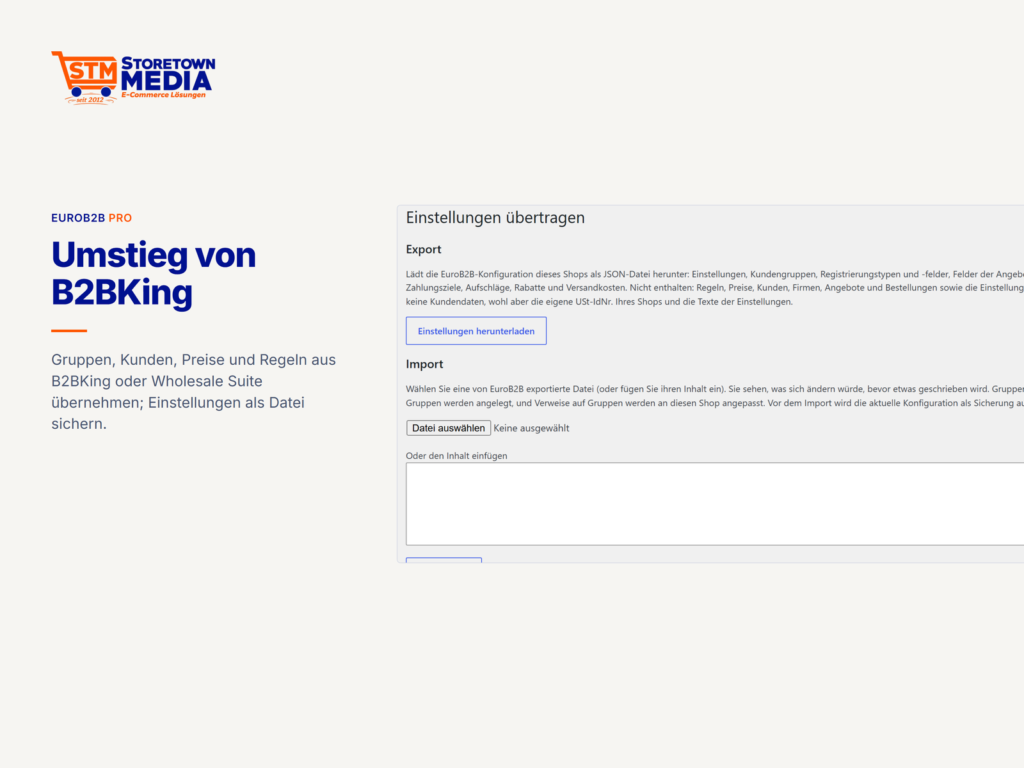
- Umzug und Verwaltung – Import aus B2BKing und Wholesale Suite mit Rückweg, Einstellungen exportieren und importieren, Multisite.
- Sprachen – Deutsch (Du und Sie), Englisch, Französisch, Italienisch, Spanisch, Niederländisch, Polnisch.
Mit EuroB2B Pro dazu
- Firmenkonten – Firma mit Inhaber und Mitgliedern, Einladung per E-Mail, Rechte und Vorlagen (Einkauf, Ansicht, Freigabe, Verwaltung), „Bestellt von“ an jeder Bestellung, Firmen- und Mitgliederadressen, Anmelden als Mitglied mit Protokoll.
- Bestellfreigabe – eigener Bestellstatus „wartet auf Freigabe“, Freigabe je Mitglied oder ab einem Betrag, E-Mails an Freigebende und Bestellende, Ablehnung mit Grund.
- Anfragen – Anfragekorb auch für Gäste, Anfrage für den ganzen Warenkorb, anfragepflichtige Produkte, eigene Anfragefelder, Posteingang im Backend.
- Angebote – Positionen mit Netto- oder Bruttopreis und Steuerklasse, Freitextpositionen mit Lagerbezug, Gültigkeit, Status, Versand per E-Mail, Annahme im Kundenkonto zu Angebotspreisen, Druckansicht und PDF mit Logo.
- Nachrichten – Unterhaltungen zu Anfragen, Bestellungen und allgemeinen Fragen, auf Wunsch für die ganze Firma.
- Schneller bestellen – Bestellformular mit Suche nach Name, Artikelnummer und Beschreibung, Übernahme aus Excel oder einer CSV-Datei, CSV-Schnellbestellung, Einkaufslisten (auch für die Firma), Variantentabelle mit mehreren Varianten auf einmal.
- Preise – Kundenpreise, Staffelpreise je Gruppe mit Staffeltabelle, Preislisten zum Export und Import, unverbindliche Preisempfehlung, Festpreise, Aufschläge, Staffelregeln, Rabatt als eigene Zeile im Warenkorb, Bedingungen wie Warenkorbwert, Menge oder Land.
- Mengen und Bestellgrenzen – Mindest-, Höchst- und Schrittmengen je Produkt und Gruppe, Mindest- und Höchstbestellwerte, Pflicht-Vielfache.
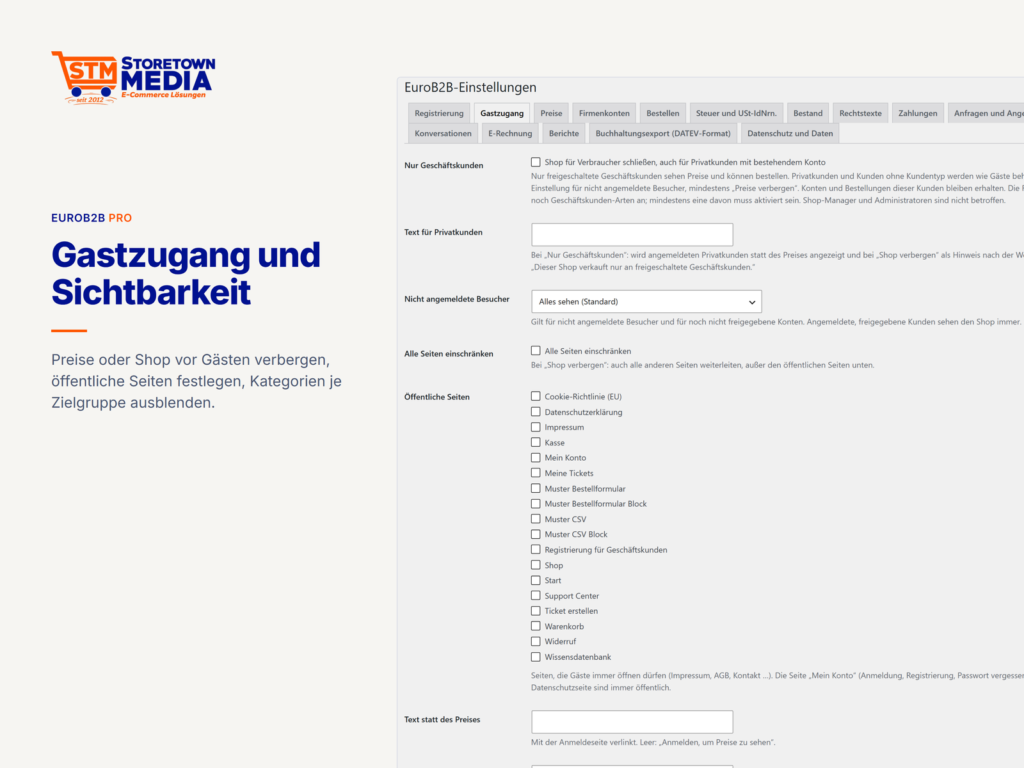
- Sichtbarkeit und Zugang – Preise oder Shop vor Gästen verbergen, Shop nur nach Anmeldung, reiner B2B-Shop, Kategorien, Produkte und einzelne Varianten je Zielgruppe ausblenden, Inhalte je Zielgruppe per Shortcode und Block, ohne Lücken in Feeds, Schnittstellen und Suche.
- Gutscheine und Währung – Gutscheine je Zielgruppe und Gutscheinwert je Gruppe; feste Währung je Kundengruppe, zusammen mit dem Währungsumschalter FOX.
- Zahlung – Kauf auf Rechnung, Kauf auf Bestellschein mit Bestellnummer und Dokument, Offline-Zahlarten, Zahlungsziele je Gruppe, Zahlarten nach Warenkorbwert, Auf- und Abschläge je Zahlart, überfällige Bestellungen, Verzugszinsen, Mahnstufen.
- Versand – Versandkosten je Gruppe als echte Versandzeile, Regel für versandkostenfreie Lieferung, Gebühren-Regeln.
- Lager – immer lieferbar für Geschäftskunden, B2B-Bestellungen ohne Lagerabzug, getrennte Bestände für B2B und B2C mit eigenen Meldungen, genaue Bestandszahlen vor Verbrauchern verbergen.
- Steuer und Nachweise – BZSt, Schweizer UID-Register, Brønnøysund, Sondergebiete, Nordirland, Liste der steuerfreien Umsätze, Zusammenfassende Meldung, Gelangensbestätigung mit Bestätigung durch den Kunden im Kundenkonto, Ausfuhrnachweis, Prüfakten, OSS-Schwelle.
- E-Rechnung – Käuferreferenz in beiden Kassen, Leitweg-ID, Peppol-ID mit Abfrage im Peppol Directory, Handelsregister-Angaben, Übergabe an Germanized Pro und PDF Invoices & Packing Slips.
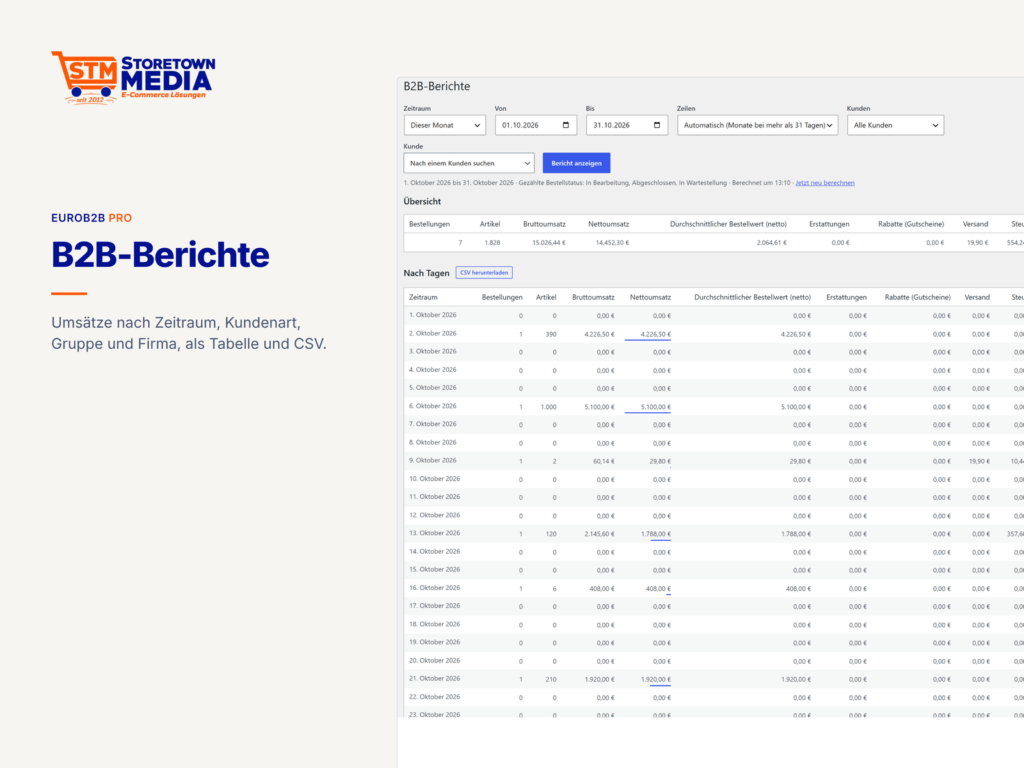
- Berichte und Buchhaltung – Umsätze nach Kundenart, Gruppe und Firma als Tabelle und CSV; Buchungsstapel im DATEV-Format für Ihre Steuerberatung.
- Schnittstelle – REST-API für Gruppen, Kunden, Regeln, USt-IdNr.-Prüfungen, Firmen und Preise.
Lizenz, Updates und Technisches
- Editionen für 1 Website, 3 Websites oder unbegrenzt viele. Die Lizenz gilt ein Jahr für Updates und Support; die Verlängerung kostet 30 % weniger.
- Läuft die Lizenz aus, arbeitet EuroB2B Pro unverändert weiter. Es kommen nur keine Updates mehr an.
- Den Lizenzschlüssel tragen Sie unter EuroB2B → Lizenz ein. Erst danach fragt EuroB2B Pro höchstens zweimal am Tag bei Storetown Media nach Updates und übermittelt dabei nur Produkt, Lizenzschlüssel, Hostnamen und Plugin-Version.
- Voraussetzung: das kostenlose EuroB2B in derselben Version. Wird Pro deaktiviert, bleiben Einstellungen und Daten erhalten, Auskunft und Löschung arbeiten weiter.
- WordPress 6.7 oder neuer, WooCommerce 10.0 oder neuer, PHP 8.1 bis 8.4, HPOS, klassische Kasse und Kassen-Block; Barrierefreiheit der Shop-Ausgabe nach WCAG 2.2 AA als Ziel.
EuroB2B Pro gibt keine Steuer- oder Rechtsberatung. Die Regeln sind mit Quellen dokumentiert; wie Ihr Shop eingerichtet wird, entscheidet Ihre Steuerberatung.
Dieses WordPress-Plugin installieren Sie als ZIP-Datei – wie jedes andere WordPress-Plugin auch.
Installation per ZIP-Datei
Nach Ihrer Bestellung steht Ihnen das Plugin als ZIP-Datei zum Download bereit.
1. ZIP-Datei herunterladen
Laden Sie die ZIP-Datei über Ihren Account unter Mein Konto → Downloads herunter.
2. Plugin im WordPress-Admin hochladen
Gehen Sie im WordPress-Admin zu Plugins → Installieren → Plugin hochladen und wählen Sie die heruntergeladene ZIP-Datei aus.
3. Plugin aktivieren
Klicken Sie nach dem Hochladen auf „Plugin aktivieren“. Das Plugin ist sofort einsatzbereit. Die Konfiguration finden Sie unter EuroB2B → Einstellungen.
Quellcode auf GitHub
Der Quellcode dieses Plugins ist öffentlich: github.com/storetown-media/stm-woocommerce-eurob2b-pro. Dort finden Sie auch alle veröffentlichten Versionen. Installieren Sie bitte die ZIP-Datei aus Ihrem Konto – sie enthält den fertigen Build.
Hilfe benötigt?
Bei Fragen zur Installation wenden Sie sich gerne an unseren Support unter support@storetown-media.de.
Change Log
Version 1.4.0 — 2026-10-29
Added- Licence and updates of EuroB2B Pro (PLT-016): the new screen EuroB2B → Licence activates a licence key from the Storetown Media shop for the site, shows status, edition (1, 3 or unlimited sites), the end of updates and support and the sites in use, checks on request and deactivates the site. Updates of EuroB2B Pro then arrive on the WordPress Plugins screen (header
Update URI, so WordPress never asks WordPress.org for EuroB2B Pro); the signed download link is fetched when the update starts. New external connection towww.storetown-media.de(docs/privacy-and-data-flows.md §4, D-33): only the product, the licence key, the host name of the site and the plugin version are sent, as JSON over HTTPS, at most twice a day and never before a key was entered; the free plugin makes no such request. EuroB2B Pro keeps working with every licence state; only updates depend on it. The key is stored in an option that is not autoloaded, shown masked, and removed on deactivation and when EuroB2B Pro is deleted (newpro/uninstall.php, every site of a network). While EuroB2B Pro cannot start next to another version of EuroB2B, the licence screen (under Plugins) and the updater still work, so the matching update can be installed. The record of processing activities gets EB-15 and the privacy policy suggestion a section on the update connection while a key is stored. Contract with the shop's licence API: docs/licence-api.md. Developers: filtereurob2b_licence_api_base. readme.txtfor the WordPress.org plugin directory (free edition): description of the free features, external services (VIES), FAQ, installation, upgrade notice for the split into EuroB2B and EuroB2B Pro. The plugin description in the header now describes the free edition.- Audit file: orders EuroB2B treated as an export get a section Export evidence (TAX-031, TAX-032) after the proof of intra-Community supply, with status, type, MRN, date of exit, who recorded and accepted it, the documents by name and the retention date.
- Northern Ireland (TAX-034): with the new setting Northern Ireland (Tax and VAT IDs, off by default) goods to a United Kingdom address with a BT postcode are treated under EU VAT rules (§ 30 UStG, Windsor Framework): a business with a valid XI VAT ID gets the intra-Community supply under the same conditions as in other member states (without a reviewed country profile for XI the order is taxed and flagged), consumers and businesses with a GB VAT ID or none are taxed like sales to another member state, services stay under UK rules, and orders with goods and services are flagged for review. The recapitulative statement reports the goods with the XI VAT ID and leaves services to XI VAT IDs out; the proof of intra-Community supply covers these orders, the export evidence does not. While the setting is off, shop staff who manage the settings see a notice when recent orders or customers in Northern Ireland exist; while it is on, the plugin pages warn when no WooCommerce tax rate for the United Kingdom with the postcodes BT* exists. Off: nothing changes. No new personal data, no migration. Sources and review status in
docs/country-matrix.md§2.1; recognition by the BT postcode rests on an indirect official source (ONS) and needs review. - Free and Pro editions, part 1 (PLT-015): EuroB2B is built as two plugins from this repository.
bin/build-release.phpwriteseurob2b-<version>.zip(free, without any Pro file and without dompdf) andeurob2b-pro-<version>.zip(EuroB2B Pro: company accounts, quotes and offers, order forms and purchase lists, conversations, coupons and currency per group, access control, e-invoicing data, reports and DATEV export, business stock, REST API). EuroB2B Pro requires EuroB2B of the same version (Requires Plugins: eurob2band a check at runtime with an admin notice) and adds its modules in the order of the single plugin, so a shop that runs both plugins behaves as before.bin/check-editions.php(incomposer checkand CI) keeps free code free of Pro classes and paths; a CI job installs the free archive alone and runs its tests and a boot smoke test. Without EuroB2B Pro the import from B2BKing leaves out company accounts, visibility and quantity limits and says so. Part 2 splits the mixed modules (see below). - Free and Pro editions, part 2 (PLT-015): the mixed modules are split, so the free archive contains no Pro code any more and is ready for WordPress.org. EuroB2B (free) keeps the price pipeline with base and group prices, percentage discount rules (audience, scope, priority, date window), payment and shipping method control per audience and customer, the VAT ID field with VIES checks, the validation records and the tax treatment and display. EuroB2B Pro adds tiers and the tier table, customer prices, price lists and the RRP; every other rule type, mode and condition and discount lines in the cart; the invoice, purchase order and offline gateways, purchase order numbers and documents, payment terms, payment windows, surcharges and discounts, free shipping rules and shipping costs per group, late payment and dunning; the BZSt, Swiss UID register and Brønnøysund checks, special territories, Northern Ireland, the exempt sales CSV, the recapitulative statement, the proof of supply, the export evidence, the OSS monitor and the audit file, with their settings, pages, e-mails and privacy texts. A shop that runs both plugins behaves as before.
- Privacy without EuroB2B Pro (product owner decision of 2026-10-29): the privacy export and erasure, WooCommerce's order anonymisation and the retention of the data EuroB2B Pro's features stored (companies and members, order approval, quotes and offers incl. guest quotes, conversations, purchase lists, e-invoicing data and Peppol lookup, DATEV debtor account, purchase order documents, dunning history, proof of supply, export evidence, customer prices) stay in EuroB2B and keep working when EuroB2B Pro is deactivated or deleted. Same exporters and erasers as before.
- Notice about the Cart and Checkout blocks on the settings page (PLT-005, PLT-015): the free plugin lists only differences of its own features, which work alike in both checkouts, so EuroB2B alone shows no notice. EuroB2B Pro adds the differences of its features (order approval, company address, purchase order document, accepted offers, discount lines, quantity rules) through the new filter
eurob2b_blocks_differences; with Pro the notice is unchanged. - Attach the offer as PDF (EuroB2B Pro): when the PDF library is missing, the setting now says to install EuroB2B Pro from its release archive, which ships dompdf, instead of EuroB2B.
- Documentation for 1.4.0 (PLT-015): the user guides (
docs/guide/) name for each chapter and feature whether it is part of EuroB2B or needs EuroB2B Pro; the setup guide starts with a section on the two editions, how EuroB2B Pro is installed and licensed; the README describes both plugins and their requirements. Stale passages corrected: the tax guide described Northern Ireland as planned and missed the export evidence and audit files, the privacy guide missed the Peppol Directory connection and several privacy policy sections,docs/tax.mdsaid the audit-file section of the export evidence was not built. - Privacy texts of the free edition (PLT-015): the record of processing activities (EB-05 order details, EB-10 audit log, special categories) and the suggested privacy policy text (business customer accounts) no longer name Pro features (order approval, purchase order number, company accounts, quote request forms, products agreed for a group). With EuroB2B Pro the texts are worded exactly as before, through the new filters
eurob2b_processing_record_special_categoriesandeurob2b_privacy_policy_account_text. - The recapitulative statement leaves services to customers with an XI VAT ID out of the file and lists them, because services to Northern Ireland are not reported (BZSt); this applies with or without the new setting.
- Without EuroB2B Pro, rules that use a part of EuroB2B Pro (another type, a fixed amount, a condition, a discount line in the cart) stay stored but do not apply; the rules page lists them without an edit link. The import from B2BKing leaves out customer prices, tier prices and such rules and says so.
- Saving the settings while EuroB2B Pro is inactive keeps the stored values of its settings (product owner decision of 2026-10-29); before, they were dropped like any unknown key.
- Deactivating EuroB2B Pro removes its scheduled event (OSS monitor refresh).
- The Pro settings of the sections Tax and VAT IDs and Prices are listed after the core settings of those sections.
- Developers: new hooks of the split (docs/architecture.md §2.1, docs/hooks.md):
eurob2b_rules_extended,eurob2b_rules_amount_modes,eurob2b_rules_form_rows,eurob2b_rules_action_from_request,eurob2b_rules_page_descriptions,eurob2b_price_tier_quantity,eurob2b_methods_page_notices,eurob2b_methods_page_sections,eurob2b_methods_page_save,eurob2b_vat_validation_enabled,eurob2b_vat_qualified_confirmation,eurob2b_vat_trader_details,eurob2b_tax_special_treatments,eurob2b_tax_treatment_input,eurob2b_tax_special_invoice_text,eurob2b_processing_record_vat_parts,eurob2b_processing_record_measures,eurob2b_processing_record_transfers,eurob2b_privacy_policy_vat_services,eurob2b_privacy_policy_intro; interfacesRules\ConditionChecker,Tax\Treatment\SpecialTreatment,Migration\PriceTarget;Settings::stored();TaxTreatmentDecider::combine()takes the treatment input instead of a flag. - Developers:
eurob2b_einvoice_data()is defined by EuroB2B Pro. New filterseurob2b_settings_transfer_parts,eurob2b_settings_transfer_warnings,eurob2b_audit_value_label,eurob2b_privacy_policy_sectionsandeurob2b_protected_forms(docs/hooks.md).ModuleRegistry::add()takes the id of the module to insert after.
- Free edition (PLT-015): a group with its own currency (CUR-001, a Pro feature) lost its base prices without EuroB2B Pro, so its customers saw "Price on request". Without Pro every group now pays in the shop currency; the group currency field is shown only with Pro, a currency stored while Pro was active is kept and applies again when Pro is active (
Currency::group_currencies_enabled(), filtereurob2b_group_currencies_enabled).
Version 1.3.0 — 2026-10-29
Added- Translations into French (
fr_FR), Italian (it_IT), Spanish (es_ES), Dutch (nl_NL) and Polish (pl_PL) (PLT-014): every string of PHP, the block editor JavaScript and block.json, with the plural forms of each language. They were made with machine assistance and a fixed glossary per language (WooCommerce's terms and form of address of each locale; legal citations of German and EU law stay as they are) and are not yet reviewed by native speakers; corrections are welcome. CI checks every catalogue for missing strings and matching placeholders like the German ones. - Accounting export in the DATEV format (RPT-006): EuroB2B → Accounting export writes the revenue bookings of a month or a quarter as a booking batch file (EXTF, following the published DATEV format specification, booking batch version 13, header version 700) for the shop's tax adviser. EuroB2B chooses no account and no tax key: the shop fills in a mapping table with its tax adviser, one row per tax treatment recorded on the order (domestic, intra-EU exempt, other member state taxed, export, special territory, Switzerland, …), type of supply and tax rate, with the revenue account and the tax key (empty for automatic accounts). Sales without a row are listed with their orders and no file is created until they have one. The supply type (goods or service) is now kept on each order line at checkout (classic and Checkout block), so a later change or deletion of a product does not change how an order is booked; a line of a deleted product without it is never taken for goods. One booking per order, treatment, supply and rate with the gross amount, exact to the cent and matched to the invoice total; refunds as separate credit bookings in the period of the refund; the invoice number and date of PDF Invoices & Packing Slips (new filter
eurob2b_invoice_number) else the order number and date; the VAT ID on exempt intra-EU bookings; no names or addresses in the file. Orders in other currencies are listed and left out. New settings Settings → Accounting export (DATEV format) (consultant number, client number, start of the fiscal year, length of the G/L accounts, chart of accounts, collective debtor account; all empty by default) and a debtor account per customer on the user profile (_eurob2b_datev_debtor, privacy export and erasure, data inventory D-31). The batch is not locked on import. Open questions for the tax adviser are listed indocs/country-matrix.md§19; the record of processing activities gets an activity EB-14 (wording approved by the product owner on 2026-10-28). - Peppol Directory lookup (EIN-006): with the new setting Peppol Directory lookup (Settings → E-invoicing, off by default) EuroB2B looks a business customer's Peppol ID up in the public Peppol Directory of OpenPeppol AISBL when the ID is saved new or changed in My Account or on the user profile, and when staff click Check again on the user profile. Only the Peppol ID is sent; never in bulk, by schedule or at checkout; timeout 5 s, and a failed or slow lookup never blocks saving. The user profile shows Listed with the registered name and country, Not listed or Lookup failed, with the checked ID and the date, and says that "not listed" does not prove the ID is not registered in the Peppol network. The result is stored with the customer (
_eurob2b_peppol_lookup, privacy D-30), removed when the ID changes or is removed, listed in the privacy export and erased with the e-invoicing data. Background: B2B e-invoices through Peppol are mandatory in Belgium since 2026-01-01 (docs/einvoicing.md§1 and §7). The privacy policy section and the processing record lines await the product owner's approval. - Dunning of overdue business orders (PAY-023): EuroB2B → Overdue orders shows the dunning level of each order, filters by it and prepares a payment reminder, a first or a final dunning letter for one order or for selected rows; the order screen shows the history and the next step. Every e-mail goes out only after a preview (recipient, level, amounts, text) and a confirmation; nothing runs automatically. The levels go in order, each once, with Settings → Payments → Days between dunning levels (default 14) between them. The dunning letters state the default interest so far and the EUR 40 flat fee where the overdue list computes them, with their legal basis; the order itself is not changed. Three new WooCommerce e-mails (EuroB2B: payment reminder, first dunning letter, final dunning letter) with theme-overridable templates. History on the order (
_eurob2b_dunning, privacy D-28) and an order note per e-mail; hookeurob2b_dunning_sent. The e-mail texts await the product owner's approval. - Export evidence (Ausfuhrnachweis, TAX-032): with the new setting Export evidence (Tax and VAT IDs, off by default) the shop tracks, for every order whose goods EuroB2B treated as an export to a third country (Switzerland, Liechtenstein, Norway, the United Kingdom and other countries outside the EU, and special territories), the evidence that the goods left the EU (§ 6 UStG, §§ 8 to 11 UStDV). Shop staff record the type of evidence (electronic exit notice from ATLAS, carrier or courier document, other), the MRN of the export declaration (format check) and the date of exit, upload PDF, JPG or PNG documents into the private file storage, accept and reopen the evidence or mark it as not needed with a reason. The status shows in the order box; EuroB2B → Proof of supply gets a tab Exports with the orders by status and completion month, counts, days since completion and a check of earlier orders. Every change is in the audit log. Kept like the proof of supply (10 years from the end of the year of the latest entry), listed in the privacy export and kept on erasure requests (data inventory D-29). A missing evidence never changes the tax of an order. Sources in
docs/country-matrix.md§18; the MRN check character is not verified (algorithm UNVERIFIED). - Audit file (TAX-031): Download audit file (PDF) below the EuroB2B box of the order screen compiles for one order what EuroB2B recorded about its tax: order header and totals, the VAT ID with every validation record (service, time, consultation number, returned name and address, manual decisions), the tax treatment with its reason, the country-matrix rules behind it and their review status, the proof of intra-Community supply with its history, the e-invoicing data copied to the order, the terms page shown at checkout and the audit log entries. Missing data is printed as "not recorded". EuroB2B → Audit files builds a ZIP for a date range (by default only orders with an exemption: reverse charge, mixed, export) with one PDF per order and
summary.csv, at most 100 orders per file; the file is deleted on the server right after the download. Needs the capability to decide on VAT ID checks. The file makes no statement on legal sufficiency. Developers add sections with the filtereurob2b_audit_file_sections. - OSS threshold monitor (TAX-033): EuroB2B → VAT IDs shows, for the current and the previous calendar year, the net distance sales of goods to consumers in other EU member states against the EUR 10,000 threshold of Art. 59c VAT Directive and § 3c (4) UStG ("8,412.50 € of 10,000 €, 84 %"). Counted: orders in processing, completed and on hold, sent from the store address's member state to another member state and not exempted as an intra-Community B2B supply; Monaco counts as France, Northern Ireland (XI, or GB with a BT postcode) counts for goods, special territories outside the EU VAT area and pick-ups do not; refunds with item lines are subtracted. Service lines, orders in other currencies (not converted) and refunds without item lines are listed separately. The screen says plainly that the threshold covers the whole business across all sales channels and that telecommunications, broadcasting and electronic services also count but cannot be told apart. The totals are cached for a day, with a Recalculate now button. An admin notice appears at 80 % in the current year and when the threshold is exceeded in the current or the previous year; it can be hidden per year and level. With One Stop Shop for WooCommerce or Germanized active, the section points to their reports. Display only: nothing changes tax rates, tax classes or the treatment (
docs/country-matrix.md§17).
Version 1.2.0 — 2026-10-28
Added- Offer PDF (OFR-011): Download PDF next to Print view in My Account and on the admin offer page gives the offer as a PDF file
offer-<id>.pdfwith logo, shop and customer address, lines, net total and a footer with the page number on every page. Same access rules as the print view, a signed link per offer. Settings → Quotes and offers → Attach the offer as PDF (off by default) attaches it to the offer e-mail; the file is deleted after sending. The templateoffer-pdf.phpcan be overridden from the theme; developers add header and footer content (eurob2b_offer_pdf_header,eurob2b_offer_pdf_footer) and fonts for other scripts (eurob2b_offer_pdf_fonts,eurob2b_offer_pdf_font_family; DejaVu Sans covers Latin, Greek and Cyrillic). Rendered on the server with the bundled library dompdf 3.1.6 (LGPL-2.1), without loading anything from the network. EuroB2B ships its own copy under a separate namespace, so it never clashes with the dompdf of PDF invoice plugins such as PDF Invoices & Packing Slips (WP Overnight); the release archive grows by about 4.2 MB, mostly fonts (docs/architecture.md §13). - Free-text offer lines linked to a product for stock (OFR-002): in the offer editor a free-text line can name a product or variation under Linked product for stock. The customer still sees only the description and the price, and the line stays a fee on the order (same tax and invoice). When the order reduces stock, the linked product's stock goes down by the line's quantity: for business orders from the business stock when the product keeps one, not at all with Business orders reduce no stock. A linked line at 0.00 (a part included in another line's price) comes as a fee of 0.00 so it moves stock too; unlinked lines at 0.00 stay out as before. Cancellation gives it back; a refund with Restock refunded items gives back the share the refunded amount covers, in whole units and at the precision of the order currency. The cart and both checkouts refuse a linked line when its product manages stock, allows no backorders and has too little stock (for business customers the business stock, with Always in stock for business customers backorders are allowed), naming the line and the available quantity. The order screen shows the link on the fee. Unlinked free-text lines behave as before. Database: migration 12 adds the nullable column
linked_product_idtoeurob2b_quote_items. - Purchase order document (PAY-015): Settings → Payments → Purchase order document (off by default, optional or required) lets customers who order with the purchase order gateway hand in their purchase order as a PDF, JPG or PNG file. In the classic checkout the file is uploaded at checkout, and "Required" refuses the order without one. The Checkout block has no file upload: the order is placed, marked "Purchase order document missing" when the document is required, and the customer uploads it on the order page in My Account or on the thank-you page. The order screen shows the status, lists the documents with a download link and lets shop staff add or replace one. The files stay in the private file storage with the order; only staff who may edit orders and the order's own customer can download them. They are deleted with the order or when WooCommerce anonymises it, listed in the privacy export and kept on erasure requests (data inventory D-25). While the setting is on, the privacy policy text suggestion has a section on purchase order documents and the record of processing activities lists them (texts approved by the product owner).
- Discount rules as a line in the cart (PRC-018): per discount rule, Show as → Discount line in the cart keeps the product's price on product pages and in the cart lines and shows the discount as a named, non-removable line in the cart, the checkout, the Cart and Checkout blocks and the order. The line is a WooCommerce coupon of its own type, so VAT is reduced per tax rate of the discounted products (no negative fee); the same rules decide as in the price mode (audience, scope, priority, stacking). The default stays Lower price (sale price with label); existing rules are unchanged.
Version 1.1.0 — 2026-10-28
Added- Business customers only (ACC-009): Settings → Guest access → Business customers only (off by default) closes the shop to consumers. Only approved business customers see prices and can buy; private customers who already have an account and customers without a customer type are treated like guests (prices hidden, no cart, no checkout in the classic checkout and the Checkout block) and read their own text; guests get at least Hide prices; the registration offers business types only. Shop staff are not affected.
- Legal texts per customer type (EU package, LGL-001, LGL-002): EuroB2B → Settings → Legal texts takes a terms and conditions page for business customers. Approved business customers see it wherever the shop links the terms (checkout, Checkout block, Germanized's legal checkboxes), and the order records which page and version applied. Withdrawal function only for consumers (off by default) withholds the withdrawal button of "EU Order Withdrawal Button" (also in Germanized) from orders of approved business customers (§ 356a BGB applies to consumers; how mixed shops may handle it is not officially settled, see
docs/country-matrix.md§15). - Proof of intra-Community supply (Gelangensnachweis, TAX-030; the account confirmation is an electronic procedure in the sense of UStAE 6a.4 Abs. 3, agreed with the customer, e.g. in the business terms; EU package, product owner decision of 2026-10-28): for every order whose goods EuroB2B exempted as an intra-Community supply, the shop requests, stores and tracks the proof that the goods reached another member state under § 17b UStDV. It never changes the tax of an order (CJEU C-639/24).
- The customer confirms place and month of receipt in My Account (order page and the tab Confirm receipt): only the order's own customer, once, as a stored snapshot with buyer, goods, place, month, date and confirming account, in German or English.
- EuroB2B → Proof of supply: orders by status and completion month with counts and days since completion; per order the request e-mail (EuroB2B: confirmation of receipt requested; guests are asked for a signed confirmation), document upload into the private file storage (signed confirmation, CMR, forwarder certificate, courier tracking, other), accept and reopen, and a printable view. The status shows in the order box, and the VAT IDs page warns about completed orders without a proof.
- Kept 10 years from the end of the year of the latest entry (setting Keep validation evidence linked to orders), then deleted by the retention job; listed in the privacy export and kept on erasure requests (data inventory D-23, docs/tax.md, country-matrix §13).
- Recapitulative statement upload file for Germany (TAX-029, EU package): EuroB2B → VAT IDs builds, for a month or quarter, the file the ZM online form of ELSTER and the BZSt Online-Portal imports (CSV version 3.0): one line per customer VAT ID and type of supply (goods
L, servicesS), whole euros (the cents of each line's sum are cut toward zero, as common ZM software does; ZM-04), at most 1,500 lines per file. Goods count by their invoice date (PDF Invoices & Packing Slips, or the new filtereurob2b_recapitulative_invoice_date), services by the completion date; refunds reduce the period they were made in. The preview lists what is not in the file: orders without an invoice date, refunds without item lines and orders in another currency. Sources indocs/country-matrix.md§12. - Special territories (TAX-024): with the new setting Special territories (Tax and VAT IDs, off by default) addresses with a member state's country code that lie outside the EU VAT area are treated like a third country. Covered: Canary Islands, Ceuta and Melilla (Spanish state, postcode as fallback), the French overseas territories (postcodes 97xxx, 986xx, 987xx), Heligoland (27498), Büsingen (78266), Campione d'Italia (22061) and Livigno (23041). The order becomes an export with the reason Territory outside the EU VAT area for business customers and consumers, WooCommerce applies only the rates set up for all countries, and the order stores the territory, shows it on the order screen and names it in the invoice text. Monaco (FR 98000) stays France. Every rule carries its sources (checked 2026-10-28) and is listed on the VAT IDs page; UNVERIFIED rules (Mount Athos, Åland by Finnish postcode, Heligoland 27486, Livigno 23030) are never applied (
docs/country-matrix.md§8). - Overdue B2B orders (PAY-021): EuroB2B → Overdue orders lists unpaid orders of business customers past their due date with days overdue, open amount, default interest so far (base rate + 9 percentage points per half-year, § 288 (2) BGB, on the actual days of the calendar year: 366 in a leap year; the day count is not officially fixed, LP-07), the EUR 40 flat fee for orders in euro (§ 288 (5) BGB) and the total claim, with a CSV download. The EuroB2B box of an overdue order shows days overdue and interest. A calculation aid only; nothing is charged. The base rates of the Deutsche Bundesbank ship with the plugin; newer half-years can be added under Settings → Payments → Newer base rates, and the screen warns when the current half-year is missing.
- Payment terms over 60 days (PAY-022): business groups with longer terms get a warning on Payment & shipping (§ 271a BGB; 30 days for public authorities in the help text). Saving stays possible.
- Privacy policy text suggestion: a section on the confirmation of receipt for deliveries to another EU country (TAX-030, data inventory D-23), shown while the tax exemption is on.
- Monaco is treated as France for VAT (Art. 7 (1) VAT Directive, product owner decision of 2026-10-28). Before, a Monaco address counted as a third country, so orders there were treated as exports: consumers in Monaco could be charged no VAT, and Monaco businesses with a French VAT ID never got the intra-Community treatment. The shop needs WooCommerce tax rates for the country Monaco (the French ones); Monaco can now be chosen for the VAT ID field.
Version 1.0.0 — 2026-10-28
Changed- Storefront UI: all customer-facing forms and tables follow the theme (docs/frontend.md). This covers the order form, CSV quick order, purchase lists, quotes and offers, the company and approvals tabs, the tier table, the quote control and the cart buttons.
- They use WooCommerce's and WordPress's own classes, so the theme draws buttons, fields and tables like the rest of the shop.
- One shared stylesheet with zero-specificity defaults and design tokens replaces
order-form.css. - Tables become labelled rows on small screens; the order form turns each line into a block.
- The order form follows the width the theme gives it, not the window (CSS container query). In My Account and other narrow columns the lines stack instead of scrolling sideways, and stacked lines label their fields (SKU, quantity, stock, unit price, total).
- Primary buttons carry WooCommerce's primary class
button alt, so classic themes such as Storefront draw them as the shop's main button instead of a plain one. - On phones, action bars stack their buttons at full width with the main action on top, and the action cell of a stacked table drops its label.
- In the classic cart, "Save as purchase list" and "Request a quote for this cart" each get a line of their own. The list name field was only 80px wide: WooCommerce's rule for the coupon field applied to it. The quote button sat outside EuroB2B's styles, so in themes without button styles it showed the browser's plain button.
- The offer print view has calmer typography.
- The My Account tabs Order form and CSV upload are on by default (product owner decision of 2026-10-22). Business customers find both features without a page holding the shortcode or block. The tabs follow the order form audience (default: business customers), and a shop that saved the setting keeps its stored value.
- The German translation
de_DEaddresses the reader with "du", as WordPressde_DEdoes;de_DE_formalkeeps "Sie" (product owner decision of 2026-10-20). 195 texts changed; shops that want "Sie" choose Deutsch (Sie) as the site language. A unit test keeps each catalog to its form of address.
- Release build:
php bin/build-release.phpbuildsdist/eurob2b-<version>.zipfrom a git ref with the production autoloader only and refuses an archive with a development version, mismatched version numbers, a missing translation or development files (roadmap 6.6,docs/release.md). SECURITY.md: security problems are reported by e-mail to info@storetown-media.de (finding P3-1 of the review before 1.0, product owner decision of 2026-10-27).- Guides for shop owners under
docs/guide/(product owner decision of 2026-10-20: before the 1.0 tag), with the German admin labels in brackets: the setup guide (requirements, groups, registration, guest access, prices and rules, companies, ordering, quotes, payment and shipping, classic checkout vs. Checkout block, language), the tax guide (VAT ID checks, evidence and retention, the treatment table, exemption prerequisites, invoice texts, reports; marked as not tax advice, with the UNVERIFIED points of the country matrix) and the privacy guide (stored data, external connections, privacy policy text, processing record, export and erasure, retention settings). The README points to them. - Connection to Germanized Pro (EIN-005, part 2; product owner decision of 2026-10-25, plugin provided on 2026-10-27): while Germanized Pro is active, its e-invoices (ZUGFeRD, XRechnung 1 to 3, Peppol BIS 3.0; written against 4.3.2) get EuroB2B's buyer reference (the plugin's routing id), purchase order number, company register entry and Leitweg-ID or Peppol ID as electronic address, where the plugin's form was left empty or held its own stand-ins ("NA", the order number, the buyer's e-mail address).
- For orders EuroB2B exempted, the VAT category, VATEX code and exemption text follow EuroB2B's reason, as for PDF Invoices & Packing Slips; the plugin alone decided between reverse charge and intra-Community supply by whether all products are virtual. The small business category, other reasons and mixed orders stay with the plugin.
- XRechnung created by hand still asks for the routing ID in the plugin's form. See
docs/einvoicing.md§6. - Checked on the test shop with the files the plugin created (ZUGFeRD Extended, XRechnung 3, Peppol BIS); Germanized Pro 4.3.2 supports Germanized up to 4.0, so the check ran with Germanized 4.0.11 (
docs/einvoicing.md§6.6). EIN-005 is done.
- Switzerland, Liechtenstein and Norway (CTY-005; product owner decisions of 2026-10-25 and 2026-10-27):
- Two new checks, each off by default with its own setting under Tax and VAT IDs: Swiss VAT numbers (CHE) in the UID register of the Swiss Federal Statistical Office (
ValidateVatNumber, valid only while the VAT number is active) and Norwegian organisation numbers in the Brønnøysund Unit Register (in the VAT register and not deleted). Only the number is sent; for a number Brønnøysund confirms, the company name and business address it returned are kept as evidence. Both use the existing evidence storage, retries, downtime policy, review page and VAT ID field. - Liechtenstein: the five-digit Liechtenstein VAT number is accepted (
LI12345, or12345with the billing country LI) and checked for its format only; Liechtenstein businesses with a UID may enter their CHE number. - CHE and Norwegian numbers must have the right check digit, so typing errors are caught before anything is sent.
- The country profiles CH, LI and NO carry their VAT rates and registration thresholds with sources (rules version 2026.10.2); the VAT IDs page lists them. The tax decision is unchanged: EuroB2B never exempts customers in these countries, WooCommerce rates decide.
- CH, LI and NO can be chosen as countries whose VAT IDs are checked at checkout; they are not in the default list.
- The privacy-policy suggestion and the record of processing activities name the two services while they are on, including the transfer to Switzerland under its adequacy decision (texts approved on 2026-10-27).
- Two new checks, each off by default with its own setting under Tax and VAT IDs: Swiss VAT numbers (CHE) in the UID register of the Swiss Federal Statistical Office (
- Import from Wholesale Suite (MIG-003): the same section takes over Wholesale Prices' wholesale roles as business customer groups, the customers with these roles and the wholesale prices of products and variations (a price entered as a percentage as the stored price; a price above the regular price with a warning). The general discount per role is imported switched off, because Wholesale Suite gives it only on products without a wholesale price. Data of the paid add-ons is not imported. See
docs/migration.md. - Import from B2BKing (MIG-001, MIG-002; product owner decision of 2026-10-25): EuroB2B → Transfer settings → Import from another plugin takes over a B2BKing shop's customer groups, customers (type, group, approval status, registration type and field values), registration roles and fields, sub-accounts as company accounts, group and customer prices with tiers and quantity limits, payment and shipping methods, rules and product visibility.
- B2BKing's data is only read, never changed; it works also when B2BKing is already deactivated.
- A test run shows first what would be new, changed or not imported, and why. The import writes through EuroB2B's own screens' validation and keeps every value it replaces (migration 11, table
eurob2b_migration_log), so it can be undone for 30 days or until it is finished. A second import changes nothing. - Not imported: tax exemptions, VAT IDs and tax rules (the tax module decides on VAT), offers, conversations, purchase lists and uploaded files. Rules EuroB2B cannot express exactly are imported switched off with a warning.
- Big shops: batches in the background, and
wp eurob2b import. Seedocs/migration.md.
- FOX – Currency Switcher as the one supported currency switcher (CUR-002, CUR-003; product owner decision of 2026-10-25), an optional integration. EuroB2B resolves group, customer, rule and tier prices in the shop currency and FOX converts the result. When customers pay in the currency FOX shows, EuroB2B converts its own thresholds, fixed fees, fixed payment surcharges, coupon values per group, free-text lines of accepted offers and the RRP with FOX's rate (exactly, rounded once), the tier table and the order form follow FOX, and the checkout re-validation compares with the price converted the way FOX converts the cart line. Customers of a group with its own currency are never switched or converted by FOX. Quote requests and offers stay in the currency of the customer's prices. Tested in CI with FOX 1.5.5.
- Currency per customer group (CUR-001, CUR-003; product owner decision of 2026-10-25): a group can pay in a currency of its own (EuroB2B → Groups, REST
currency), without conversion. Its customers see and pay in that currency on the storefront and in both checkouts, and the order is stored in it. Group prices, group tier sets and customer prices are entered per currency on the product and variation screen, in the price lists and through the REST API; they are stored under the existing meta keys with the currency appended (_eurob2b_group_price_7_chf), so a change of currency never reads old prices in the new one. The shop's own prices do not apply to such a group: a product without a price in its currency shows "Price on request" and cannot be bought. Rules get a Currency of the amounts: rules with prices, fixed amounts or a cart value apply only to customers who pay in their currency, rules with percentages or quantities everywhere. Fixed payment surcharges stay in the shop currency, coupons with amounts in the shop currency and offers in another currency are refused with a message. New modulecurrency. - Connection to PDF Invoices & Packing Slips for WooCommerce (EIN-005, part 1; product owner decision of 2026-10-25): while the plugin is active, its e-documents (UBL 2.1, Peppol BIS 3.0, CII D16B, Factur-X, ZUGFeRD; tested with 5.16.6) carry EuroB2B's buyer reference, purchase order number, company register entry, Leitweg-ID or Peppol ID as electronic address and, when the plugin found none, the VAT ID.
- For orders EuroB2B exempted, the VAT category and exemption code follow EuroB2B's reason: intra-Community supply of goods K with VATEX-EU-IC, reverse-charge services AE with VATEX-EU-AE (VATEX code list 9.0), on every line and in the tax breakdown, with EuroB2B's exemption text. Without settings the plugin used reverse charge for every exempt order. Other reasons and mixed orders keep the plugin's classification; amounts and tax never change.
- In CII, EuroB2B adds the delivery country and date that category K needs and writes the exemption text in the order the CII schema expects.
- Only the plugin's public filters are used; the filter
eurob2b_einvoice_connectionswitches the connection off,eurob2b_einvoice_vat_categorychanges the mapping. The plugin creates no XRechnung. Germanized Pro follows. Seedocs/einvoicing.md§5.
- Documents with the registration (REG-016, PRV-006; product owner decision of 2026-10-25): the field type File in the registration form takes a PDF, JPG or PNG up to 5 MB (setting). Files are checked by content, kept in a private folder under random names (migration 10, table
eurob2b_files;EUROB2B_PRIVATE_DIRmoves the folder outside the web root) and downloaded only by staff who manage customers, from the approval card. They are deleted 30 days after the approval or rejection (setting), with the account and on an erasure request. A Site Health test reports when the folder can be reached from the web (nginx ignores.htaccess). File fields never appear at checkout, on the account page or in quote forms. - Quote requests from guests (ACC-006, QUO-015, off by default; product owner decision of 2026-10-25): visitors without a customer account collect products and send a request with name, e-mail address and, optionally, company on the page with the quote form. The shop replies by e-mail and, once the guest has a customer account, assigns the request to it to make an offer. Honeypot, captcha hook and at most 3 requests per connection and hour; the confirmation e-mail carries no text the guest typed; guest requests are deleted 180 days after their last change. Migration 9 adds the guest columns to the quote table. The suggested privacy policy text names the IP-based abuse protection of the registration, guest requests and the order form. See
docs/quotes.md. - Separate stock for business customers (STK-003, STK-004, STK-005, STK-007, off by default): products and variations can keep a second stock for business customers, switched on per product in the inventory tab.
- Business customers see and buy from that stock, with its own backorder setting (or its own stock status without stock management); everybody else uses WooCommerce's stock.
- Orders recorded as business orders reduce it and get it back on cancellation, on refunds with restock and on item edits in the admin; the Checkout block holds no stock for them.
- Low and out-of-stock e-mails for the business stock follow WooCommerce's notification settings. See
docs/stock.md.
- Log in as a member (CMP-011, off by default): with Log in as a member switched on, the owner of a company account can act in the account of an administrator or member, a company administrator in the account of a member, for 30 minutes, e.g. to help with an order.
- My Account → Company offers Log in as next to these members. Never into shop staff accounts, accounts with other roles, other companies or accounts that are not approved.
- A strip at the top of every page shows whose account is in use and until when, with Back to my account. The account details cannot be changed meanwhile.
- The audit log records the start, the end and every order placed meanwhile. See
docs/companies.md.
- Audit log of administrative decisions (PRV-011): EuroB2B → Audit log lists who approved or rejected registrations, changed a customer's status, type or group, decided a VAT ID check manually, or approved or rejected an order waiting for approval, and when.
- One entry per changed value, with user IDs, the order or check number and the previous and new value. No IP addresses, notes or names; names are looked up when shown.
- Entries are deleted after 365 days by the daily retention job (setting under Settings → Privacy and data, 30 to 3650 days).
- An erasure request or the deletion of an account removes the person from the entries; the entries stay. The privacy export lists a person's entries without the other person.
- Read only, for users who manage EuroB2B's settings. New table
eurob2b_audit_log(migration 8).
- Record of processing activities (PRV-010): EuroB2B → Processing record shows a draft for the shop owner's record under Art. 30 GDPR, laid out like the template of the German data protection authorities.
- One activity per purpose: registration and approval, individual conditions, VAT ID checks, company accounts, order details, quotes, purchase lists, imports, abuse protection, conversations, sales reports and e-invoicing data. Each lists purposes, data subjects, data, persons with access, external recipients, erasure periods and legal-basis candidates.
- Erasure periods, external recipients (VIES, BZSt) and switched-off features follow the current settings. The controller sheet takes the site title and the WooCommerce store address and marks what the shop owner must add.
- Print view (also for saving as PDF) and a download as an HTML file to edit in a word processor. Nothing is stored.
- Extensions add their own activities with the filter
eurob2b_processing_activities.
- Privacy self-test (PRV-009, EU package).
- Site Health and the screens Export/Erase Personal Data warn when a plugin breaks WordPress's privacy tools by replacing the list of exporters or erasers instead of extending it.
- The warning names the plugin and the callback, and lists the data that would silently be left out of requests.
- Seen with Germanized 4.1.5 and its EU order withdrawal button package.
- Company register entry (CTY-006).
- Business customers and staff store register, number and court with the e-invoicing data.
- German registers (HRA, HRB, GnR, PR, VR, GsR) need the court; the Austrian Firmenbuch number needs its check letter; other registers are kept as given.
- The entry goes on the order and is handed to invoice plugins as BT-47.
- E-invoicing data (EIN-001 … EIN-004, first part of the EU package).
- Business customers store their reference on invoices, Leitweg-ID and Peppol ID under My Account. The Leitweg-ID check digit is verified after the KoSIT specification.
- An optional checkout field "Your reference" (classic checkout and Checkout block) sets the order's buyer reference.
- The values go on the order, the order screen and the e-mails.
eurob2b_einvoice_data( $order )hands them to invoice plugins with the terms of EN 16931 (BT-10, BT-13, BT-48, BT-49, BT-120) plus EuroB2B's exemption reason code.- Covered by privacy export and erasure (also the copies on orders), and by order anonymisation.
- EuroB2B still creates no invoices. See
docs/einvoicing.md.
- REST API
eurob2b/v1: prices (API-004)./products/<id>/pricesreads and changes the group prices, customer prices and tier sets of a product or variation./prices/batchchanges up to 100 products, answered product by product.- Prices are stored by the classes the product screen uses, so they read back the same there.
- Invalid prices or tiers are refused with every message, and nothing of that product is written.
- Group and customer prices each need their capability, and every product needs the right to edit it.
- See
docs/rest-api.md.
- REST API
eurob2b/v1: company accounts (CMP-013)./companieslists, creates, reads, changes and deletes company accounts./companies/<id>/memberslinks existing users, changes their permissions and approval settings, and unlinks them, through the same service as the Companies page.- Besides
eurob2b_manage_companies, every change that reclassifies a user account needs the right to edit that account. - Addresses and e-mail addresses are not part of the API.
- See
docs/rest-api.md.
- REST API
eurob2b/v1, part 2 (API-001, issue #62):- Rules: list (filter by type, switch and audience token), create, read, change, delete, and a batch route for up to 100 lines answered line by line, e.g. one fixed price per customer (PRC-008). The API accepts exactly what the Rules page accepts, with the page's messages; audience tokens must name existing groups and users.
- VAT ID validations: list (by customer, order, result, country), read, and the manual decision of the VAT IDs page. Trader names and addresses returned by VIES or BZSt are not part of the API; no route starts an online check.
- See
docs/rest-api.md.
- Registration through form builders (REG-011):
eurob2b_register_business_customer( $user_id, $data ), as a function and as an action, turns a user created by a form builder into a business customer.- It stores the registration type, custom field values, terms acceptance and VAT ID with the validation of EuroB2B's own form.
- The customer is pending or approved as the registration type says, and the usual e-mails go out.
eurob2b_validate_business_registration( $data )checks the data in the form builder's validation step, before the user exists.- Staff accounts and existing customers are refused.
- See
docs/form-builders.md.
- Transfer settings (PLT-012): EuroB2B → Transfer settings downloads the configuration as a JSON file and imports such a file into another shop or back into the same one.
- The file holds the settings, customer groups, registration types and fields, quote request fields, payment and shipping methods per audience, payment terms, and the surcharges, discounts and shipping costs. Rules, prices, customers, companies, quotes and orders are not part of it, nor is the setting that deletes the data on uninstall.
- The import has two steps: Check file shows what would change, Import now writes it. Groups are matched by slug (default groups by their role), missing groups are created and every group reference is adjusted to the local ids. References to single customers, companies or pages are flagged.
- Before the import the current configuration is kept as a backup that can be downloaded and imported to go back.
- See
docs/settings-transfer.md.
- Multisite (PLT-012): a network activation provisions every site, a site added to the network is provisioned when EuroB2B is network-active, and the uninstall follows each site's own data deletion setting. Customer values stay shared between the sites of a network because WordPress keeps user meta once per network; the limitation is documented. A CI job runs the multisite tests.
- Conversations (MSG-001…007, off by default): customers write to the shop under My Account → Messages (message or inquiry, optionally about one of their orders) and read the replies there; the shop answers and starts conversations under EuroB2B → Conversations with an unread counter and a dashboard widget. E-mails both ways as WooCommerce e-mail types. Members of a company account with View company conversations read and answer the company's conversations. Export, erasure and a retention of 24 months after the last message (product owner decision of 2026-10-23); no attachments. Migration 7 creates the tables
eurob2b_conversationsandeurob2b_messages. Seedocs/conversations.md. - Coupon values per group (CPN-003, opt-in): with Coupon values per group switched on, a coupon gets a value per customer group, so the same code gives each group its own discount in the cart, the classic checkout and the blocks. See
docs/pricing.md. - Recommended retail price (PRC-009, off by default): business customers (or another audience) see "RRP …" under the price when it is above the price shown; the source is the product's regular price or an own RRP field per product and variation. See
docs/pricing.md. - Free shipping rule (RUL-014) and shipping costs per group (SHP-004): the rule type Free shipping adds a shipping rate at no cost for its audience and conditions (optionally hiding the other rates except local pickup); a table on Payment & shipping changes the shipping cost per group or for guests by a percentage or an amount, as a real shipping line with its tax. See
docs/payments.md. - Surcharges and discounts per payment method (PAY-018/PAY-019, product owner decision of 2026-10-23): a fee line for the chosen method, a percentage of goods plus shipping (net) or a fixed amount, taxed at the standard rate, updated on every change of the method in the classic checkout and the Checkout block. Discounts for everyone; surcharges for approved business customers only and only on methods the shop owner releases; SEPA transfers and direct debits never carry one (§ 270a BGB). An order whose method would change the total the customer saw is refused in both checkouts. See
docs/payments.md. - Fee rules (RUL-013): the rule type Fee adds a named fee line to the cart and checkout (classic and blocks): a fixed amount per order, a percentage of the net value in scope or an amount per unit in scope, net, taxable with a chosen tax class (standard by default). Audience, scope, conditions and date window work as for every rule. A fee cannot depend on the payment method (payment surcharges are restricted by § 270a BGB and wait for their own decision). See
docs/rules.md. - Group upgrade suggestions (GRP-008): a group can name a target group, a net sales threshold and a period (last 12 months, previous year, previous month, all time). EuroB2B → Group suggestions lists the approved customers who reached it; staff move them by click (also all at once) or keep them in their group. Nothing changes automatically (product owner decision of 2026-10-23). See
docs/group-upgrades.md. - Stock for business customers (STK-001, STK-002, STK-006), EuroB2B → Settings → Stock:
- Always in stock for business customers: they can order out-of-stock products as a backorder; everyone else still sees "out of stock".
- Business orders do not reduce stock, decided by the customer type recorded on the order.
- Exact numbers only for business customers: private customers and guests see "In stock" without the quantity, also in the Store API.
- Separate B2B and B2C stock pools are deferred (product owner decision of 2026-10-23). See
docs/stock.md.
- Single variations can be hidden per audience (VIS-009): a variation field EuroB2B visibility limits it to the ticked customer types or groups. For everyone else it is left out of the variation form, the Store API product and the price range, and it cannot be bought. A variation of a hidden product now also answers 404 in the Store API.
- Variations table on the product page (VAR-001…005): all variations of a variable product in one table with a quantity field per row, below WooCommerce's variation form or instead of it.
- Switched on in the shop settings, per category or per product (Advanced tab); an audience setting limits it to some customers.
- Variant, SKU, availability, unit price with the customer's tiers; with two or more attributes, filters per attribute; a compact block per variation on phones.
- One click adds every row with a quantity through the cart's own checks; refused rows are reported.
- The running total and the tier prices follow the quantities, counted per variation or across all variations of the product, as the tier quantity basis says.
- See
docs/variations-table.md.
- Price lists (PRC-022, issue #75): EuroB2B → Price lists exports the prices as a CSV for editing in Excel and imports the edited file.
- The export has every product and variation (optionally one category) with the tier set for everyone and, per chosen group, the price, sale price and tier set; optionally one customer's prices.
- Columns are named by the group slug or the customer's user id; tier sets read
10:9,50 | 50:8,90; amounts use the shop's decimal separator. - The import finds products by ID, else SKU, checks every cell and reports problems per row. Check file is a test run that saves nothing. Empty cells keep the stored price unless the import is told to remove it.
- Changes go through the same storage as the product screen; each changed product is saved once.
- See
docs/pricing.md.
- Reports (RPT-001…005, issue #62 part E): EuroB2B → Reports shows sales by day or month, customer type, group and company.
- Filters: this month, last month, this year, last year or a custom period; all customers, business or private customers, one group, one company or one customer.
- Metrics: orders, items, gross and net sales, average order value (net), refunds, coupon discounts, shipping and tax, added up exactly. Refunds count with the order they refund.
- Customer type, group and company are the ones recorded on the order at purchase. Orders in another currency are left out and counted.
- The counted order statuses are a setting (default: processing, completed, on hold).
- Every table has a CSV download (Excel-friendly: BOM, semicolon by default, the shop's decimal separator).
- See
docs/reports.md.
- Accessibility review of the storefront (PLT-013, docs/accessibility.md): EuroB2B's customer-facing parts target WCAG 2.2 Level AA, as the BFSG / European Accessibility Act expects from shops that sell to consumers. 18 findings fixed:
- The order form announces the number of search hits instead of reading the whole result list on every keystroke. The focus stays in place when rows are removed, more hits are loaded or the form is busy. An unknown SKU is marked on the field and announced. Network errors show the translated message.
- The inline quote form shows the errors of a submission (they were not printed at all).
- Controls repeated per row (quantity, remove, save, approve, delete) name their product, member, list or order. Help texts are linked to their fields, and classic checkout errors are linked to the VAT ID and purchase order fields.
- Secondary text keeps the theme's text colour (a lighter mix fell below 4.5:1 with grey theme text). Focus outlines can no longer be removed by a theme's reset. Table headers stay readable on phones.
- My Account headings start at h2. The tier table has a caption and marks the applying tier. The company address fields autocomplete. Deleting a list, emptying a quote request and removing a member ask first.
- Order form: "Import from a file or Excel" (ORD-013).
- Customers paste rows copied in Excel or choose a CSV file; the rows fill the form, where they check quantities and prices before adding to the cart.
- Rows are matched by SKU, or by exact product name when exactly one orderable product carries it. Ambiguous names and unavailable products are reported per row, never guessed.
- A row without a quantity gets the smallest valid quantity.
- The import uses the CSV quick order's format, size limit and switch, and can be turned off per form (block toggle,
importshortcode attribute).
- Purchase lists: "Import from a file or Excel" on a list the customer owns, with the same technique. The rows are added to the list, and a product already on it gets the quantity added.
- CSV quick order: the same import technique as the order form.
- Product names count when unique, and the quantity is optional.
- Repeated rows are added up with a note.
- Rows can be pasted from Excel instead of choosing a file.
- Windows-1252 files from German Excel are read correctly.
- Messages come in row order.
- REST API
eurob2b/v1, part 1 (API-001, issue #62):- Groups: list, create, read, update and delete with the members moved to another group of the same customer type.
- Customers: list with the filters of the users list, read, and change customer type, status and group.
- The API is capability-protected and paginated (at most 100 per page). It returns EuroB2B's classification by user id only, never names or e-mail addresses, and writes through the same services as the admin screens.
- See
docs/rest-api.md.
- Customer prices (PRC-007): an own regular and sale price and tier set per customer and product or variation, stored as product meta (
_eurob2b_customer_price_<user id>,_eurob2b_customer_sale_price_<user id>,_eurob2b_tiers_user_<user id>); they replace group prices and fixed-price rules for that customer, discount rules still apply on top; edited on the product screen for products and variations and on the customer's user profile, carried by WooCommerce's CSV export and import; exported and erased with the privacy tools and removed with the account. A fixed-price rule for one customer (user:<id>) is tested (PRC-008). Seedocs/pricing.md. - Test of the CSV round trip for group prices: WooCommerce's exporter writes them as
Meta:columns, its importer maps them back (PRC-003). - German translations for the block editor (settings of the six EuroB2B blocks and the visibility panel) and for the block titles, descriptions and keywords; JavaScript translations ship as JSON files per script. CI checks both German catalogs against PHP, JavaScript and block.json, and a unit test catches stale
.mofiles, fuzzy entries and missing script translations (PLT-010). - 1.0 leftovers, part B: variations without a price can be asked for in a quote, and a variable product without any priced variation shows only the quote control instead of an empty "out of stock" form (QUO-004); a quote-only rule for all products replaces the cart for its audience, now covered by a test (RUL-010).
- 1.0 leftovers, part A: the WooCommerce welcome e-mail of a customer who waits for approval carries the pending notice, also with the block e-mail editor (REG-006);
eurob2b_set_customer_group()moves a customer into a group from code, e.g. importers (GRP-006, REST later); tests prove that consumer groups get their own prices and rules (GRP-004) and that themes override templates (PLT-009). - The Invoice (EuroB2B) and Purchase order (EuroB2B) payment methods are offered in the Checkout block (PAY-016): a block payment method integration per gateway hands title, description and features to a small script that registers them; availability per customer, payment and the purchase order number check stay on the server. The settings-page hint no longer lists them as a difference. See
docs/payments.md. - 1.0 hardening, part 1: a CI guard for HPOS-safe order access (PLT-003); the Cart/Checkout Blocks compatibility table with tests per feature and a hint on the settings page listing the differences of the blocks the shop uses (PLT-005); a query-count test on a 50-product shop page (PLT-011); the generated hook reference docs/hooks.md and the meta key reference docs/meta-keys.md, both checked in CI (API-002).
- Company purchase lists and list tools: owners share a list with their company, colleagues with View company purchase lists see it under Lists of your company, add it to their cart and download it (read-only; changes stay with the owner); product search inside a list; Save as purchase list under the Cart block; filters for extra CSV columns and the file name; Users → All users gets a company filter and a Company column (LST-001, 004, 005, 007, CMP-004, 007, 010, GRP-005). See
docs/purchase-lists.md,docs/companies.md. - BZSt confirmation of foreign VAT IDs (TAX-025): for shops with a German VAT ID, VAT IDs of the other member states and Northern Ireland are confirmed by the Bundeszentralamt für Steuern through its eVatR REST API, as a simple or a qualified confirmation (company name, street, postcode and city from the billing address), with the BZSt query id, status code and A/B/C/D comparison codes stored as evidence and shown on the VAT IDs page; off by default (setting Confirm foreign VAT IDs with the BZSt). New external connection, documented in
docs/privacy-and-data-flows.md§4. Seedocs/tax.md. - Quotes and offers completed (M5b): custom quote request fields (EuroB2B → Quote fields: eight types, required flag, placeholder, help text, options, order, audience; values stored with their label on the request and shown to the customer, on the admin request page, in the shop e-mail and in the privacy export; typed values survive a failed submission once); "Request a quote for this cart" under the Cart block;
[eurob2b_quote_form]and the block EuroB2B Quote Request (inline basket or button);[eurob2b_offers]and the block EuroB2B Offers (list or one offer); offers visible to extra audiences (groups, companies, customers) who may accept but not decline them; print view of offers with a logo setting. Migration 6 addsfield_valuesandaudiencetoeurob2b_quotes. Seedocs/quotes.md. - Privacy package (PRV-002…008, QUO-014, PLT-007): a daily retention job runs the retention tasks of all modules in batches of 100 with a follow-up run and a counts-only log; rejected registrations are deleted after a configurable period (default 180 days; only never-approved accounts without orders and without other roles), quote requests and offers after a configurable period (default off; order-related quotes never); suggested privacy policy text in WordPress's policy guide that follows the settings (VIES only while enabled, retention periods); privacy export and erasure of per-customer payment and shipping method lists; WooCommerce's order anonymisation now also removes the VAT ID copies of orders without a tax exemption. Settings → Privacy and data. See
docs/privacy-and-data-flows.md§6–§7. - Company billing address and order e-mail copy (CMP-012): a company can carry a billing address (street, postcode, city, country, state) and an e-mail address, edited in My Account → Company (owners and member managers) and on the admin Companies page; with an address, every member's order is billed to the company in the classic checkout (fields pre-filled and locked, posted values replaced) and in the Checkout block (customer address getters and order written server-side), shipping addresses stay personal, and My Account hides the billing address editor for such members; optionally the company e-mail receives a copy of the customer order e-mails (per company, default off). No migration (company settings column). See
docs/companies.md. - Quotes and offers (M5a): quote basket for logged-in customers of a configurable audience with "Add to quote" on product pages (variations selectable) and "Request a quote for this cart" in the classic cart; My Account → Quotes with the basket, a message and the list of own requests and offers; rule type "Quote only (no cart)" that makes scoped products non-purchasable for its audience with an optional "Price on request" display; admin page EuroB2B → Quotes with the open-request counter, request detail, reply (e-mailed), offer editor (product or free-text lines, net unit prices, tax classes, expiry, reusable flag) and "create offer from request" with the customer's pipeline prices pre-filled; offers are sent by e-mail and accepted into the cart at the offered prices with locked quantities, free-text lines as fees, enforcement from the database on every totals run, both checkouts re-checking the offer,
_eurob2b_offer_idon the order and the offer turning accepted (reusable offers stay open until they expire); three WooCommerce e-mail types; privacy export and erasure. Tableseurob2b_quotesandeurob2b_quote_items(migration 5). Seedocs/quotes.md. - Order approval (M4.5): members with the approval flag (optionally above an amount threshold) check out without payment into the new order status "Pending approval" (classic checkout and Checkout block, no pseudo gateway); approvers see the company's waiting orders in My Account → Approvals and approve (→ pending payment, payment link for the placer, approvers may pay too) or reject (→ cancelled with the reason on the order); e-mails to the approvers and to the placer; a status change by the shop counts as a decision; setting for self-approval. See
docs/companies.md. - Company accounts (M4.4a): companies with an owner and a customer group, members with permission templates (buyer, viewer, approver, admin) or custom flags, inheritance of group, prices, rules and visibility through the audience context, "place orders" enforced in both checkouts, "placed by" on orders (My Account and admin columns), members with "view company orders" see and open the company's orders, My Account "Company" page (add by e-mail invitation or with a password, change permissions, remove), admin "Companies" page (create, edit, link existing users, detach, delete), privacy export and erasure, global switch. Tables
eurob2b_companiesandeurob2b_company_members(migration 4). Seedocs/companies.md. - Purchase lists (M3.7b): customers save the cart (classic cart button, My Account page) or the order form rows as named lists, manage them in My Account (quantities, remove, add by SKU, rename, delete), add a whole list to the cart through the order form's checks, download a CSV that the CSV quick order reads back, and get them exported and erased with the WordPress privacy tools. Tables
eurob2b_purchase_listsandeurob2b_purchase_list_items(migration 3). Seedocs/purchase-lists.md. - CSV quick order (M3.7): upload form as shortcode
[eurob2b_csv_order], server-rendered block and optional My Account tab; rows of SKU and quantity with delimiter detection, header row, UTF-8 BOM and decimal comma; the file is parsed in memory and never stored (D-10); rows pass the order form's availability and quantity-rule checks; merge into or replace the cart; report of added, refused and skipped rows. Seedocs/order-form.md. - Bulk order form (M3.6): shortcode, server-rendered block and optional My Account tab; search by name, SKU and optionally descriptions with paging; only visible, purchasable products and variations appear; live unit and line prices from the pricing pipeline with tier breaks; quantity rules in the inputs and on the server; works as a plain SKU/quantity sheet without JavaScript; audience gating, nonce and per-connection throttle (D-16). See
docs/order-form.md. - Product and category visibility per audience (M3.4b): category and product rules (documented JSON meta), inheritance with manual override, hidden-priority semantics switch, query-level enforcement for shop, search, widgets, feeds, Store API and sitemap, 404 or login redirect for direct links, bulk reset.
- Payment-method windows (M4.3): a
payment_windowrule limits gateways to an order total, net subtotal or quantity range; hidden gateways get a visible hint, and the checkout is blocked with an explanation when no gateway is left. - Invoice and purchase order gateways (M4.2): pay later with configurable order status and instructions, payment terms per group with the due date on the order and in e-mails, purchase order number field for both checkouts (off/optional/required, business customers or everyone).
- Payment and shipping method control (M4.1): allow-lists per group, customer type and guests with a default policy for new methods, zone-aware shipping method control with an optional switch for non-zone methods, per-user overrides on the profile; enforced in the classic checkout and the Store API, admin order editing untouched. See
docs/payments.md. - Coupon restriction (M3.8): coupons limited to audiences (customer types, groups, individual customers) on the coupon screen, a global switch that disables coupons for business customers; enforced in cart, checkout and Store API.
- Content restriction (M3.5):
[eurob2b_restricted]shortcode with[eurob2b_otherwise]fallback, visibility attribute on every block (removed server-side), container block with fallback text, body classes per audience,bought:<product_id>token. - Guest restrictions (M3.4a): modes none / hide prices / hide shop / whole site behind login for logged-out and not yet approved visitors; editable texts; public page whitelist; Store API product responses redacted or refused; both checkouts refuse guest orders. See
docs/access.md. - Quantity rules (M3.3): minimum, maximum and step per product and group (variations inherit),
required_multiple,min_orderandmax_orderrules with value or quantity basis and per-line option; enforced on the product page inputs, add-to-cart, cart update, cart/checkout and the Store API (quantity_limits); feature switch Ordering → Quantity rules. Seedocs/quantities.md. - Quantity tiers (M3.2): tier sets per product and variation for everyone and per group (documented JSON meta), tiered-price rules (absolute or percentage), quantity basis setting for variations, tier table on the product page with live tier price preview and variation switching, shortcode
[eurob2b_tier_table]. - Rules engine core (M3.1): rule storage (migration 2, table
eurob2b_rules), evaluator with audience tokens, scopes (all, products, variations, categories incl. sub-categories, tags), conditions (cart value, cart quantity, product quantity, category quantity, billing/shipping country, payment and shipping method), date windows and priorities; rule types discount, markup, fixed price, hidden price and non-purchasable wired into the price pipeline and WooCommerce purchasability; admin page with WooCommerce search pickers. Seedocs/rules.md. - German translation (
de_DE, formal "Sie" for customer-facing texts, plusde_DE_formal) of every PHP string built so far (the block editor's JavaScript strings follow); the POT template is generated in CI and the build fails on untranslated strings or placeholder mismatches (PLT-010). - Planning documents: product scope, feature matrix (282 requirements), architecture, country matrix, privacy and data flows, security, testing, roadmap.
- Plugin skeleton: bootstrap with requirement checks, service container, module registry with two-phase boot, installer with versioned migrations and lock, capabilities, opt-in uninstall, HPOS and Cart/Checkout Blocks compatibility declaration.
- Migration 1: tables
eurob2b_groupsandeurob2b_vat_validations. Moneyvalue object (integer minor units, exact decimal parsing, deterministic rounding and allocation).- Country registry with tax areas (EU VAT area, Swiss VAT area, EEA with own VAT, third country) and country profile contract.
- VAT ID normaliser with syntax patterns for all EU member states, Northern Ireland (XI), Switzerland/Liechtenstein (CHE) and Norway (NO); validation status and result contracts.
- Privacy module wiring personal data providers into the WordPress export and erasure tools.
- Migrations verify their result (
verify()), record failures in an option with an admin notice and retry; the migration lock is owner-bound (token) with atomic acquire (INSERT IGNORE), compare-and-swap takeover of stale locks and owner-only release. Moneyrefuses integer overflow (OverflowException) and over-precise percentages instead of silently continuing with floats.- Settings framework: schema-based settings (
eurob2b_settings_schemafilter), typed store, admin page with tabs under a new "EuroB2B" menu; core settings "shop mode" and "remove data on uninstall". - Customer groups: entity, repository (one default per customer type, slug uniqueness, delete with member reassignment), admin page (list, create, edit, delete), default groups created on activation.
- Customer type, approval status and group on the user profile (capability-gated), users list filters and column,
CustomerServiceas the single writer of customer meta. - Audience context:
AudienceResolverderives B2B/B2C/guest, group and (reserved) company once per request;eurob2b_audience()helper; audience tokens for rules and content restriction. - Country profiles: versioned, sourced data profiles for all 27 member states (DE/AT with primary sources) plus CH/LI/NO, with review state shown on the VAT IDs page; unreviewed countries are never auto-exempted unless the shop opts in.
- Tax treatment: decision table (domestic, intra-EU taxed, intra-EU reverse charge, Swiss area, export, manual, out of scope) with reason codes; exemption only when every condition holds and the setting is on; WooCommerce customer exemption at cart/checkout (shipping included); treatment, reason and invoice text on the order and under the order table / in e-mails; goods vs service per product; pick-up orders taxed and flagged; CSV export of exempt intra-EU sales per period; warning for customer countries without a tax rate; price display and suffix per audience (net for B2B, gross for B2C).
- Tax: VIES validator (REST with SOAP fallback, every fault mapped to
unavailable, consultation number when the shop's VAT ID is configured), validation service with evidence storage, pending state and scheduled retries with backoff, downtime policy (review / block / provisional), re-check window, retention and daily purge, admin notification; "VAT IDs" admin page with review list, manual accept/reject and re-check; VAT ID field at registration (business types), in My Account and in both checkouts with validation and order meta for invoice plugins; privacy export/erasure for VAT ID data. The VIES connection is off until enabled in the settings. - Pricing: group regular and sale prices per product and variation (product edit screen, documented meta keys for CSV round trips), pricing pipeline (
PriceResolver: base → most specific replacement source → adjustments with a shop-wide stacking setting; request cache; provider interfaces for customer/company prices and rules), WooCommerce integration at priority 999 (product and variation getters, variation price arrays, per-audience variation price hash, on-sale state, cart lines), context guard (no B2B pricing in admin, cron, WP-CLI and non-Store-API REST), checkout re-validation of pipeline-priced lines in the classic checkout and the Store API. - Orders: customer type, group and company recorded as order meta at purchase in both checkouts (HPOS-safe), shown read-only on the order screen;
eurob2b_order_attributesfilter for further modules. - Registration: registration types (public choices with customer type, automatic or manual approval, target group), custom fields (eight types, required flag, per-type visibility, checkout and My Account display, mapping to billing fields), WooCommerce registration form integration,
[eurob2b_registration]shortcode and a server-rendered block locked to one type, honeypot and per-connection throttle with a captcha hook, optional terms checkbox with acceptance time. - Approval workflow: Approvals admin page (pending list with details, approve into group, reject with note), login guard for pending and rejected customers, no auto-login for pending registrations, four WooCommerce e-mails (admin new registration, admin approval required, customer approved, customer rejected (off by default)).
- Custom field values are copied to orders as
_eurob2b_field_<key>(classic checkout, Checkout block via the additional checkout fields API, and orders created elsewhere) for invoicing plugins. - Privacy:
CustomersDataProviderexports and erases customer classification, registration data and custom field values through the WordPress privacy tools. - Tooling: Composer scripts, PHPCS (WordPress Coding Standards), PHPStan level 6, PHPUnit unit and integration suites, GitHub Actions CI, Dependabot, issue and PR templates.
- A valid VAT ID result older than Re-check a valid number after (default 30 days) no longer exempts the cart: the VAT ID field at checkout checks the number again and only the fresh result exempts; outages follow the downtime policy, manual decisions stay final (TAX-010, product owner decision of 2026-10-19). See
docs/tax.md. - 1.0 scope (product owner decision of 2026-10-19): RUL-011 tax exemption rule, PRC-018 discount as cart line, OFR-002 free-text line with stock sync, QUO-013 audit trail and TAX-012 bulk re-check queue move to later; ORD-003, GRP-006, GRP-007 and PRC-004 are done for 1.0 with their remaining parts documented.
- Product lists no longer cost one query per product: group prices, tiers, quantity limits and the supply type are read from the post meta cache WordPress primed for the list; enabled rules load with one query per request instead of one per rule type; category and product visibility rules load with one query per request (the category query returned every category because WooCommerce replaces its meta key). A 50-product shop page as a business customer went from 57 to 4 extra queries (PLT-011).
- The setting Shop mode (
shop_mode, Hybrid or B2B only) and with it the General settings tab (product owner decision of 2026-10-27). No code ever read the value, so B2B only changed nothing in the shop. A B2B-only shop is set up with guest access and the registration types;docs/guide/setup.mdshows how. A real B2B-only mode is planned after 1.0 (ACC-009). A value a shop saved earlier stays in the option without effect and is dropped with the next save of the settings; a settings file from another shop that still holds it imports without it.
- VAT IDs → Country profiles and the table of VAT rates outside the EU showed the country names, company identifiers and e-invoicing notes in English in every site language. Country names now come from WooCommerce's translated country list, the identifiers and notes are translatable (German included); a text a filter adds stays as it is. The e-invoicing note of Cyprus and Malta reads "No mandate" instead of "None" (backlog #82).
- Company accounts, findings P2-1 and P2-5 of the security and privacy review before 1.0 (product owner decision of 2026-10-27):
- A member whose orders need approval and who may manage members could add a member without approval (with a password they chose) and order through that account. New members now inherit the approval flag and the threshold of the member who adds them, and a member who needs approval can no longer give Approve orders (templates Approver and Admin), neither to a new nor to an existing member.
- While the owner or an administrator acts as a member (Log in as a member), an order needs approval when either of them needs it. The order records the actor (
_eurob2b_acted_by), and the actor counts as placer: nobody approves an order they placed by switching accounts, in either direction, and the approval e-mail leaves them out. - While someone acts as a member, the member's saved payment methods are hidden and cannot be used, deleted or set as default, no new payment method is saved to the member's account, and the My Account pages for payment methods and addresses are closed.
- Security and privacy review before 1.0 (
docs/reviews/1.0-security-privacy.md), the P1 findings:- Registration: a visitor could skip the registration type, the required fields, the terms, the spam checks and the approval by sending WooCommerce's register nonce as
_wpnonce(which WooCommerce accepts) or by adding a checkout field to the form; the account was created as an approved consumer and logged in. Every registration WooCommerce's My Account handler processes is now validated. - Checkout block: for an approver whose own orders need approval, on a shop that lets approvers decide their own orders, the Checkout block's completion without payment counted as their approval and left the order Processing without payment. The order now waits for approval as in the classic checkout.
- Classic checkout: a VAT ID typed after the last refresh of the order review was checked only after WooCommerce had calculated the totals, so the order could be taxed while its tax treatment, invoice text and the list of exempt sales said exempt (or the other way round). The number posted with Place order now decides the totals, and the order review refreshes when the number changes.
- Prices hidden from guests, by a hidden-price rule or for quote-only products were still in the variation data of variable products (the variation form's
data-product_variationsand?wc-ajax=get_variation). They are removed there too. - Visibility: the Store API product list with
?type=variation,?sku=or?slug=listed variations hidden by their own rule and variations of hidden products. They are left out now. - VAT ID outages with the policy Provisionally accept: any recent valid result of the customer accepted a different, unchecked number. Only an earlier valid result for the same country and number counts now, and an order exempted this way is marked needs review (product owner decision of 2026-10-27).
- Privacy: an erasure request left the values WooCommerce keeps on the customer for EuroB2B's Checkout block fields (VAT ID and custom registration fields,
_wc_billing/eurob2b/…and_wc_shipping/eurob2b/…), and WooCommerce's order anonymisation left the shipping address copies on orders. Both are removed now (the VAT ID stays on exempt orders as tax evidence, as before).
- Registration: a visitor could skip the registration type, the required fields, the terms, the spam checks and the approval by sending WooCommerce's register nonce as
- Security and privacy review before 1.0, P2 findings (#82):
- Companies page: saving, linking, changing, detaching and deleting checked only Manage companies. Every action now also needs
edit_userfor each account it changes, as the REST API did. Linking an account that is not an approved business customer yet approves it, so that also needs Manage customers, on the page and in the REST API (P2-3). - The tier table of a variable product listed the ids and tier prices of every variation in the page source, also of variations hidden from the customer or not for sale. It lists only variations the customer can see and buy (P2-6).
- CSV quick order and the purchase list import count against the order form's requests per minute (Order form requests per minute), as
docs/security.mdrequires for CSV uploads (P2-7). - No coupons for business customers hid the coupon form only; a coupon applied as a guest stayed in the cart after logging in as a business customer. WooCommerce's cart check now removes it (P2-8).
- Customer prices on the user profile were saved also for products the user may not edit. Such rows are skipped now, as in the price list import (P2-9).
- VAT ID checks: the BZSt request waited up to 15 seconds, now 10 like the other services; no request follows a redirect, and a response is read up to 256 KB (P2-11).
- REST API: an approval threshold with more than 15 integer or 4 fractional digits is refused; the database column could not hold it.
- Companies page: saving, linking, changing, detaching and deleting checked only Manage companies. Every action now also needs
- With the downtime policy Block the action, a VAT ID no service could ever check blocked registration or checkout for good: every number while all checking services were off (registration with Check at registration on), and Swiss or Norwegian numbers while only VIES was on. Such a number has passed the format check only and no longer counts as an outage (CTY-005).
- Codex P2 findings on merged features (#82):
- B2B prices, stock overrides and the stock format applied to every REST route beginning with
wc/store, so also to a third-party namespace such as/wc/storefront/v1. They now apply to the Store API namespace only (/wc/store,/wc/store/…). - Group suggestions leave out members of company accounts while company accounts are on: the company's group applies to them, so a move changed nothing they see. Each group says how many were left out. Keep in … and Suggest again check, as Move does, that the customer is still an approved member of the group, so an out-of-date page no longer sets the mark on a customer who was moved meanwhile.
- Conversations: when an erasure deleted the last message of a conversation, the conversation stayed open or unread and its retention counted from the deleted message. It now takes these values from the message that is now the last.
- Plain-text e-mails print links with
esc_url_raw(). Withesc_url(), a template rendered on its own showed&instead of&in links with two parameters. Sent mails were not affected, because WooCommerce decodes the entity when it sends a plain-text mail. - Transfer settings: the import token is consumed before anything is written, by one request only, so a double submission imports once and keeps the backup of the state before the first import. Surcharges, discounts and shipping costs are written through their modules' validation; an invalid row is reported and that option is not written. The check shows parts that refer to a group it would create as changed; before, such a part could compare equal to a local group with the same number and be missing from the preview.
- B2B prices, stock overrides and the stock format applied to every REST route beginning with
- Registration fields: two fields could be mapped to the same WooCommerce billing field, and then the one saved last overwrote the other on every save. A billing field now takes its value from one field only. Saving a second mapping is refused with a message naming the field that holds it, and the Map to billing field list marks those fields as already filled (browser round of 2026-10-23, case REG-01). Installations that already had two fields on one billing field keep the first in display order as its only source; the other field keeps its own value, and the Registration page names it so the mapping can be checked.
- Add company / Edit company: after a failed save (for example without an owner) the form came back empty and the name had to be typed again. It now shows what was entered, owner included; the values are kept for the administrator for at most five minutes (data inventory D-19) (case DAT-04).
- Company e-mail address (admin form and the Company tab in My Account): an entry without "@", such as "purchasing", was silently dropped and the company saved without an address. It is now refused with "The company e-mail address is not valid.". The test meant to catch this caught its own failure (PHPUnit's failure is a
RuntimeException) and passed; it now fails when nothing is thrown. - Product page: in block themes the price did not follow the quantity tiers.
tier-table.jslooked for a classic.pricein the product summary, but block themes show the price in the Product Price block, and for variable products they hide the variation price that the script changed. The script now updates the visible price nearest to the table and applies the tier again when WooCommerce rewrites the price, for example after another variation is chosen. Cart and checkout were always priced correctly (browser round of 2026-10-23, cases PRE-03 and PRE-10). - Classic checkout: when a quantity limit or a minimum order blocked the order, WooCommerce replaced the checkout with its general "There are some issues with the items in your cart" and dropped the reason. EuroB2B's message now appears below that text (cases PRE-04, PRE-05, PRE-07).
- With Germanized, an order against a purchase order number (or on account) that the gateway puts into Processing got Germanized's customer e-mail "Order paid", although nothing was paid. Both pay-later gateways are now on Germanized's list of unpaid methods (found in the browser round of 2026-10-23, case ZAH-03).
- Order form: the stock column stayed empty for products that do not manage their stock. It now shows WooCommerce's stock status ("In stock").
- Order form: the total sat one column too far left and the footer row ended before the last column.
- Development builds kept the version
…-devon every script and style, so after a deploy browsers went on running their cached copy of a changed file (seen with the Checkout block). Assets are now versioned throughEuroB2B\Support\Assets::version(): release versions are unchanged; development versions carry the commit from theBUILD_SHAfile of the build, or else the file's modification time. - The editor scripts of the six EuroB2B blocks kept the fixed version
0.1.0from theirblock.json, so after a deploy the block editor went on running cached scripts. They now get the same version as every other plugin asset (EuroB2B\Support\Assets::version()), in releases the plugin version. - Findings of the automated 1.0 test round on the test site:
- The Checkout block can place an order that waits for company approval. Before, WooCommerce asked the draft for a payment method before any extension ran and then set every order to Pending payment; with a payment method in the request, the approval was skipped.
- A status change of a waiting order counts as a decision only when shop staff or an approver of the company makes it.
- Offers charge the offered net price for products that are not taxable; with prices entered including tax they were 19 % too expensive. Germanized no longer treats offer fees as gross amounts.
- Rules with a cart-value or product-quantity condition price the cart correctly after it is loaded from the session. Before, the checkout aborted with "The price of … has changed".
- Guests in the mode Hide prices no longer find the prices in the page source (WooCommerce's block hydration has its own filter), and the add-to-cart text of the Store API points to the login.
- The restriction shortcode in excerpts runs in block themes; before, the short description showed the restricted text and the shortcode to everybody.
- The login notice reaches first-time visitors: it travels in the URL instead of the session.
- A Checkout block order without the required purchase order number leaves no order to pay behind.
- The payment window hint of the classic checkout follows each checkout update.
- Changed shipping policies, user overrides and customer groups apply to carts that already hold shipping rates.
- The order button reads Submit for approval also with Germanized active, only for orders that wait for approval (product owner decision of 2026-10-21).
- EuroB2B's privacy exporters and erasers survive a plugin that replaces the whole list (Germanized 4.1.5).
- P3 batch before 1.0 (#61):
- An undone status change of an order that waits for approval fires no status hooks any more and writes one note, "Status change undone: this order waits for approval." Before, WooCommerce kept the queued change and reported "Pending approval to Pending approval" as a status change with its own note.
- Offer lines carry the label "Offer: #…" as cart item data, so the Cart and Checkout blocks show it too, not only the classic cart.
- With the purchase order number set to required, the classic checkout reports an empty field once, not twice.
- The privacy export shows labels instead of stored values (customer type, registration type, company role, last VAT ID check, validation service) and quote line prices in the shop's number format with the currency symbol.
- The EuroB2B box on the order screen names the reason of the tax treatment in words instead of its code; the VAT IDs page shows the check date with translated month names.
- The approval threshold of a company member shows the shop's price decimals ("100,00" instead of "100,0000").
- WooCommerce's e-mail list shows the recipient of EuroB2B: new quote request; the recipient can be set on the e-mail's settings like for the other shop e-mails.
- After a registration that waits for approval, WooCommerce's notice that the login details were sent no longer appears when the welcome e-mail is suppressed; the pending notice remains.
- Members who may not order no longer get the "may not place orders" message in the empty mini-cart; a cart with items still shows it and blocks the checkout.
- The registration approvals list shows the newest application first.
- Deleting a customer group removes its group prices, tier prices and quantity limits from all products and variations; the delete form says so.
- Docs: the Store API corrects invalid quantities of existing cart lines without a message (docs/quantities.md); On hold is the recommended order status for the invoice and purchase order gateways (docs/payments.md, also in the setting's description); the Blocks notice looks only at the assigned cart and checkout pages; the Cart block's struck-through regular price on offer lines and the quantity correction are listed as Blocks differences; new docs/compatibility.md with the notes on Germanized, STM Smart Checkout and Internal Link Juicer.
- Pre-release fixes from the 1.0 test preparation: a cart line with a group, customer or fixed price (or an unconditional discount) now gets its quantity tier; before, WooCommerce read the quantity-1 price back and the checkout check aborted the order (PRC-010). A late background retry of a VAT ID no longer overrides a manual decision taken on a newer row of the same number, also when the decision is saved while the service is being asked (TAX-009). The purchase order number field is shown to everyone who may use the purchase order gateway, also when the field setting is off; before, that gateway could not be used with the default settings (PAY-013). The order form and the purchase list page use the first valid quantity as the minimum of a quantity field, so a step without a minimum no longer makes every valid quantity invalid, and a stored quantity that breaks a rule no longer locks the list page (ORD-011, LST-004). The Checkout block reads a VAT ID typed without its country prefix with the billing country, as the classic checkout does, and checks only the VAT ID of the billing address; the value the block also shows in the shipping address no longer blocks the order (TAX-015).
- Texts and docs from the 1.0 test preparation: "Order" in the sense of a shop order and "Service" in the sense of the VAT ID validation service get their own translation context, so the approvals table, the VAT IDs page and the privacy export say "Bestellung" and "Prüfdienst" instead of "Reihenfolge" and "Dienstleistung"; the privacy text uses singular and plural forms; the VIES hint names the right settings tab; group and customer assignment errors and the billing field names of custom registration fields are translatable; an oversized CSV upload says that the file is too large; the order form shows each product once across "Show more" pages; a fixed registration form shows its set-up hints to the logged-in administrator; the audience checkboxes of visibility, rules and coupons separate customer types from groups (the default groups carry the same names); saving the VAT ID in My Account checks it once. Validation evidence linked to an order is now deleted after the invoice retention period (setting Keep evidence linked to orders, default 10 years), as documented, and the period counts from the end of the calendar year, as invoice retention does in Germany (§ 147 (4) AO); before, it was never deleted. The VAT ID country setting says what it does. Docs: e-mail template overrides, empty list names, the product quantity condition on product pages. Copying the cart into a quote request names the products that cannot be quoted instead of leaving them out silently. Two texts of
de_DE_formalsaid "du"; they now say "Sie". E2E tests (roadmap 6.1) moved to later. - P2 batch before 1.0 (#18): the Checkout block shows the payment window hints above the payment methods, like the classic checkout (Store API cart extension data
eurob2b-payment-windows, plain text), and the order-pay page shows them too, with a clear message when no payment method is left (PAY-020); when several payment windows name the same payment method, one rule decides for it (most specific audience, then priority) instead of all of them at once; a payment window has no product scope any more (it always measured the whole cart), and the rule form rejects a minimum above the maximum and fractional item counts (PAY-017). Classic navigation menus drop items of hidden categories and products with the items below them, block-theme Navigation links and submenus to them render nothing, the Store API category list with?include=no longer lists hidden categories, and the Store API single-category route answers 404 for a hidden category like for an unknown id (VIS-002). The VAT ID review list shows only the newest result per customer and number; older records stay as evidence (TAX-008). The group quantity rows on the product screen needeurob2b_manage_groups, and a save without them keeps the stored rows (QTY-001).bin/check-translations.phpcounts fuzzy entries as untranslated (PLT-010). - Group prices and group tier sets on the product screen (products and variations) were shown to and saved for everyone who may edit products; they now need
eurob2b_manage_groupslike the Groups page, so a staff role without it neither sees them nor changes or deletes them with a crafted request. Administrators and shop managers have the capability. The tier set for everyone and the tier table toggle stay with WooCommerce's product permission. A save without the group fields keeps the stored group prices and group tiers, and removing the last tier row of a product or variation now empties the set (it used to stay). Seedocs/security.md,docs/pricing.md. - A customer who emptied the pre-filled VAT ID field at checkout was still exempt through the number saved on the account, while the order got no VAT ID: an emptied field now means no VAT ID and no exemption (classic checkout and Checkout block). In the Cart and Checkout blocks the block field's value now counts for the cart before the order is placed; the field is prefilled with the account number, an emptied block field applies to that order only, and saving or removing the account number keeps WooCommerce's copy of the block field in step.
- Uninstall with "Remove all data" left the payment and shipping method policies and the payment terms options, plugin meta on products, variations, coupons and categories, the plugin's Checkout block field values on customers and all scheduled events behind; it now removes them (order meta stays as WooCommerce's record), and scheduled events are removed on every uninstall and the daily events on deactivation. A test fails when a module adds an option or a scheduled hook the uninstaller does not know.
Häufig gestellte Fragen
Welche WordPress-Versionen werden unterstützt?
Dieses Plugin ist kompatibel mit WordPress 6.7 und höher. Die genauen Versionsanforderungen finden Sie in der jeweiligen Produktbeschreibung.
Funktioniert das Plugin mit meinem Theme?
Ja, unsere Plugins sind mit allen standardkonformen WordPress-Themes kompatibel – einschließlich Gutenberg und Classic Editor.
Erhalte ich automatische Updates?
Ja. Tragen Sie Ihren Lizenzschlüssel unter EuroB2B → Lizenz ein, dann meldet WordPress neue Versionen wie bei jedem anderen Plugin und aktualisiert auf Knopfdruck. Läuft die Lizenz aus, bleibt das Plugin voll funktionsfähig – nur die Updates entfallen.
Kann ich das Plugin auf mehreren Websites einsetzen?
Jede Lizenz gilt für eine WordPress-Installation. Für den Einsatz auf mehreren Websites benötigen Sie entsprechend weitere Lizenzen. Kontaktieren Sie uns gerne für Mengenrabatte.
Wo finde ich Support?
Schreiben Sie uns an support@storetown-media.de. Wir antworten in der Regel innerhalb von 24 Stunden.
Individuelle Anpassungen
Sie benötigen zusätzliche Funktionen oder eine Anpassung dieser Extension an Ihre individuellen Anforderungen? Wir bieten maßgeschneiderte Entwicklung als Agenturleistung an.
Unser Angebot umfasst:
- Funktionserweiterungen & individuelle Features
- Integration in bestehende Workflows & Drittsysteme
- Anpassung an Ihr Corporate Design & Theme
- Performance-Optimierung & Code-Reviews
- Dedizierter Support & Wartungsverträge
Interesse? Beschreiben Sie uns kurz Ihre Anforderungen und wir erstellen Ihnen ein unverbindliches Angebot.
E-Mail: info@storetown-media.de
Web: storetown-media.de
Häufige Fragen zu EuroB2B
Was ist EuroB2B und wofür wird es eingesetzt?
EuroB2B ist ein professionelles digitales Produkt aus der Kategorie „Wordpress / WooCommerce Plugins“, entwickelt und vertrieben von Storetown Media aus Hamburg. Die Erweiterung für größere B2B-Shops. EuroB2B Pro ergänzt das kostenlose EuroB2B um Firmenkonten mit Bestellfreigabe, Anfragen und Angebote, Bestellformular, Staffelpreise, Rechnungskauf mit Mahnwesen und die Meldungen und Nachweise, die sonst von Hand entstehen. Das Produkt richtet sich an Entwickler, Agenturen und Shop-Betreiber, die eine zuverlässige und professionell gewartete Lösung suchen.
Was kostet EuroB2B? Welche Editionen und Lizenzmodelle gibt es?
EuroB2B ist ab 249,00 € inkl. MwSt. erhältlich. Es stehen 3 Editionen zur Auswahl: 1 Website (249,00 €), 3 Websites (399,00 €), Unbegrenzt (599,00 €). Die Editionen unterscheiden sich nur in der Zahl der Websites, auf denen Sie die Lizenz einsetzen; der Funktionsumfang ist in jeder Edition gleich. Im Kaufpreis enthalten sind 12 Monate kostenlose Produktaktualisierungen sowie professioneller technischer Support. Nach Ablauf des ersten Jahres können Sie den Support und die Updates optional verlängern – und profitieren dabei von 30 % Rabatt auf den ursprünglichen Kaufpreis. Die Lizenz selbst ist zeitlich unbegrenzt: Sie dürfen das Produkt auch ohne aktive Verlängerung dauerhaft weiter nutzen.
Wie funktionieren Download und Installation von EuroB2B?
Der Download von EuroB2B erfolgt sofort nach Kaufabschluss. Sie erhalten automatisch eine Bestätigungsmail mit dem direkten Download-Link. Zusätzlich steht die Datei dauerhaft in Ihrem persönlichen Kundenkonto unter „Meine Downloads“ zur Verfügung. Die Installationsanleitung finden Sie im Reiter „Installation“ auf dieser Seite. Bei Fragen zur Einrichtung unterstützt Sie unser technischer Support – auf Deutsch, direkt aus Hamburg.
Welcher technische Support und welche Updates sind bei EuroB2B enthalten?
Jeder Kauf von EuroB2B beinhaltet 12 Monate professionellen technischen Support auf Deutsch sowie alle Produktaktualisierungen. Konkret sind folgende Leistungen im Kaufpreis enthalten: Erweiterung des kostenlosen EuroB2B in derselben Version; Kompatibel mit WordPress 6.7+ und WooCommerce 10.0+; Produktaktualisierungen und Support für 12 Monate; Verlängerung von Updates und Support mit 30 % Rabatt; 30 Tage Geld-zurück-Garantie; Die Lizenz sperrt keine Funktion. Unser Entwicklerteam mit über 14 Jahren E-Commerce-Erfahrung steht Ihnen per E-Mail zur Verfügung. Nach Ablauf des ersten Jahres können Sie den Support-Zeitraum mit 30 % Rabatt verlängern. Regelmäßige Sicherheits- und Kompatibilitätsupdates stellen sicher, dass EuroB2B zuverlässig und auf dem neuesten Stand bleibt.
Mit welchen Versionen und Systemen ist EuroB2B kompatibel?
EuroB2B unterstützt folgende Umgebungen: Erweiterung des kostenlosen EuroB2B in derselben Version. Unser Entwicklerteam testet jedes Update ausführlich auf Kompatibilität mit den aktuellsten stabilen Versionen, bevor es veröffentlicht wird. Bei Fragen zur Kompatibilität mit Ihrer spezifischen Server-Konfiguration oder Theme-Umgebung beraten wir Sie gerne vorab – kontaktieren Sie einfach unseren Support vor dem Kauf.
Welche Zahlungsmethoden akzeptiert Storetown Media? Ist die Bezahlung sicher?
Im Storetown Media Shop bezahlen Sie unter anderem mit PayPal, Kreditkarte, Apple Pay, Google Pay, Amazon Pay, Klarna, per Vorkasse oder auf Rechnung. Welche Zahlarten für Ihr Land verfügbar sind, sehen Sie an der Kasse. Alle Transaktionen sind durch SSL-Verschlüsselung geschützt. Sensible Zahlungsdaten werden nicht auf unseren Servern gespeichert, sondern ausschließlich von PCI-DSS-zertifizierten Zahlungsdienstleistern verarbeitet.
Bietet Storetown Media eine Geld-zurück-Garantie für EuroB2B?
Ja, für EuroB2B gilt eine 30 Tage Geld-zurück-Garantie ohne Angabe von Gründen. Sollte das Produkt nicht Ihren Erwartungen entsprechen, erstatten wir den vollständigen Kaufpreis. Senden Sie dazu einfach eine E-Mail an unseren Support innerhalb von 30 Tagen nach Kaufdatum. Die Erstattung erfolgt über die ursprüngliche Zahlungsmethode innerhalb von 5 Werktagen. Wir stehen für Qualität und möchten, dass Sie risikofrei einkaufen können.
Wer steckt hinter EuroB2B? Wer ist Storetown Media?
EuroB2B wird entwickelt und vertrieben von Storetown Media, einem spezialisierten E-Commerce-Dienstleister mit Sitz in Hamburg (Tornesch). Das Unternehmen verfügt über mehr als 14 Jahre Erfahrung in der Entwicklung professioneller Shop-Lösungen auf Basis von Magento, Adobe Commerce und WooCommerce. Alle Produkte werden von erfahrenen, zertifizierten Entwicklern intern konzipiert, programmiert und gewartet – keine Drittanbieter-Software. Weitere Informationen finden Sie unter storetown-media.de.
Welche weiteren Wordpress / WooCommerce Plugins bietet Storetown Media an?
EuroB2B ist Teil der Kategorie „Wordpress / WooCommerce Plugins“ im Storetown Media Shop, die insgesamt 7 professionelle Produkte umfasst. Alle Produkte in dieser Kategorie werden vom selben Entwicklerteam gepflegt und sind aufeinander abgestimmt. Entdecken Sie unser gesamtes Portfolio an E-Commerce-Lösungen, die Ihren Online-Shop leistungsfähiger, sicherer und profitabler machen.
Darf ich EuroB2B in mehreren Projekten oder Shops einsetzen?
Die Standardlizenz von EuroB2B berechtigt zur Nutzung in einem einzelnen Projekt bzw. einer Produktivumgebung. Für den Einsatz in mehreren Shops oder Kundenprojekten bieten wir Agenturlizenzen und Mengenrabatte an. Kontaktieren Sie unser Vertriebsteam für ein individuelles Angebot. Entwicklungs- und Staging-Umgebungen sind in jeder Lizenz kostenfrei enthalten.
Ähnliche Produkte

STM Custom CSS & JS Manager Pro - Die Premium-Lösung für WordPress
inkl. 19 % MwSt.

Magento 2 B2B Registration Extension – STM B2B Register
inkl. 19 % MwSt.

STM Barrierelotse for WooCommerce – BFSG-Prüfung der echten Kaufstrecke
inkl. 19 % MwSt.
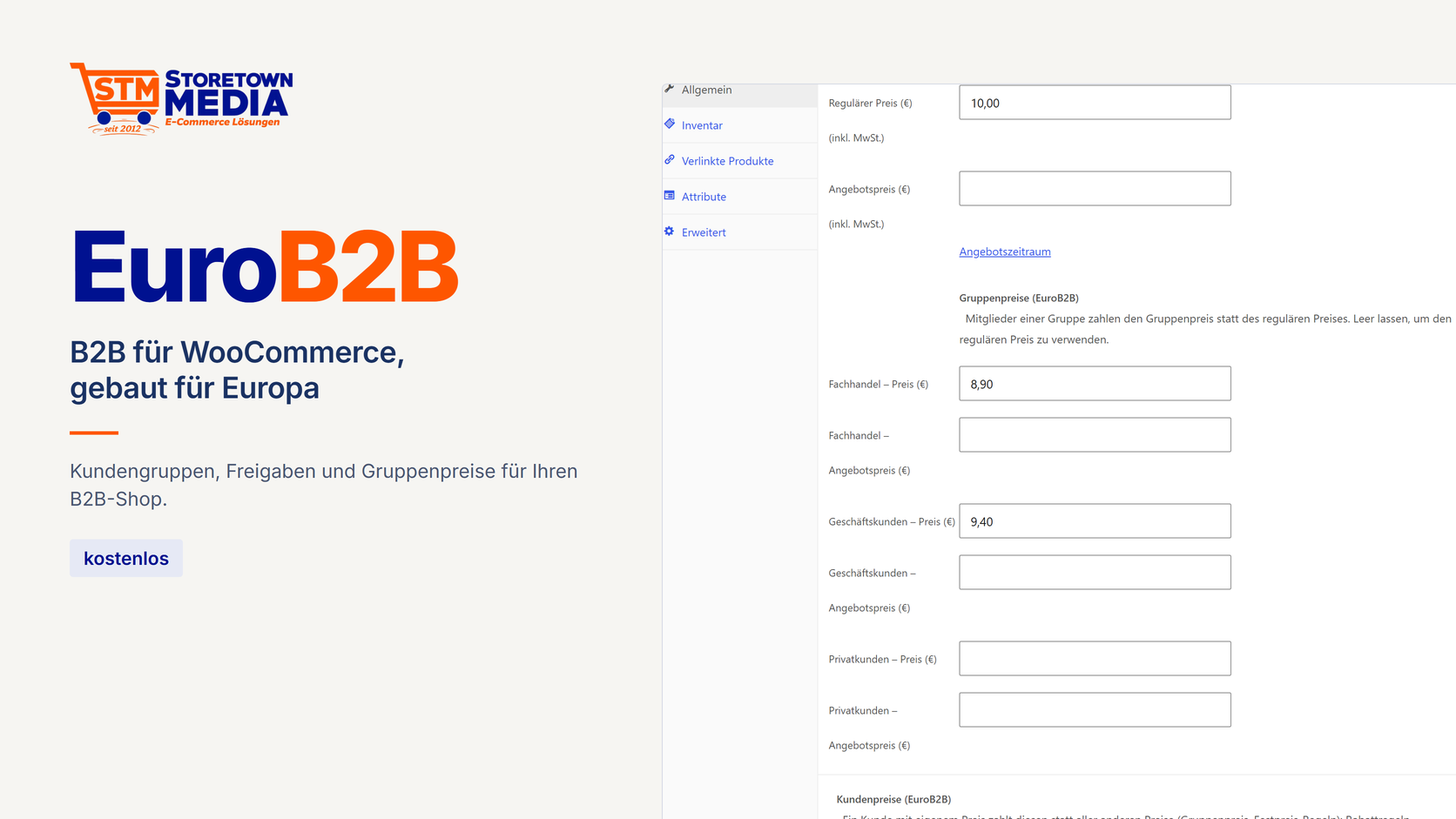
 {% endif %}
{% if title and title != "" %}
{{ title }}
{% endif %}
{% if excerpt and excerpt != "" %}
{% endif %}
{% if title and title != "" %}
{{ title }}
{% endif %}
{% if excerpt and excerpt != "" %}
Rezensionen
Es gibt noch keine Rezensionen.